
Ownpets PET0264-BD
Ownpets 6 Meals Automatic Cat Feeder User Manual
Brand: Ownpets | Model: PET0264-BD
Introduction
Thank you for choosing the Ownpets 6 Meals Automatic Cat Feeder. This device is designed to simplify pet feeding by providing timed meals for your cats or small dogs, ensuring they are fed on schedule even when you are away. Featuring six individual food compartments and two ice packs for freshness, this feeder supports both wet and dry food. Its cordless, rechargeable design offers flexible placement in your home.

Image: Top view of the Ownpets Automatic Cat Feeder, showing its sleek white design and one open food compartment with wet food.
Setup
- Unboxing: Carefully remove all components from the packaging. Ensure you have the feeder unit, two ice packs, and the charging cable.
- Charging the Battery: The feeder has a built-in rechargeable battery. Before first use, fully charge the device using the provided charging cable. A full charge can last up to 30 days.
- Installing Ice Packs: Place the two included ice packs in the freezer until completely frozen. Once frozen, insert them into the designated compartments beneath the food tray to help keep food fresh.
- Filling Food Compartments: Open the top lid to access the six individual food compartments. Each compartment holds approximately 8 ounces of food. Fill with your pet's preferred wet or dry food.

Image: The Ownpets feeder with its top tray lifted, revealing the two blue ice packs placed in their compartments below, designed to keep food fresh.
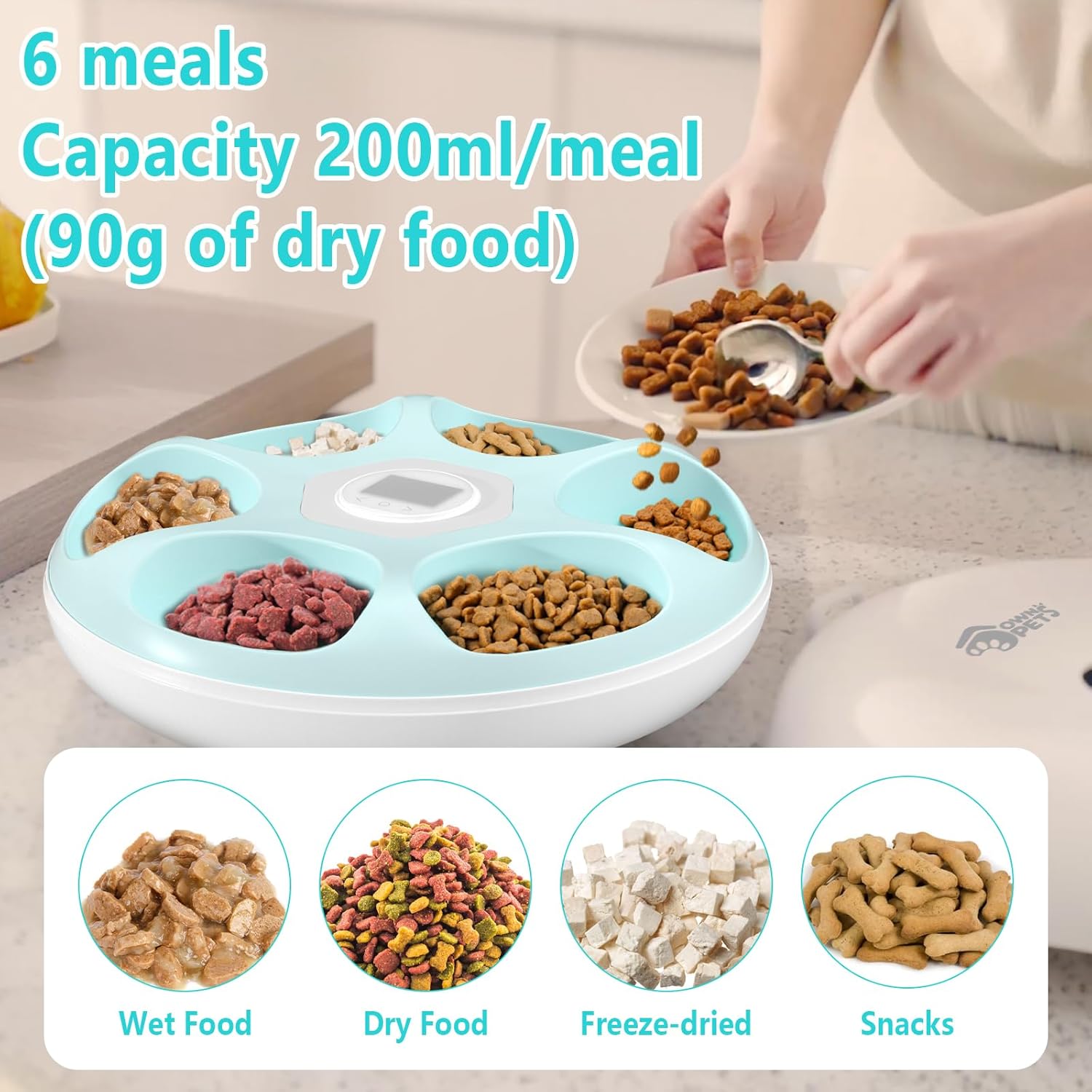
Image: The feeder's six compartments filled with various types of pet food, including wet food, dry kibble, freeze-dried food, and snacks, demonstrating its versatility.
Operating Instructions
The Ownpets Automatic Cat Feeder allows for programmable meal times to suit your pet's schedule. You can set up to 6 meals per day, or distribute meals over several days (e.g., 2 meals per day for 3 days).
- Setting the Clock: Press the 'Time' button to enter clock setting mode. Use the '<' and '>' buttons to adjust the hour and minute. Press 'Set' to confirm.
- Programming Meal Times:
- After setting the clock, the first MEAL indicator will flash.
- Press '<' or '>' to set the first meal time.
- Press 'Set' to save the first meal time. The feeder will automatically move to the Second Meal time setting.
- Repeat this process for as many meal times as desired, up to 6 meals.
- Safety Lock: The feeder is equipped with a safety lock mechanism to prevent accidental opening by pets. Ensure the lock is engaged after filling and programming.

Image: A visual guide illustrating the steps to program meal times on the feeder's digital display, showing the time adjustment and meal slot progression.

Image: A close-up of a hand interacting with the feeder's control panel, demonstrating the ease of programming and setup.
Maintenance
Proper maintenance ensures the longevity and hygiene of your Ownpets Automatic Cat Feeder.
- Cleaning: The food tray and lid are designed for easy disassembly and cleaning. Hand wash only with mild soap and water. Ensure all parts are completely dry before reassembling. Do not immerse the main unit (with electronics) in water.
- Ice Pack Care: Regularly check and replace the ice packs as needed to maintain the freshness of the cat food, especially in warmer environments.
- Battery Maintenance: Recharge the built-in battery when the low battery indicator appears. Avoid letting the battery completely drain for extended periods to preserve its lifespan.

Image: The feeder's removable components, including the food tray and top cover, shown being cleaned in water, highlighting the ease of disassembly for hygiene.
Troubleshooting
| Problem | Possible Cause | Solution |
|---|---|---|
| Feeder not dispensing food. | Low battery; Incorrect meal time setting; Food jammed; Safety lock engaged. | Recharge battery; Verify programmed meal times; Check for food obstructions; Ensure safety lock is disengaged for dispensing. |
| Display not turning on. | Battery drained. | Connect to power source and charge the battery. |
| Food not staying fresh. | Ice packs not frozen or need replacement. | Ensure ice packs are fully frozen before placing them in the feeder. Replace ice packs regularly. |
Specifications
- Model Number: PET0264-BD
- Dimensions (LxWxH): 12.6 x 12.6 x 3 inches
- Item Weight: 4.86 pounds
- Material: Acrylonitrile Butadiene Styrene
- Color: White
- Power Source: Rechargeable Lithium Ion Battery (5 included)
- Food Capacity: 6 individual compartments, approx. 8 ounces per portion
- Compatibility: Wet Food, Dry Food
- Special Features: Programmable Feeding Schedule, Ice Pack Cooling, Cordless Design
Warranty & Support
This Ownpets Automatic Cat Feeder comes with a 3 Months Warranty from the date of purchase. This warranty covers manufacturing defects under normal use.
For technical support, warranty claims, or any questions regarding your product, please contact Ownpets customer service through their official website or the retailer where the product was purchased. Please have your model number (PET0264-BD) and proof of purchase ready when contacting support.
Ask a question about this manual
Ask about setup, troubleshooting, compatibility, parts, safety, or missing instructions. Manuals+ will review the question and use this page’s manual context to help answer it.