1. Introduction
This document provides instructions for the Generic replacement remote control, designed for use with various portable Bluetooth party PA DJ speaker systems, including specific models like Ridgeway QS-1238 D1208, REX Speaker, Sytech SY-XTR27BT, and Soundart SPM-W8400M. This remote functions as an infrared (IR) replacement and requires no complex setup or coding.
It is crucial to verify that your original remote or speaker system is compatible with this replacement. Please compare your current remote with the images provided in this manual to ensure compatibility before use.
2. Setup
2.1 Battery Installation
The remote control requires 1 CR2 battery (not included). Follow these steps to install the battery:
- Locate the battery compartment on the back of the remote control.
- Slide open the battery cover.
- Insert the CR2 battery, ensuring the correct polarity (+ and -) as indicated inside the compartment.
- Close the battery cover securely.
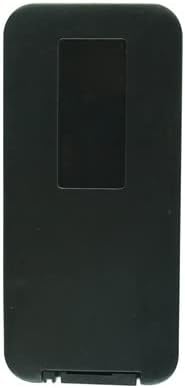
Figure 2.1: Rear view of the remote control, highlighting the battery compartment.
This image displays the back of the remote control, which is black and rectangular. A rectangular indentation is visible at the top, indicating the location of the battery compartment cover. This is where the CR2 battery should be inserted.
2.2 Initial Use
This remote control is an infrared replacement and does not require any special setup, pairing, or code programming. Once the battery is correctly installed, it should be ready for immediate use with compatible speaker systems.
3. Operating Instructions
Point the remote control directly at the infrared receiver on your speaker system. Ensure there are no obstructions between the remote and the speaker.

Figure 3.1: Front view of the remote control with button layout.
This image shows the front face of the remote control, which is silver-grey with various circular buttons. Key buttons include Power (red), Mode, Mute, Play/Pause, Previous/Next Track, Volume Up/Down, EQ, Number Pad (0-9), Repeat, and Scan.
3.1 Button Functions
- Power (Red button with universal power symbol): Turns the speaker system on or off.
- Mode: Cycles through different input modes (e.g., Bluetooth, USB, SD card, FM radio).
- Mute (Speaker icon with a cross): Mutes or unmutes the audio output.
- Play/Pause (Triangle and two vertical lines icon): Starts or pauses playback of media.
- Previous/Next Track (Double arrow pointing left/right with a vertical line): Skips to the previous or next track/station.
- VOL- / VOL+: Decreases or increases the volume level.
- EQ (Purple button with "EQ" text): Adjusts the equalizer settings (if supported by the speaker).
- Number Pad (0-9): Used for direct track selection or FM radio frequency input.
- RPT (Repeat): Toggles repeat modes for media playback.
- SCAN: Initiates a scan for FM radio stations.
4. Maintenance
4.1 Battery Replacement
When the remote control's range decreases or buttons become unresponsive, it is likely time to replace the battery. Refer to Section 2.1 for battery installation instructions.
4.2 Cleaning
To clean the remote control, use a soft, dry cloth. Do not use liquid cleaners, aerosols, or abrasive materials, as these can damage the remote's surface or internal components.
4.3 Storage
Store the remote control in a cool, dry place away from direct sunlight and extreme temperatures. If the remote will not be used for an extended period, it is recommended to remove the battery to prevent leakage.
5. Troubleshooting
- Remote not responding:
- Ensure the battery is correctly installed and not depleted. Replace if necessary.
- Check for any obstructions between the remote control and the speaker system's IR receiver.
- Ensure you are within the effective operating range of the speaker's IR receiver.
- Remote functions are incorrect or limited:
- This remote is a replacement. Verify that your specific speaker model is listed as compatible in the product title or description.
- Consult your speaker system's original manual to confirm the correct remote control type and functions it supports.
- If your speaker model is not explicitly mentioned as compatible, the remote may not function correctly or fully. In such cases, please contact the seller for assistance.
6. Specifications
| Feature | Detail |
|---|---|
| Model ASIN | B0C135YQKX |
| Brand | Generic |
| Connectivity Technology | Infrared (IR) |
| Controller Type | Button Control |
| Power Source | 1 CR2 battery (not included) |
| Color | Random (as per product listing) |
| Special Feature | Portable |
7. Warranty and Support
This product is a replacement remote control. For any issues, questions, or concerns regarding compatibility or functionality, please contact the seller directly through the platform where the purchase was made. Please refer to your purchase details for seller contact information.
It is recommended to retain your purchase receipt or order confirmation for any support inquiries.