
Introduction
This manual provides essential instructions for the setup, operation, and maintenance of your Generic replacement remote control. This remote is designed to be compatible with the Craig CR4189BT and CR4189 Portable Rechargeable Digital Mini Tower FM Stereo Radio. Please read this manual thoroughly to ensure proper use and to maximize the functionality of your device.
Important Note: This remote control is an infrared (IR) replacement. Ensure your original remote matches the appearance of this replacement for guaranteed compatibility. No setup or coding is required; it operates directly with compatible models.
Product Overview
The remote control features a standard button layout for easy navigation and control of your Craig Mini Tower Radio. Below is an image illustrating the remote's design and button placement.
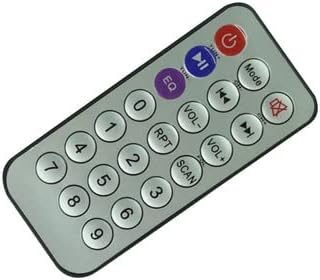
Image Description: A silver-grey rectangular remote control with rounded edges. It features a red power button at the top right, a blue play/pause button, and a purple EQ button at the top center. Below these are two rows of circular buttons for mode, volume, skip, and repeat functions. The lower section contains a numeric keypad (0-9) and a scan button. All buttons are clearly labeled.
Setup
1. Battery Installation
Your remote control requires one (1) CR2 battery (not included). Follow these steps to install the battery:
- Locate the battery compartment on the back of the remote control.
- Gently slide the battery compartment cover downwards or outwards to open it.
- Insert one CR2 battery, ensuring the positive (+) and negative (-) terminals align correctly with the markings inside the compartment.
- Slide the battery compartment cover back into place until it clicks securely.


Image Description (Left): The back of the remote control, showing the smooth black surface and the rectangular battery compartment cover. Image Description (Right): The back of the remote control with the battery compartment cover removed, revealing the internal slot for battery insertion.
After installing the battery, the remote is ready for use. No further setup or pairing is required.
Operating Instructions
Point the remote control directly at the infrared receiver on your Craig CR4189BT or CR4189 radio. Ensure there are no obstructions between the remote and the radio.
Button Functions:
- Power: Turns the radio on or off.
- Mode: Switches between different input modes (e.g., FM, Bluetooth, AUX).
- EQ: Adjusts the equalizer settings for sound customization.
- Play/Pause: Starts or pauses playback in media modes.
- VOL- / VOL+: Decreases or increases the volume level.
- Previous Track / Next Track: Skips to the previous or next track/station.
- RPT (Repeat): Toggles repeat playback modes.
- SCAN: Initiates a scan for radio stations in FM mode.
- Numeric Keypad (0-9): Used for direct input of radio frequencies or track numbers, depending on the mode.
Maintenance
Cleaning the Remote Control
To maintain the remote's appearance and functionality:
- Wipe the surface with a soft, dry cloth.
- For stubborn dirt, slightly dampen the cloth with water or a mild, non-abrasive cleaner.
- Avoid using harsh chemicals, solvents, or abrasive cleaning pads, as these can damage the remote's finish or buttons.
Battery Replacement
If the remote control becomes unresponsive or its range decreases significantly, the battery may need to be replaced. Refer to the "Battery Installation" section under Setup for instructions on how to replace the CR2 battery.
Storage
Store the remote control in a cool, dry place away from direct sunlight and extreme temperatures when not in use for extended periods. Remove the battery if storing for several months to prevent leakage.
Troubleshooting
If you experience issues with your remote control, please consult the following common problems and solutions:
| Problem | Possible Cause | Solution |
|---|---|---|
| Remote is not responding. |
|
|
| Buttons are sticky or unresponsive. |
|
|
| Remote only works intermittently. |
|
|
Specifications
- Product Type: Replacement Remote Control
- Compatibility: Craig CR4189BT, Craig CR4189 Portable Rechargeable Digital Mini Tower FM Stereo Radio
- Connectivity Technology: Infrared (IR)
- Controller Type: Button Control
- Power Source: 1 x CR2 Battery (not included)
- Setup Required: None (Pre-programmed for compatible models)
Warranty and Support
Specific warranty details for this Generic replacement remote control are not provided in this manual. For warranty information, technical support, or further assistance, please contact the seller or retailer from whom you purchased the product.
Always refer to the original user manual of your Craig CR4189BT or CR4189 radio for detailed information regarding the radio's functions and features.