
QANYI toast time toaster
QANYI Timer Clock Night Light User Manual
Model: toast time toaster
Introduction
The QANYI Timer Clock Night Light is a versatile device designed for various uses, including as a night light, a time management tool, and an alarm clock. Its compact and portable design makes it suitable for children's rooms, kitchens, bathrooms, and study areas. This manual provides detailed instructions to help you set up and operate your device effectively.

Front view of the QANYI Timer Clock Night Light, showcasing its digital display and main control buttons.
Product Features
- Novelty Toaster Design Nightlight: Features a charming toaster shape with a soft, dimmable LED light. One button controls the light, with a long press for dimming and a double-click for a 15-minute delayed light-off function.
- Time Management Tool: Equipped with a digital timer that can count both up and down, with a maximum range of 99 minutes and 59 seconds. Ideal for various activities such as cooking, studying, or exercise.
- LED Display Alarm Clock: Includes a clear LED digital display for time (12-hour format) and battery level. The alarm buzzer is designed to be audible in large spaces, and can be easily stopped with a single button press.
- Long-lasting Battery and Portable: Built-in 800mAh lithium-ion battery provides up to 120 hours of light on low brightness. Its compact, hand-sized design allows for easy portability to any room.
Setup
Charging the Device
Before first use, fully charge the QANYI Timer Clock Night Light. The device is equipped with a rechargeable 800mAh Lithium Ion battery.
- Locate the USB Type-C charging port on the back of the device.
- Connect the provided USB Type-C cable to the device and plug the other end into a compatible USB power adapter (not included), power bank, or computer USB port.
- The LED display will indicate charging status. A full charge takes approximately 4.5 hours.

The device can be charged via USB Type-C cable, allowing for both wired and wireless operation.
Operating Instructions
Night Light Operation
The night light features a simple lever control for ease of use.
- Turn On/Off: Push the side lever down once to turn the light on or off.
- Adjust Brightness: While the light is on, press and hold the side lever down to increase or decrease the brightness. Release the lever when the desired brightness is reached.
- Delayed Light Off (15 minutes): Double-click the side lever. The light will flash twice to confirm the 15-minute timer has been set. To cancel the timer before it expires, simply press the lever down once to turn off the light.

Operating the side lever for light control, including on/off and brightness adjustment.
Timer Function
The device includes both count-up and count-down timer capabilities.
- Buttons: The front panel features "ST/SP" (Start/Stop), "M" (Minutes), and "S" (Seconds) buttons. The back panel has a "Clock" button and "+" and "-" buttons for setting.
- Count-Up Timer: From the clock display, press the "ST/SP" button once to start the count-up timer. Press again to pause. Hold "ST/SP" for 3-4 seconds to reset the timer to zero.
- Count-Down Timer: From the clock display, press the "M" button to set minutes and the "S" button to set seconds. The maximum count-down time is 99 minutes and 59 seconds. Press "ST/SP" to begin the countdown. The alarm will sound when the timer reaches zero.
- Return to Clock Display: Press the "Clock" button on the back of the device to switch back to the time display.

The timer function is useful for managing time during activities such as studying or cooking.
Alarm Clock Function
Set your alarm for timely reminders.
- Setting Time: Use the "Clock" button on the back to enter time setting mode. Use the "+" and "-" buttons to adjust hours and minutes. The display supports a 12-hour format.
- Setting Alarm: Use the "Alarm Clock Setting Key" (bell icon) on the back to enter alarm setting mode. Use the "+" and "-" buttons to set the desired alarm time.
- Stopping Alarm: When the alarm sounds, press any side button to stop the beep. The light will automatically turn on at the last set brightness level when the alarm goes off.

The alarm clock is easy to set and features both 12-hour and 24-hour time formats.
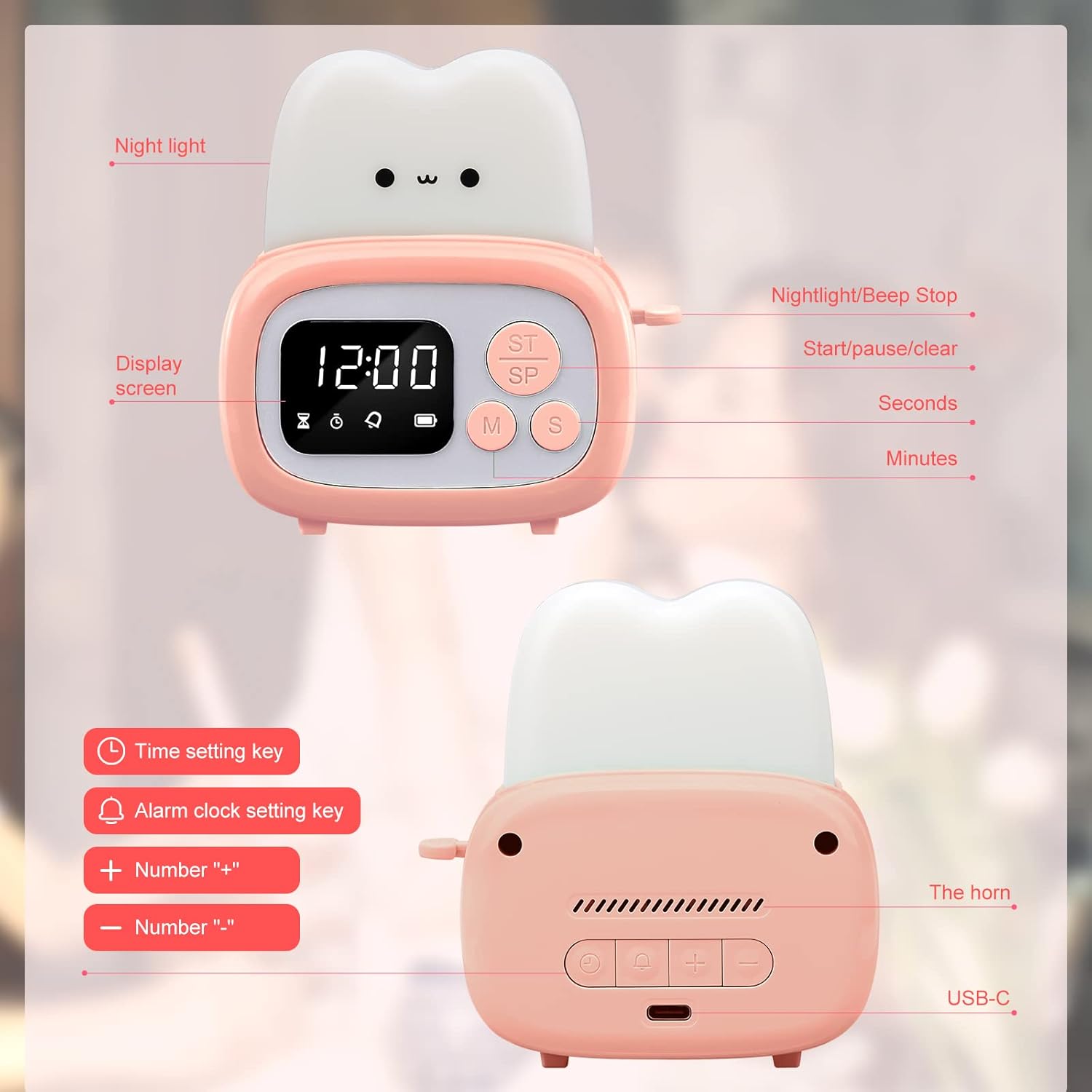
Detailed view of the back panel buttons for time and alarm settings, along with the USB-C port.
Maintenance
- Cleaning: Use a soft, dry cloth to clean the surface of the device. Do not use abrasive cleaners or immerse the device in water.
- Battery Care: To prolong battery life, avoid fully discharging the battery frequently. Recharge the device when the battery indicator shows low power. If storing for an extended period, charge the device every 3-6 months.
- Storage: Store the device in a cool, dry place away from direct sunlight and extreme temperatures.
Troubleshooting
| Problem | Possible Cause | Solution |
|---|---|---|
| Light is dim or not turning on. | Low battery; brightness set too low. | Recharge the device. Press and hold the side lever to increase brightness. |
| Alarm rings at the wrong time (e.g., PM instead of AM). | Incorrect 12-hour format setting (AM/PM confusion). | Carefully re-set the alarm time, ensuring the correct AM/PM indicator is selected. Refer to the "Setting Time" section. |
| Buttons feel stuck or unresponsive. | Minor manufacturing variation; debris. | Gently press the buttons multiple times. Ensure no foreign objects are lodged around the buttons. If the issue persists, contact customer support. |
| Device not charging. | Cable not properly connected; faulty cable/adapter. | Ensure the USB Type-C cable is securely connected to both the device and the power source. Try a different USB cable or power adapter. |
Specifications
| Feature | Detail |
|---|---|
| Brand | QANYI |
| Model Number | toast time toaster |
| Product Dimensions | 2.2"D x 3.8"W x 4"H |
| Item Weight | 5.8 ounces (0.36 Pounds) |
| Lamp Type | Night Light |
| Light Source Type | LED |
| Power Source | Battery Powered (Rechargeable Lithium Ion) |
| Battery Capacity | 800mAh |
| Max Timer Range | 99 minutes 59 seconds |
| Material | Acrylonitrile Butadiene Styrene (ABS) |
| Included Components | Timer & Clock & Night Light unit, USB Type-C cable, User Manual |
Warranty and Support
For any questions, technical support, or warranty inquiries, please contact QANYI customer service through the retailer's platform or the official QANYI website. Please retain your proof of purchase for warranty claims.
For more information, visit the QANYI Store on Amazon.
Ask a question about this manual
Ask about setup, troubleshooting, compatibility, parts, safety, or missing instructions. Manuals+ will review the question and use this page’s manual context to help answer it.