
1. Introduction
This manual provides comprehensive instructions for the safe and efficient operation of the Cole Parmer Digi-Sense Model 2186-20 Temperature Controller. Please read this manual thoroughly before operating the device to ensure proper usage and to prevent damage or injury.
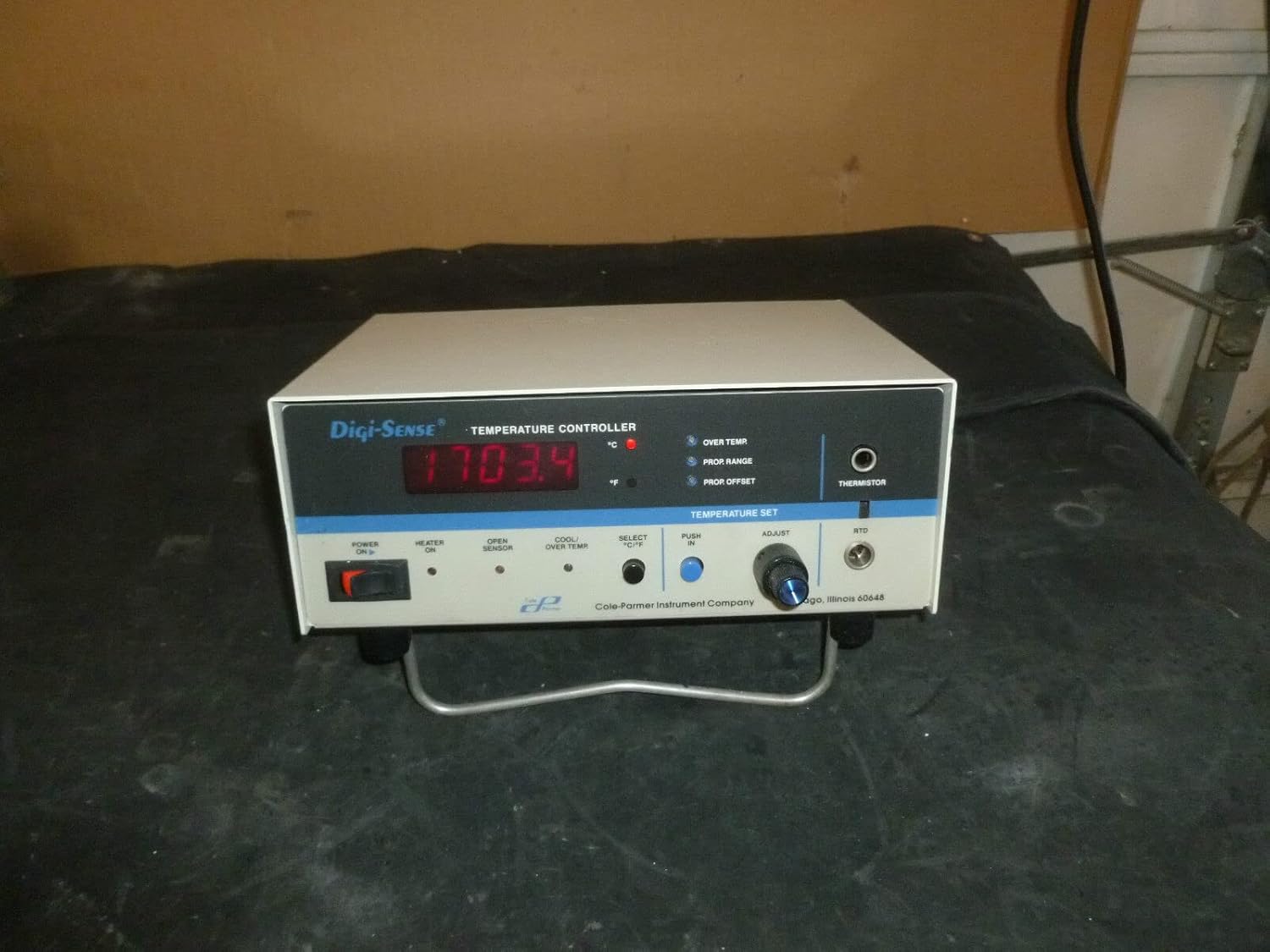
Figure 1: Front view of the Digi-Sense Model 2186-20 Temperature Controller, showing the digital display, control knobs, and indicator lights.
2. Setup
Before initial use, ensure the temperature controller is placed on a stable, level surface with adequate ventilation. Keep the unit away from direct sunlight, excessive heat, or moisture.
2.1 Power Connection
- Ensure the power switch on the front panel is in the OFF position.
- Connect the provided power cord to the power input on the rear of the unit.
- Plug the other end of the power cord into a grounded electrical outlet (115 VAC, 12 AMP, 20 AMP Peak).
2.2 Sensor Connection
The unit supports Thermistor and RTD sensors. Ensure you connect the correct type of sensor to the corresponding input jack on the front panel.
- Thermistor Input: Connect your thermistor probe to the "THERMISTOR" jack.
- RTD Input: Connect your RTD probe to the "RTD" jack.
2.3 Load Connection
Connect the device you wish to control (e.g., heater, cooler) to the "LOAD" output receptacle on the rear of the unit.
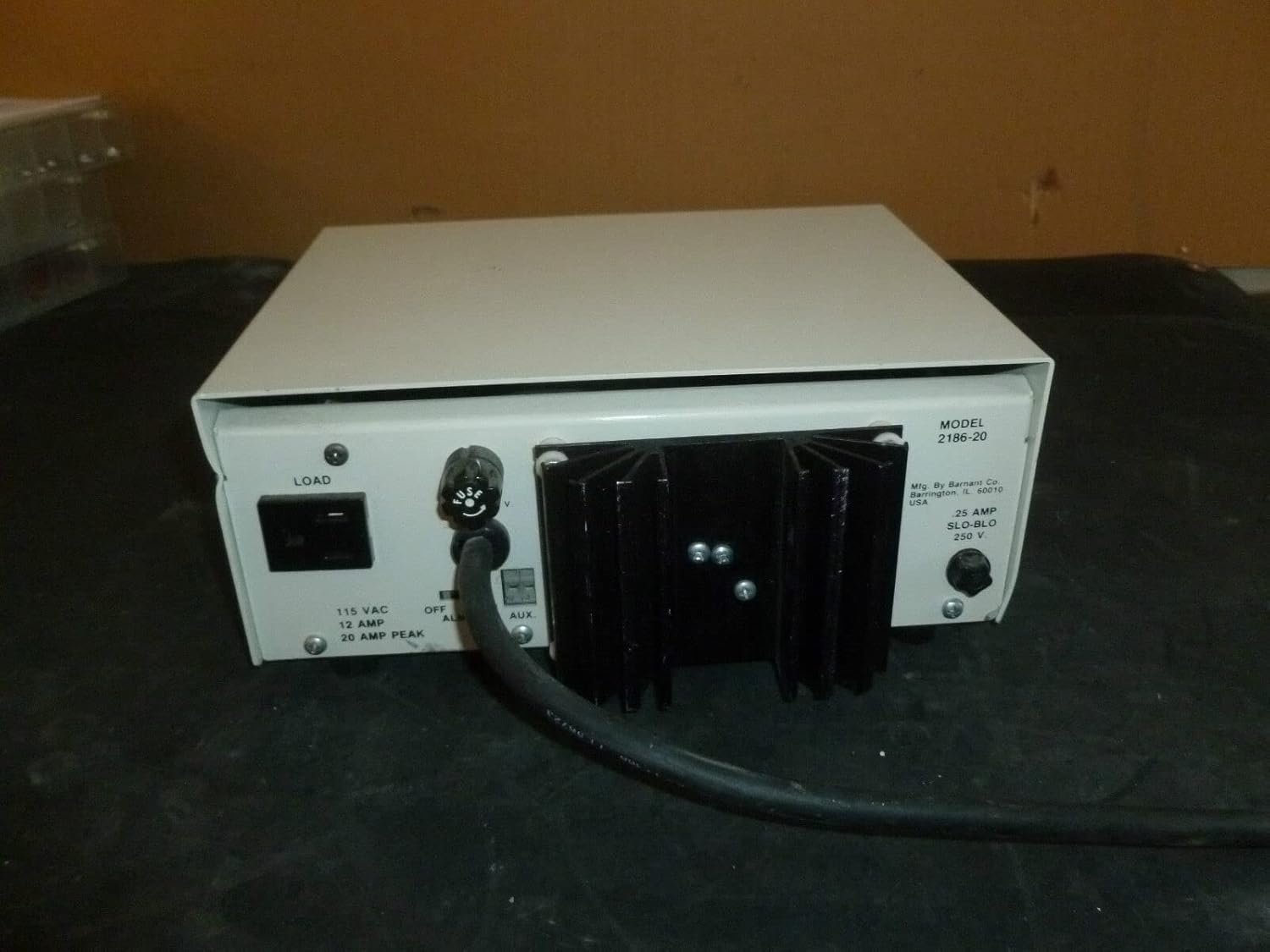
Figure 2: Rear view of the temperature controller, showing the power input, load output, and fuse holder.
3. Operating Instructions
3.1 Powering On/Off
- To power on the unit, flip the POWER ON/OFF switch to the ON position. The digital display will illuminate.
- To power off, flip the switch to the OFF position.
3.2 Setting Temperature
- The large digital display shows the current measured temperature.
- To set the desired temperature, use the ADJUST knob located under "TEMPERATURE SET".
- Rotate the knob clockwise to increase the set temperature and counter-clockwise to decrease it.
- The display will temporarily show the set temperature as you adjust the knob.
3.3 Selecting Temperature Units (°C/°F)
- Press the SELECT °C/°F button to toggle between Celsius (°C) and Fahrenheit (°F) temperature readings. The corresponding LED indicator will light up.
3.4 Indicator Lights
Observe the following indicator lights on the front panel:
- HEATER ON: Illuminates when the heating element connected to the LOAD output is active.
- OPEN SENSOR: Indicates a disconnected or faulty sensor.
- COOL/OVER TEMP: Illuminates when the unit is cooling or if the temperature exceeds a safe limit.
- OVER TEMP: Indicates the measured temperature is above the set point.
- PROP RANGE: Indicates the unit is operating within the proportional control range.
- PROP OFFSET: Indicates a proportional offset is active.

Figure 3: Detailed view of the front panel, highlighting the digital display, temperature set knob, and various indicator lights.
4. Maintenance
Regular maintenance ensures the longevity and accuracy of your temperature controller.
4.1 Cleaning
- Always disconnect the unit from power before cleaning.
- Wipe the exterior surfaces with a soft, damp cloth. Do not use abrasive cleaners or solvents.
- Ensure no liquid enters the unit.
4.2 Fuse Replacement
If the unit fails to power on, check the fuse located on the rear panel. Replace with a fuse of the same type and rating: .25 AMP SLO-BLO 250 V.

Figure 4: Close-up of the rear panel, showing the fuse holder and model information.
5. Troubleshooting
| Problem | Possible Cause | Solution |
|---|---|---|
| Unit does not power on. | No power from outlet; Blown fuse; Loose power cord. | Check power outlet; Replace fuse (.25 AMP SLO-BLO 250 V); Ensure power cord is securely connected. |
| "OPEN SENSOR" indicator is lit. | Sensor not connected; Faulty sensor; Incorrect sensor type. | Connect sensor securely; Test sensor; Ensure correct sensor (Thermistor/RTD) is used. |
| Temperature reading is inaccurate. | Sensor not properly placed; Sensor calibration needed. | Ensure sensor is in good thermal contact; Refer to manufacturer for calibration procedures. |
| Load (heater/cooler) not activating. | Load not connected; Set temperature not reached; Faulty load. | Check load connection; Adjust set temperature; Test load device independently. |
6. Specifications
- Model: 2186-20
- MPN: 2186-20
- Manufacturer: Generic (Mfg. By Barnard Co., Barrington, IL 60010 USA)
- Power Input: 115 VAC, 12 AMP, 20 AMP Peak
- Fuse: .25 AMP SLO-BLO 250 V
- Sensor Inputs: Thermistor, RTD
- Date First Available: February 15, 2019
7. Warranty and Support
For specific warranty information and technical support, please refer to the documentation provided with your purchase or contact the manufacturer directly. As this product is listed under a "Generic" brand, it is recommended to contact the original manufacturer, Barnard Co., for detailed support.
Manufacturer details found on the unit: Mfg. By Barnard Co., Barrington, IL 60010 USA.

