
Wildgame Innovations WGI-WGICM0745
Wildgame Innovations Scrapeline 18MP Trail Camera User Manual
Model: WGI-WGICM0745
Introduction
This user manual provides detailed instructions for the setup, operation, and maintenance of your Wildgame Innovations Scrapeline 18MP Trail Camera. Designed for reliability and ease of use, this camera is an essential tool for monitoring wildlife. Please read this manual thoroughly before using your camera to ensure optimal performance and longevity.
Product Overview
Key Features
- High Resolution Imaging: Captures 18 Megapixel still images and 720p HD video.
- Extended Illumination: Features 40 high-intensity invisible IR LEDs with a 75-foot illumination range for clear night vision.
- Fast Trigger Speed: Less than 3/4 second trigger speed ensures minimal missed activity.
- Silent Shield Technology: Designed to operate quietly, minimizing disturbance to wildlife.
- Complete Bundle: Includes 8 AA batteries and a 16GB SD card for immediate use.
- Durable Design: Built for outdoor use with a robust, multi-color casing.
Included Components
- Wildgame Innovations Scrapeline 18MP Trail Camera
- Tree Strap
- 8 AA Batteries
- 16GB SD Card
Product Views

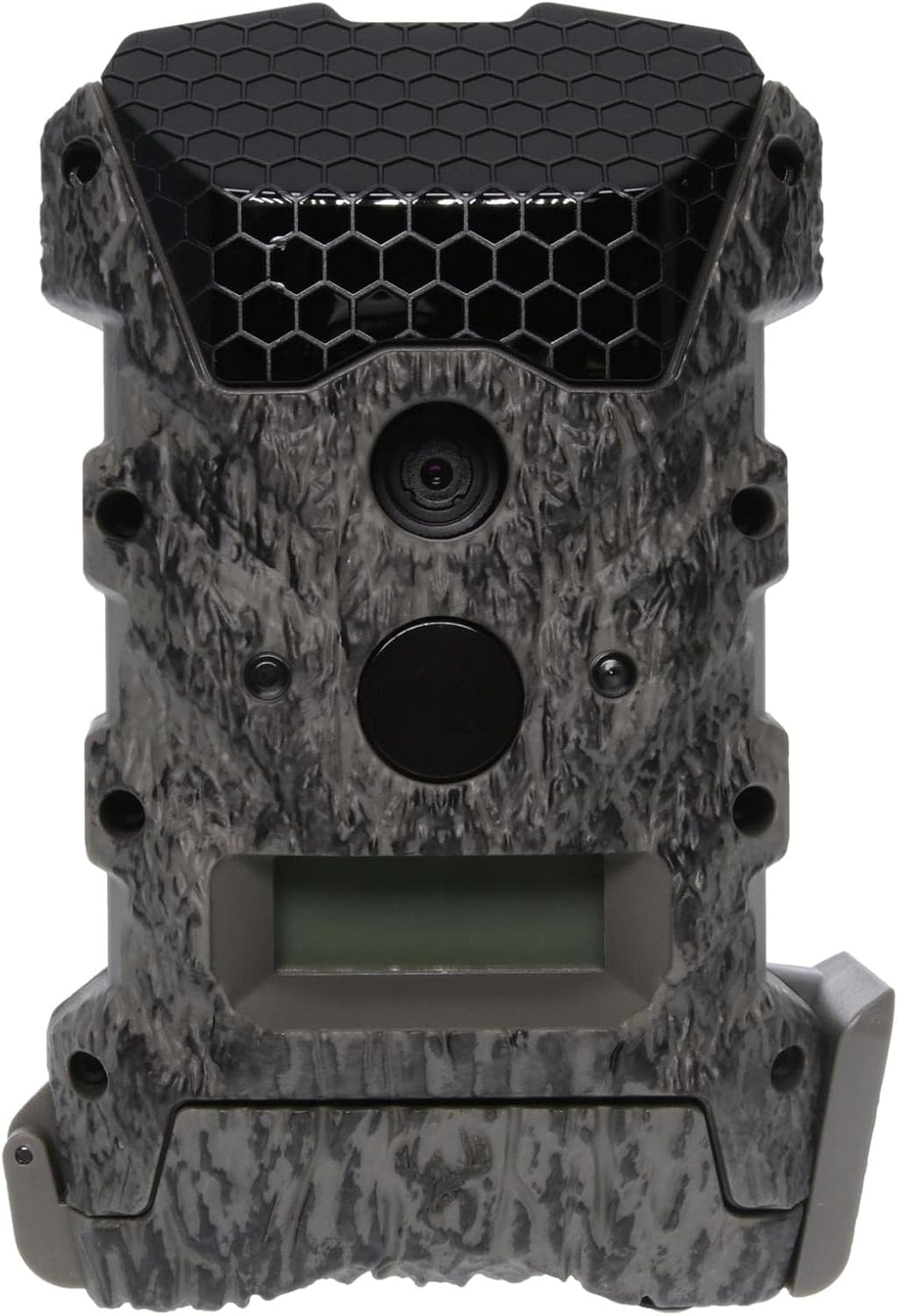

Setup
1. Battery Installation
- Open the camera's side latch to access the battery compartment.
- Insert the 8 included AA alkaline batteries, ensuring correct polarity (+/-) as indicated inside the compartment.
- Close the battery compartment securely to maintain weather resistance.
2. SD Card Installation
- Locate the SD card slot, typically near the battery compartment.
- Insert the included 16GB SD card into the slot until it clicks into place. Ensure the card is inserted in the correct orientation.
- To remove, gently push the SD card in until it springs out.
3. Mounting the Camera
- Select a suitable location for your camera, such as a tree or post, ensuring a clear view of the desired monitoring area.
- Thread the included tree strap through the mounting slots on the back of the camera.
- Securely fasten the strap around the mounting surface, adjusting the camera's angle as needed. Ensure the camera is stable and will not shift.
Operating Instructions
Powering On and Basic Settings
- After installing batteries and SD card, locate the power switch inside the camera.
- Switch the camera to the "ON" position. The display screen will illuminate.
- Use the navigation buttons (typically labeled UP, DOWN, ENTER, MENU) to set the current date, time, and desired operating mode (e.g., Photo, Video, or Photo+Video).
- Adjust other settings such as photo resolution (18MP), video resolution (720p), trigger delay, and number of photos per trigger as per your requirements.
Capturing Images and Videos
Once configured and mounted, the camera will automatically begin capturing images or videos when motion is detected within its sensor range. The camera's fast trigger speed (less than 3/4 second) ensures quick capture of moving subjects. The 40 high-intensity invisible IR LEDs provide clear night vision up to 75 feet without alerting wildlife.
Viewing Captured Media
To view captured images and videos, remove the SD card from the camera and insert it into a compatible SD card reader connected to a computer or other viewing device. The files will be stored in standard image (JPEG) and video (AVI/MOV) formats.


Maintenance
- Cleaning: Periodically wipe the camera lens and IR LED array with a soft, clean cloth to ensure clear images. Avoid abrasive materials or harsh chemicals.
- Battery Replacement: Replace all 8 AA batteries when the low battery indicator appears or when performance degrades. Always use fresh, high-quality alkaline batteries.
- SD Card Management: Regularly format your SD card (after backing up important data) to maintain optimal performance and prevent data corruption.
- Storage: When not in use for extended periods, remove batteries and the SD card, and store the camera in a cool, dry place away from direct sunlight.
- Weather Protection: Ensure all latches and seals are properly closed when the camera is deployed outdoors to protect against moisture and dust.
Troubleshooting
| Problem | Possible Cause / Solution |
|---|---|
| Camera not powering on |
|
| No images/videos captured |
|
| Poor image/video quality |
|
| Short battery life |
|
Specifications
| Feature | Detail |
|---|---|
| Model Name | Scrapeline |
| Model Number | WGI-WGICM0745 |
| Effective Still Resolution | 18 MP |
| Video Capture Resolution | 720p HD |
| Illumination Type | 40 high-intensity invisible IR LEDs |
| Illumination Range | 75 feet |
| Trigger Speed | Less than 3/4 second |
| Power Source | 8 AA Batteries (included) |
| Storage | SD Card (16GB included) |
| Connectivity Protocol | SD Card, Wi-Fi |
| Mounting Type | Tree Strap |
| Dimensions (L x W x H) | 4 x 2.5 x 6 inches |
| Item Weight | 1.4 pounds (0.64 Kilograms) |
| Color | Multi |
| Manufacturer | GSM Outdoors |
| UPC | 616376001994 |
Warranty and Support
For information regarding warranty coverage, technical support, or service, please contact Wildgame Innovations customer service. Refer to the product packaging or the official Wildgame Innovations website for the most current contact details and warranty policy.
Wildgame Innovations Official Website: www.wildgameinnovations.com
Ask a question about this manual
Ask about setup, troubleshooting, compatibility, parts, safety, or missing instructions. Manuals+ will review the question and use this page’s manual context to help answer it.