
Philips NPX122
Philips NeoPix 122 Mini Projector User Manual
Model: NPX122
1. Introduction
Welcome to the user manual for your Philips NeoPix 122 Mini Projector. This guide provides essential information for setting up, operating, and maintaining your device to ensure optimal performance and longevity. The NeoPix 122 offers True HD 720p resolution, Wi-Fi Dual Band Screen Mirroring, and an integrated 2.1 Audio System for an immersive viewing experience.
2. Package Contents
Please check the box for the following items:
- Philips NeoPix 122 Mini Projector
- Remote Control (with AAA batteries, if included)
- AC Adapter
- Quick Start Guide
- Warranty Card
- Electric Cord
3. Product Overview
Familiarize yourself with the various parts and connections of your NeoPix 122 projector.
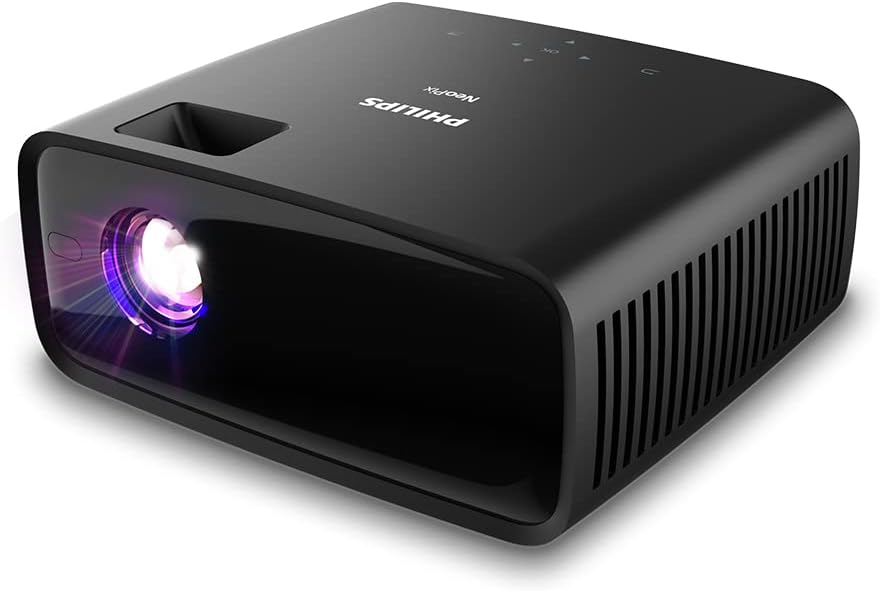
Figure 3.1: Angled view of the Philips NeoPix 122 Mini Projector, showing the lens and top controls.

Figure 3.2: Rear view of the projector, highlighting the power button, USB, 3.5mm audio, and HDMI ports.
3.1 Front Panel
- Projection Lens: Emits the image onto the screen or wall.
3.2 Rear Panel (Connectivity)
- Power Button: Turns the projector on/off.
- USB Port: For connecting USB storage devices (e.g., USB sticks) or powering external dongles like Amazon Fire TV Stick.
- 3.5mm Audio Output: Connect external speakers or headphones.
- HDMI Port: Connect to laptops, TV boxes, gaming consoles, or other HDMI-enabled devices.
3.3 Side Panels
- Ventilation Grilles: Ensure proper airflow for cooling. Do not block.

Figure 3.3: Side view of the projector, showing the ventilation grilles for heat dissipation.
4. Setup
4.1 Placement
Place the projector on a stable, flat surface. For optimal viewing, ensure the projector is positioned directly in front of the projection surface (wall or screen). The recommended projection distance for a 65-inch screen is approximately 2.12 meters (7 feet).

Figure 4.1: The projector set up on a table, projecting an image onto a wall.
4.2 Power Connection
- Connect the AC adapter to the projector's power input.
- Plug the AC adapter into a power outlet.
- Press the power button on the projector or remote control to turn it on.
4.3 Focus Adjustment
Adjust the focus ring on the projector lens until the projected image is clear and sharp.
4.4 Keystone Correction
If the projected image appears trapezoidal, use the keystone correction feature (manual adjustment) to square the image. Refer to the on-screen menu for this setting.
5. Operating Instructions
5.1 Navigating the Menu
Use the remote control or the buttons on top of the projector to navigate the on-screen menu. The menu allows you to select input sources, adjust picture settings, sound settings, and more.

Figure 5.1: Example of the projector's on-screen menu for settings and input selection.
5.2 Input Sources
The NeoPix 122 supports multiple input sources:
- HDMI: For connecting laptops, TV boxes, gaming consoles, etc.
- USB: For playing media directly from a USB storage device.
- Wi-Fi Screen Mirroring: For wirelessly mirroring content from compatible smartphones or laptops.
6. Connectivity
6.1 Wi-Fi Screen Mirroring
The projector supports high-speed 2.4 GHz Wi-Fi for screen mirroring from your phone or laptop. This feature is ideal for presentations, gaming, and streaming. Please note that Wi-Fi screen mirroring may not work with protected content from services like Netflix or Amazon Prime due to digital rights management (DRM).

Figure 6.1: Demonstrating Wi-Fi screen mirroring from a smartphone to the projector.
6.2 HDMI Connection
Connect your laptop, TV box, Amazon Fire TV dongle, Android TV dongle, or other compatible devices via the HDMI port for a stable wired connection.
6.3 USB Playback
Insert a USB stick into the USB port to play supported multimedia files directly. The projector supports various video, audio, and photo formats.
- Supported video formats: MP4, RMVB, AVI, RM, MKV
- Supported audio formats: MP3, WMA, OGG, AAC, FLAC, APE, WAV
- Supported photo formats: BMP, PNG, JPEG
7. Audio System
The NeoPix 122 features an integrated 2.1 audio system, comprising two speakers and a subwoofer, delivering exceptional sound quality for both indoor and outdoor use.

Figure 7.1: Diagram illustrating the internal 2.1 audio system components.
You can also connect external speakers or headphones via the 3.5mm audio output for a personalized audio experience.
8. Maintenance
8.1 Cleaning the Lens
Gently wipe the projector lens with a soft, lint-free cloth specifically designed for optical surfaces. Do not use abrasive cleaners or solvents.
8.2 Cleaning the Projector Body
Use a soft, dry cloth to clean the exterior of the projector. For stubborn marks, slightly dampen the cloth with water and mild detergent, then wipe dry.
8.3 Ventilation
Ensure the ventilation grilles are free from dust and obstructions to maintain proper airflow and prevent overheating. The NeoPix 122 is designed with high-performance fans for quiet operation and efficient heat dissipation.
9. Troubleshooting
| Problem | Possible Cause | Solution |
|---|---|---|
| No image projected | Power not connected; Incorrect input source selected; Lens cap on. | Check power connection; Select correct input source (HDMI, USB, Screen Mirroring); Remove lens cap. |
| Image is blurry | Focus not adjusted; Projector too far/close. | Adjust the focus ring; Reposition the projector within recommended distance. |
| Image is trapezoidal | Projector not perpendicular to screen. | Use manual keystone correction in the settings menu. |
| No sound | Volume too low; Muted; External audio device not connected properly. | Increase volume; Unmute; Check external audio connections. |
| Wi-Fi Screen Mirroring not working with certain apps | DRM protection on content (e.g., Netflix, Amazon Prime). | This is expected behavior for protected content. Use an HDMI connection with a compatible streaming device (e.g., Google Chromecast, Amazon Fire TV Stick) for these services. |
10. Specifications
| Feature | Detail |
|---|---|
| Brand | Philips |
| Model Name | NeoPix 122 |
| Model Number | NPX122 / NPX122/INT |
| Display Technology | LED |
| Light Source Life | Over 30,000 hours |
| Native Resolution | 1280 x 720 pixels (True HD 720p) |
| Supported Resolution | Up to 1920 x 1080 pixels |
| Contrast Ratio | 3000:1 |
| Aspect Ratio | 16:9 |
| Screen Size (Diagonal) | Up to 65 inches |
| Screen Distance (65") | 2.12 meters / 7 feet |
| Focus Adjustment | Manual |
| Vertical Keystone | Manual |
| Digital Zoom | Yes (50-100%) |
| Connectivity | HDMI, USB, 3.5mm Audio, Wi-Fi (2.4 GHz) |
| Audio System | Internal 2.1 stereo speakers (2x5 Watts with bass boost) |
| Dimensions (WxDxH) Unpacked | 225x190x102 mm / 8.86x7.46x4.02 inches |
| Weight Unpacked | 1.55 kg / 3.41 lbs |
| Power Supply | AC Adapter |
11. Warranty and Support
Your Philips NeoPix 122 Mini Projector comes with a standard manufacturer's warranty. Please refer to the included warranty card for detailed terms and conditions, including warranty period and coverage.
For technical support, troubleshooting assistance beyond this manual, or warranty claims, please contact Philips customer service or visit the official Philips support website. Keep your purchase receipt and warranty card handy for any inquiries.
Online Support: www.philips.com/support
Ask a question about this manual
Ask about setup, troubleshooting, compatibility, parts, safety, or missing instructions. Manuals+ will review the question and use this page’s manual context to help answer it.