
1. Introduction
This manual provides detailed instructions for operating the jasugKEY Multi-Frequency RFID Card Copier and NFC Reader. This device is designed for reading, writing, and decoding various RFID and NFC cards and key fobs. Please read this manual thoroughly to ensure proper usage and to maximize the device's capabilities.
2. Product Features
The jasugKEY Multi-Frequency RFID Card Copier offers a range of advanced features:
- Comprehensive Decoding: Full decoding functionality for encrypted IC cards.
- Automatic Frequency Scanning: Automatically scans for various frequencies to detect cards.
- Integrated Database: Features an integrated password database and upgrade procedures for enhanced capabilities.
- Android NFC Support: Supports writing encrypted IC cards to most Android mobile phones with NFC functionality.
- High-Definition Display: Equipped with a 3.2-inch HD color screen for clear display and voice prompts for an optimal user experience.
- Multi-Language Software: PC and mobile software support both English and Chinese operating languages.
- Portable Design: A standard portable device, powered by 4 AAA batteries (not included), making it easy to carry.
- USB Interface: Includes a USB interface for connectivity and power.
- Dual Induction Areas: Supports both front and rear induction for improved compatibility. Note: The front induction area exclusively supports 13.56MHz IC cards.
- Standalone NFC Simulation: Allows NFC-enabled devices like mobile phones and bracelets to simulate encrypted IC cards, facilitating a card-free lifestyle.

Image 2.1: Overview of the jasugKEY RFID Card Copier with labeled components including communication indicator, charging indicator, ID/IC high frequency induction zones, LCD display, speaker, navigation keys, function keys, battery compartment, Type-C USB port, and Mini USB expansion port.

Image 2.2: Illustration of the dual induction areas on the jasugKEY RFID Card Copier, highlighting the ID/IC high frequency induction zones on both the front and rear of the device.
3. Package Contents
Upon opening the package, please verify that all the following items are included:
- 1 x jasugKEY Multi-Frequency RFID Card Copier
- 1 x OTG Unit (for smartphone connection)
- 5 x Blue Rewritable 13.56MHz Key Fobs (for Mifare IC cards)
- 5 x White Rewritable 125kHz ID Cards
- 1 x Type-C USB Cable

Image 3.1: The jasugKEY RFID Card Copier shown with its accessories, including the USB cable, OTG adapter, five blue key fobs, and five white rewritable cards.
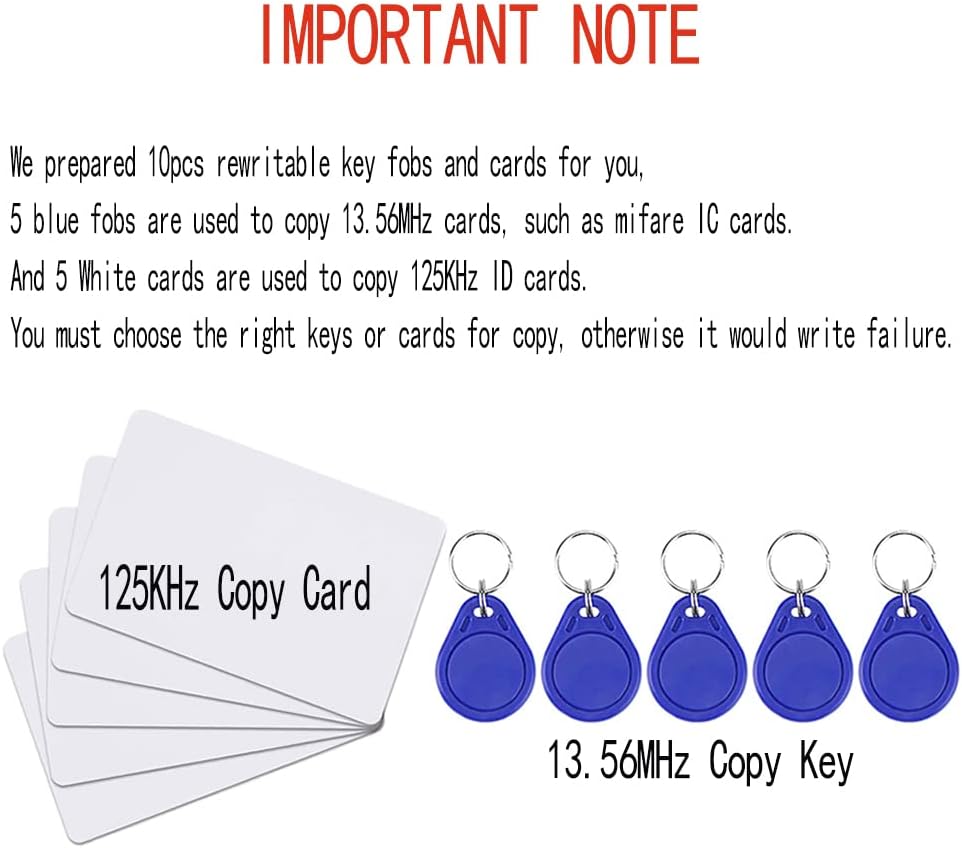
Image 3.2: An important note indicating that 5 blue fobs are for 13.56MHz cards (e.g., Mifare IC) and 5 white cards are for 125KHz ID cards. Users must select the correct type for copying to avoid errors.
4. Setup
Follow these steps to set up your jasugKEY RFID Card Copier:
4.1 Powering the Device
- Battery Power: Insert 4 AAA batteries into the battery compartment located on the back of the device.
- USB Power: Alternatively, connect the device to a power source or computer using the provided Type-C USB cable.
4.2 PC Connection and Software Installation
- Connect the jasugKEY device to your computer using the Type-C USB cable.
- Upon connection, the computer should automatically detect the device and load the 'CopyKEY Decryption Software' from the device's internal storage (U disk).
- If the software does not load automatically, navigate to 'My Computer' or 'This PC', locate the device's drive, and run the software installer. If you cannot find the software, please contact customer support for the file.
4.3 Smartphone Connection and App Installation
- Ensure your smartphone runs on Android or Harmony OS.
- Use the provided OTG unit to connect the jasugKEY device to your smartphone.
- Download and install the dedicated smartphone application. Contact customer support for the correct app link if needed.
5. Operating Instructions
This section details the primary operations of the jasugKEY RFID Card Copier.
5.1 General Device Navigation
Use the navigation keys (up, down, left, right) and the 'OK' button on the device to navigate through menus and confirm selections. The 'C' button typically serves as a delete key, and the return arrow key allows you to go back.
5.2 Decoding Cards (PC Software)
- Ensure the jasugKEY device is connected to your PC and the 'CopyKEY Decryption Software' is running.
- Place the RFID or NFC card you wish to decode onto one of the device's induction areas.
- In the software interface, click the "Start" or "Decode" button to initiate the decoding process. The software will display the card data upon successful decoding.

Image 5.1: Screenshot of the PC-based decryption software interface, showing the process of connecting the device and decoding card data. The software displays card parameters and data sectors.
5.3 Decoding Cards (Smartphone App)
- Connect the jasugKEY device to your Android smartphone via the OTG unit.
- Launch the dedicated smartphone application.
- Place the RFID or NFC card onto one of the device's induction areas.
- Follow the on-screen instructions within the app to perform the decoding operation. The app will display the decoded information.

Image 5.2: Screenshots illustrating the smartphone application interface for card decryption, showing the device connected via Type-C OTG and displaying decoded card data.
5.4 Writing Cards
- After successfully decoding a card, remove the original card.
- Place a compatible rewritable blank card or key fob onto the appropriate induction area of the device. Ensure the blank card/fob matches the frequency and type of the original card (e.g., 13.56MHz for IC cards, 125kHz for ID cards).
- Use the "WRITE" function on the device's menu or within the PC software/smartphone app to transfer the decoded data to the blank card/fob.
5.5 NFC Simulation
The device supports standalone NFC simulation. This feature allows you to use NFC-enabled mobile phones, bracelets, or other compatible devices to simulate encrypted IC cards, such as hotel cards, door access cards, or elevator cards. Refer to the device's menu or app for specific instructions on activating and managing NFC simulation.
6. Supported Card Types and Frequencies
The jasugKEY RFID Card Copier is compatible with a wide range of card types and frequencies:
6.1 Supported Card Types
- IC, MF1, S50, S70
- ID, TK4100, EM4100
- HID26, HID35, HID37
- GID64, GID50, GID40, GID32
- SID64, SID50, SID40, SID32
6.2 Supported Frequencies
- 125kHz, 175kHz, 250kHz, 300kHz, 375kHz
- 500kHz, 625kHz, 750kHz, 875kHz, 1000kHz
- 13.56MHz

Image 6.1: The device's screen displaying various supported frequencies (e.g., 13.56MHz, 125kHz, 175kHz, 250kHz, 300kHz, 375kHz, 500kHz, 625kHz, 750kHz, 875kHz, 1000kHz) along with tips for reading and writing cards.
7. Important Notes
- Frequency Matching: Copying RFID cards requires that the blank card operates at the same frequency as the original card.
- Rewritable Cards: Not all card types are rewritable. Ensure you are using a compatible rewritable blank card or key fob for writing operations.
- Card Compatibility: While this product is powerful, it may not be able to read and write all existing RFID card types. If you are unsure about compatibility, please contact customer support before attempting to copy.
- Smartphone App OS: The smartphone application currently supports only Android and Harmony OS operating systems.
- Front Induction Area: The front induction area of the device is specifically designed to support only 13.56MHz IC cards.
8. Specifications
| Feature | Detail |
|---|---|
| Manufacturer | jasugKEY |
| Model Number | JASAG-X100 55 |
| Dimensions (L x W x H) | 18.1 x 7 x 3.1 cm |
| Weight | 250 grams |
| Color | Black |
| Power Source | 4 AAA batteries (not included), USB power |
| Display | 3.2-inch HD Color Screen |
| Connectivity | Type-C USB, Mini USB Expansion Port |
| Country of Origin | China |

Image 8.1: The jasugKEY RFID Card Copier with its dimensions clearly marked: 181mm length, 70mm width, and 31mm thickness.
9. Troubleshooting
If you encounter issues while using your jasugKEY RFID Card Copier, consider the following:
- Card Detection Failure: Ensure the card is placed correctly and firmly on the induction area. Verify that the card type and frequency are supported by the device.
- Writing Errors: Confirm that the blank card or key fob is rewritable and matches the frequency and type of the original card you are attempting to copy. Incorrect card types will result in writing failures.
- Software/App Issues: For problems with the PC software or smartphone app, ensure the device is properly connected. Refer to the software's specific instructions or the app's help section. Try restarting the device and the application.
- Power Issues: Check battery levels or ensure the USB connection is secure and providing adequate power.
10. Warranty and Support
For technical assistance, software updates, or further inquiries regarding your jasugKEY Multi-Frequency RFID Card Copier, please contact jasugKEY customer support. Refer to the product packaging or the official jasugKEY website for the most current contact details and warranty information.