
AODELAN TZC-1
AODELAN TZC-1 Wired Timer Shutter Release and Zoom Remote Control User Manual
Model: TZC-1
Brand: AODELAN
1. Introduction
This manual provides detailed instructions for the AODELAN TZC-1 Wired Timer Shutter Release and Zoom Remote Control. This device is designed to enhance your photography experience by offering precise control over various camera functions, including zoom, time-lapse, long exposure, and continuous shooting, while minimizing camera shake.

Figure 1.1: AODELAN TZC-1 Remote Control with included connection cables.
2. Product Features
- Zoom Remote Control: Allows for precise optical zoom control directly from the remote. Press the [W] button to zoom out (wide-angle) and the [T] button to zoom in (telephoto). Half-pressing the zoom button enables slower, more controlled zoom, while fully pressing speeds up the zoom.
- Advanced Timer Functions: Supports time-lapse shooting with adjustable settings for delay (SELF), long exposure time (LONG), interval between shots (INTVL), and number of shots (N).
- SELF (Delayed Exposure): Sets a self-timer before the first photo is taken (0s-99hrs 59min 59s).
- LONG (Long Exposure): Programs the exposure time for Bulb mode (0s-99hrs 59min 59s).
- INTVL (Interval): Sets the time between consecutive shots (1s-99hrs 59min 59s).
- N (Number of Shots): Specifies the number of photos to be taken (1 to 399, or unlimited when set to "--").
- Shutter Release and Video Recording: Supports single shooting, continuous shooting (when camera is set to continuous mode), and video recording. The dedicated Shutter Release button allows for half-press focus and full-press capture. A separate Record button initiates video recording.
- Anti-Shake Function: By controlling the camera's shutter remotely, the TZC-1 eliminates vibrations caused by manually pressing the camera's shutter button, crucial for sharp images in various scenarios like long exposures, macro photography, and astrophotography.
- DORMANCY Button: Allows the user to turn off the camera's function to conserve power.
- GRID LINES Button: Displays grid lines on the camera's LCD for composition assistance.

Figure 2.1: Illustration of the zoom in (T) and zoom out (W) functions on the remote control.
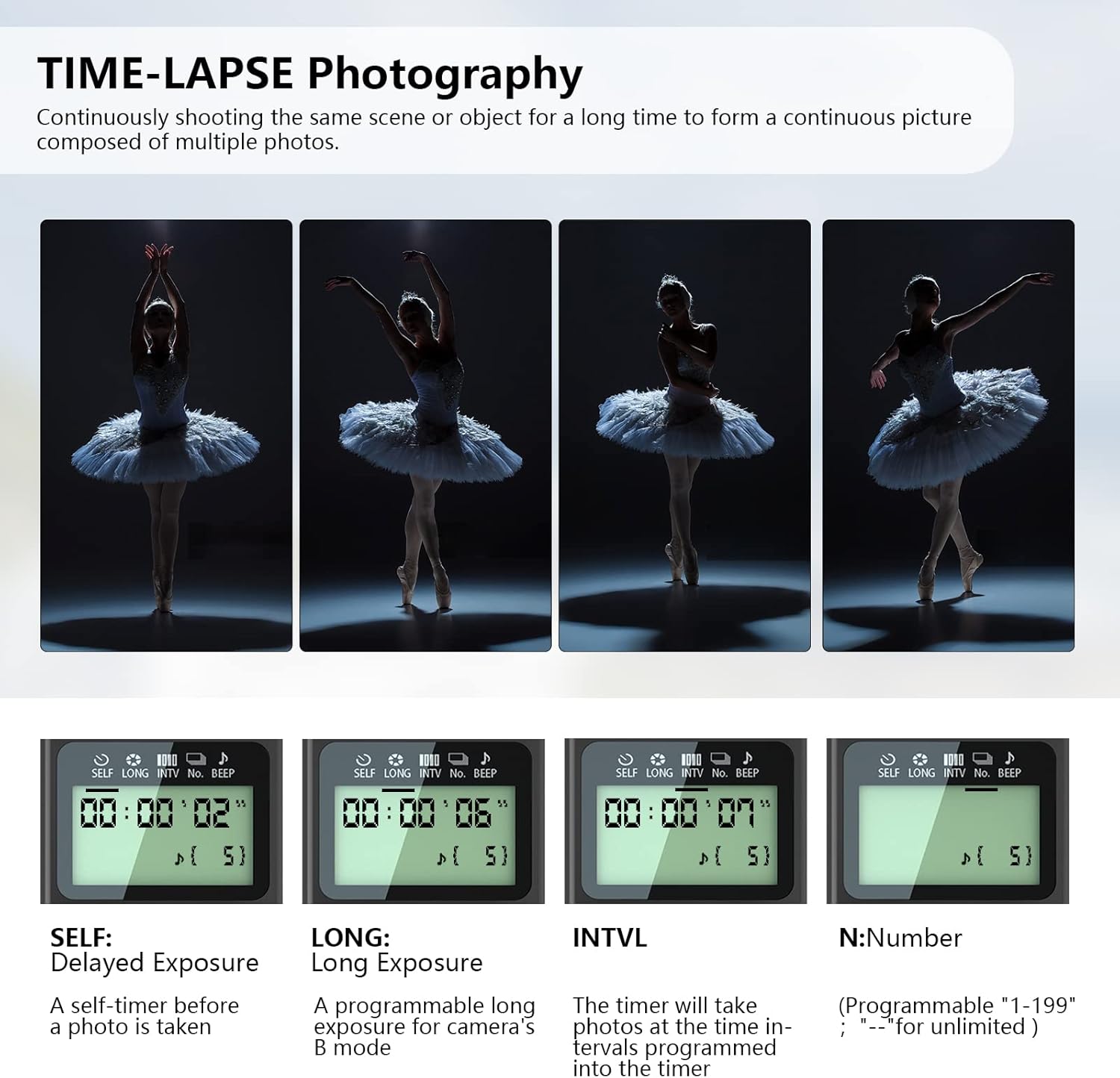
Figure 2.2: Examples of time-lapse photography and the remote's display for timer settings.

Figure 2.3: Depiction of auto-focus, single shooting, continuous shooting, and video recording capabilities.

Figure 2.4: Examples of long exposure photography, such as light trails and water splashes, enabled by the remote's anti-shake feature.
3. Setup Guide
3.1. Battery Installation
The AODELAN TZC-1 requires 2 AAA batteries for operation. Locate the battery compartment on the back of the remote control, open the cover, insert the batteries according to the polarity indicators (+/-), and close the cover securely.
3.2. Connecting to Camera
Connect the appropriate cable from the remote control to your camera's multi-terminal or Remote/LANC 2.5mm port. Ensure the connection is secure before operation.

Figure 3.1: The remote control with its cables, showing compatibility with Sony cameras via Multi port and Remote/LANC port.
4. Operating Instructions
4.1. Control Layout Overview
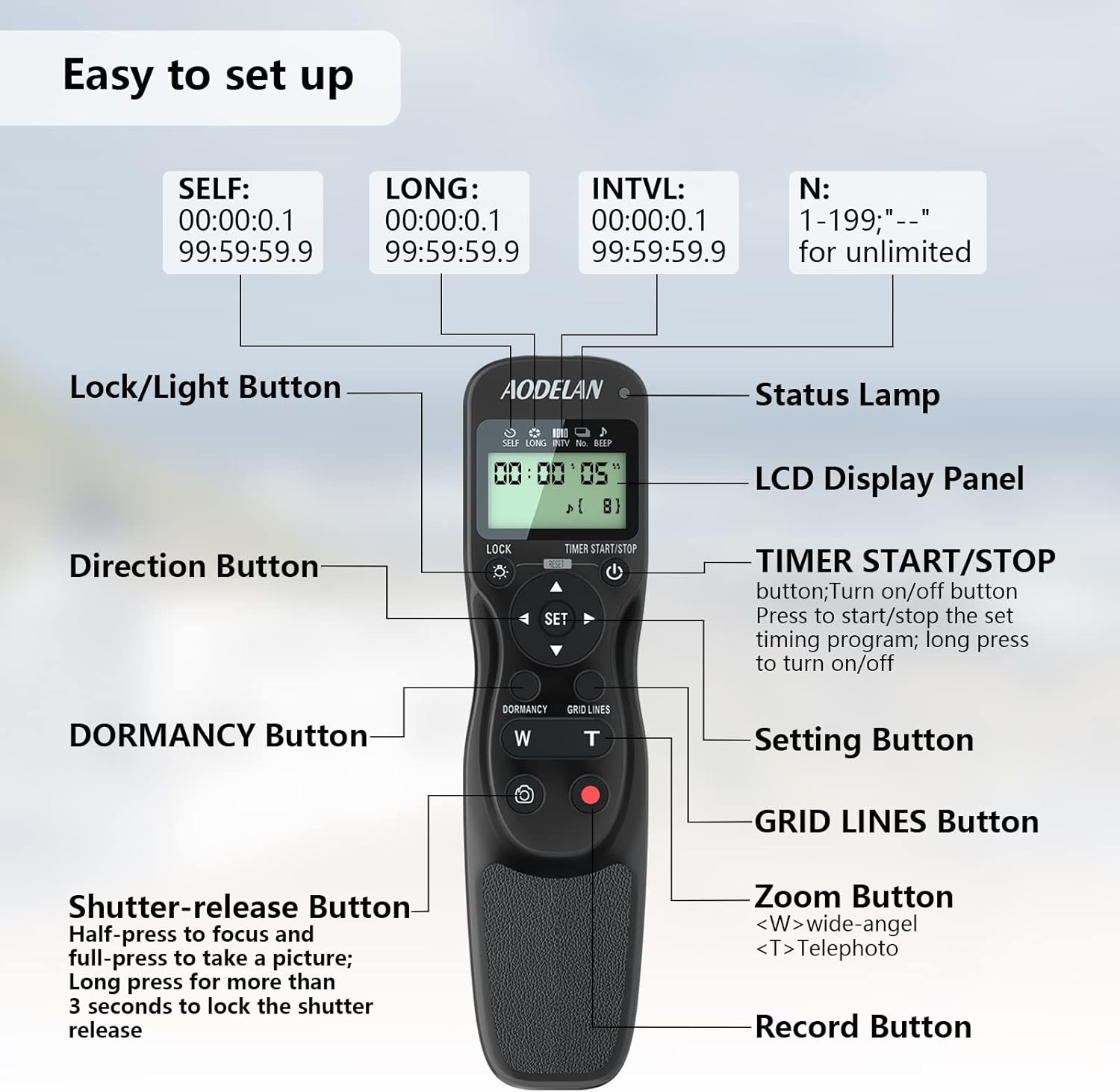
Figure 4.1: Detailed diagram of the AODELAN TZC-1 remote control's buttons and LCD display.
- LCD Display Panel: Shows current timer settings (SELF, LONG, INTVL, N) and other status indicators.
- TIMER START/STOP Button: Press to start or stop the set timing program. Long press to turn the remote on/off.
- Direction Buttons (Up, Down, Left, Right): Used for navigating menus and adjusting settings.
- SET Button: Confirms selections and enters setting modes.
- LOCK/Light Button: Locks the remote's buttons to prevent accidental presses. Also activates the LCD backlight.
- Shutter-release Button: Half-press to focus, full-press to take a picture. Long press for more than 3 seconds to lock the shutter release for continuous shooting.
- Record Button: Initiates and stops video recording.
- Zoom Buttons (W/T): 'W' for wide-angle zoom out, 'T' for telephoto zoom in.
- DORMANCY Button: Puts the camera into a low-power state or turns off its function.
- GRID LINES Button: Toggles the display of grid lines on the camera's screen.
4.2. Setting Timer Functions
To set the timer functions (SELF, LONG, INTVL, N):
- Press the SET button to enter the setting mode.
- Use the Direction buttons (Up/Down) to select the desired parameter (SELF, LONG, INTVL, N).
- Use the Direction buttons (Left/Right) to adjust the values.
- Press SET again to confirm the setting and move to the next parameter, or exit the setting mode.
- Once all desired parameters are set, press the TIMER START/STOP button to begin the sequence.
Important Considerations for Timer Settings:
- To ensure correct operation, choose an interval at least one second longer than the exposure time.
- When using autofocus, set the delay to two seconds or more and choose an interval at least two seconds longer than the exposure time to ensure the camera has time to focus.
- When using long exposure noise reduction (NR), the interval should be at least twice the exposure time.
5. Maintenance
To ensure the longevity and optimal performance of your AODELAN TZC-1 remote control, follow these maintenance guidelines:
- Cleaning: Use a soft, dry cloth to clean the remote's surface. Do not use liquid cleaners or solvents, as they may damage the device.
- Storage: Store the remote in a cool, dry place away from direct sunlight and extreme temperatures. If storing for an extended period, remove the AAA batteries to prevent leakage.
- Battery Replacement: Replace batteries when the LCD display becomes dim or the remote's functions become unreliable. Always use fresh AAA batteries.
- Cable Care: Handle the connection cables carefully. Avoid sharp bends or excessive pulling, which can damage the internal wires.
6. Troubleshooting
If you encounter issues with your AODELAN TZC-1 remote control, refer to the following common problems and solutions:
- Remote not responding:
- Check if the batteries are correctly installed and have sufficient charge. Replace if necessary.
- Ensure the remote is turned on by long-pressing the TIMER START/STOP button.
- Verify that the cable is securely connected to both the remote and the camera.
- Check if the LOCK function is activated. Press the LOCK/Light button to unlock.
- Time-lapse or long exposure not working as expected:
- Review your SELF, LONG, INTVL, and N settings. Ensure the interval is longer than the exposure time.
- If using autofocus, allow sufficient delay and interval time for the camera to focus.
- If using long exposure noise reduction, ensure the interval is at least twice the exposure time.
- Confirm your camera is set to the appropriate mode (e.g., Bulb mode for long exposures).
- Zoom function not working:
- Ensure your camera lens supports electronic zoom control via the remote port.
- Verify the cable connection.
- Camera not focusing or shooting:
- Ensure the camera is powered on and in a shooting mode.
- Check camera settings for any restrictions on remote control.
7. Specifications
| Specification | Value |
|---|---|
| Model Number | TZC-1 |
| Package Dimensions | 5.67 x 2.48 x 1.06 inches |
| Item Weight | 4.6 ounces |
| Batteries Required | 2 AAA batteries |
| Max Number of Supported Devices | 1 |
| Special Feature | Ergonomic design |
| Date First Available | March 29, 2023 |
8. Compatible Devices
The AODELAN TZC-1 remote control is compatible with a wide range of Sony cameras and camcorders equipped with a multi-terminal or Remote/LANC 2.5mm port. Compatible models include, but are not limited to:
- Sony A7, A7 III, A7R, A7R II, A7R III, A7R IV, A7s
- Sony A99 II
- Sony A5000, A5100, A6000, A6100, A6300, A6400, A6500, A6600
- Sony ZV-1
- Sony RX100 VII, RX0 II
- Sony Camcorders: HXR-MC2500, PXW-Z280V, HDR-SR7E, HXR-NX3, etc.
9. Warranty and Support
For warranty information or technical support, please refer to the product packaging or visit the official AODELAN website. Specific warranty terms may vary by region and retailer.
Official Website: www.aodelan.net
Ask a question about this manual
Ask about setup, troubleshooting, compatibility, parts, safety, or missing instructions. Manuals+ will review the question and use this page’s manual context to help answer it.