
1. Introduction
Thank you for choosing the ENUOTEK LED Wall Mounted Reading Light. This compact and versatile light is designed to provide focused illumination for reading, while also offering convenient features such as wireless remote control, dimmable neutral white light, a timer function, and a 5V 2A USB output for charging devices. Its wall-mounted design helps save space on bedside tables, making it an ideal solution for bedrooms, home offices, or study areas.
2. Safety Information
- Read all instructions carefully before installation and use.
- Do not disassemble or modify the product. Unauthorized modifications may cause damage or injury.
- Ensure the power supply is disconnected before installation or maintenance.
- This product is designed for indoor use only. Do not expose to water or high humidity.
- Keep out of reach of children.
- Use only the provided power adapter.
3. Product Overview
The ENUOTEK LED Wall Mounted Reading Light features a durable aluminum lamp head, a flexible steel gooseneck, and an ABS lamp base. It utilizes the latest COB LED technology for efficient and bright illumination. The light is controlled by a wireless remote, offering stepless dimming, four preset brightness levels, and a timer function. A built-in USB port allows for convenient charging of mobile devices.

Image: The ENUOTEK LED Wall Mounted Reading Light installed above a bed, providing focused light for reading.
4. Package Contents
- 1 x LED Wall Mount Reading Light
- 1 x Remote Control
- 1 x Instruction Manual (this document)
- Mounting Plate with Adhesive Tape
- Screws and Wall Anchors for alternative mounting
Video: Unboxing the ENUOTEK LED Wall Mounted Reading Light, showing all included components: the lamp unit, power adapter, remote control, mounting plate, and instruction manual.
5. Installation
The ENUOTEK LED Wall Mounted Reading Light offers two installation methods:
Method 1: Adhesive Mounting (for flat surfaces)
- Clean the desired wall surface thoroughly to ensure it is dry and free of dust or grease.
- Peel off the protective film from the adhesive tape on the back of the mounting plate.
- Firmly press the mounting plate onto the wall at the desired height and hold for 30 seconds.
- Slide the lamp base onto the mounted plate until it clicks securely into place.
Method 2: Screw Mounting (for uneven surfaces or added security)
- Mark the desired installation location on the wall.
- Drill pilot holes at the marked points. Insert the wall anchors if necessary.
- Align the mounting plate with the drilled holes and secure it to the wall using the provided screws.
- Slide the lamp base onto the mounted plate until it clicks securely into place.
The installation process typically takes 3-5 minutes.
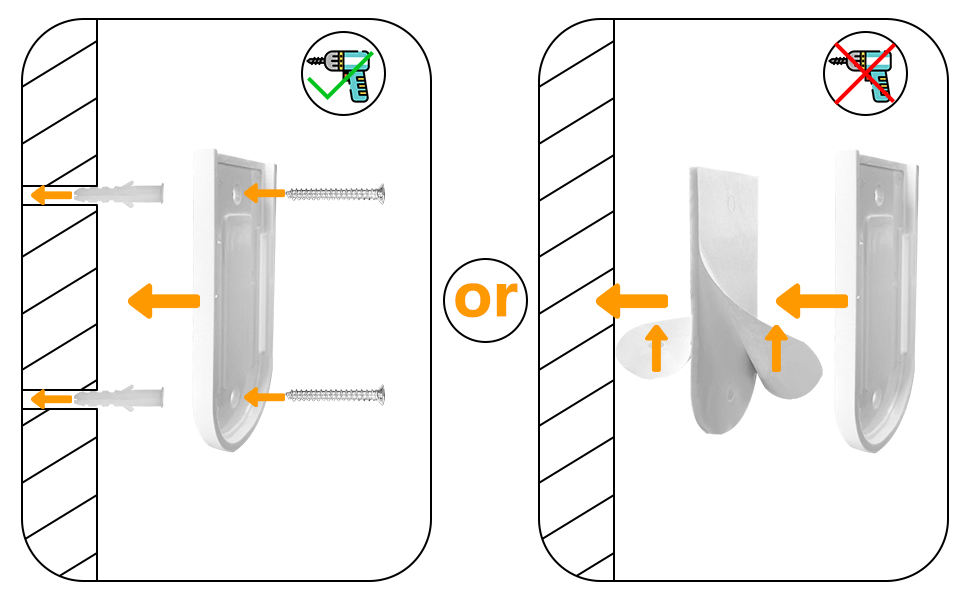
Image: A diagram illustrating the two optional installation methods for the lamp: using adhesive tape for flat surfaces or screws and wall anchors for uneven surfaces.
6. Operating Instructions
The reading light can be operated via the touch button on the lamp base or the included wireless remote control.
Using the Touch Button:
- Press the touch button once to turn the light ON/OFF.
Using the Wireless Remote Control:
Ensure the remote control is paired with the lamp. Follow the instructions in the remote control section of the manual for pairing if needed.
- ON/OFF: Press the ON button to turn the light on, and the OFF button to turn it off.
- Stepless Dimming: Use the + and - buttons to smoothly adjust the brightness from 1% to 100%.
- Preset Brightness Levels: Select from four preset brightness levels: 15%, 35%, 70%, and 100%.
- Timer Function: Set the light to automatically turn off after a specified duration: 10 minutes, 20 minutes, 1 hour, or 2 hours. This is useful for falling asleep while reading.

Image: A detailed diagram of the wireless remote control, highlighting buttons for power, stepless dimming, four preset brightness levels (15%, 35%, 70%, 100%), and timer settings (10min, 20min, 1hr, 2hr).
Video: A demonstration of the ENUOTEK LED Wall Mounted Reading Light's remote control functions, including turning the light on/off, adjusting brightness, and setting the timer.
7. USB Charging Function
The lamp base is integrated with a standard 5V 2A USB output socket. This allows for quick charging of mobile phones, tablets, and other electronic digital equipment. This feature is highly convenient for charging your devices while reading or during sleep.

Image: The ENUOTEK LED Wall Mounted Reading Light installed above a desk, with a smartphone connected to and charging from the lamp's integrated USB port.
8. Maintenance
- To clean the lamp, wipe it with a soft, dry cloth. Do not use abrasive cleaners or solvents.
- Ensure the lamp is unplugged before cleaning.
- Regularly check the power cord for any signs of damage. If damaged, discontinue use and contact support.
9. Troubleshooting
| Problem | Possible Cause | Solution |
|---|---|---|
| Light does not turn on | No power supply; Remote control battery low/dead; Remote not paired. | Check power connection; Replace remote battery (CR2032); Re-pair remote control (refer to remote instructions). |
| Remote control not responding | Battery low/dead; Obstruction between remote and lamp; Remote not paired. | Replace remote battery; Ensure clear line of sight; Re-pair remote control. |
| USB charging not working | Device not compatible; Cable faulty; Lamp not powered. | Ensure device is 5V compatible; Try a different USB cable; Check if the lamp is powered on. |
10. Specifications
| Feature | Detail |
|---|---|
| Brand | ENUOTEK |
| Model Name | LB-W001-11 |
| Item Model Number | LB-W001-11-12 |
| Color | White |
| Material | Acrylonitrile Butadiene Styrene, Aluminum |
| Product Dimensions | 0.98"L x 2.36"W x 19.96"H |
| Item Weight | 12.8 ounces |
| Power Source | Corded Electric |
| Wattage | 5 watts |
| Voltage | 120 Volts |
| Light Source Type | LED |
| Brightness | 500 Lumens |
| Color Temperature | 4000 Kelvin (Neutral White) |
| Color Rendering Index (CRI) | 85.00 |
| Average Life | 30000 Hours |
| Control Method | Remote, Touch |
| Special Features | Adjustable Height, Dimmable, Energy Efficient, Timer |
| USB Output | 5V 2A Max |
| Remote Battery | 1 CR2032 battery (included) |
| Certification | FCC |
11. Warranty and Support
This ENUOTEK product comes with a 2 Years Quality Warranty by Seller. For any questions, troubleshooting assistance, or warranty claims, please contact ENUOTEK customer support. You can find more information and contact details by visiting the official ENUOTEK store: