
1. Introduction
Thank you for purchasing the MUSE Dual Alarm Clock Radio PLL M-186CMR. This device combines a digital clock, dual alarm functions, and a PLL FM/AM radio into a compact unit, ideal for your bedroom or office. This manual provides detailed instructions for setup, operation, and maintenance to ensure optimal performance and longevity of your device. Please read this manual thoroughly before use and retain it for future reference.
2. Important Safety Instructions
To reduce the risk of electric shock, fire, or injury, always follow these basic safety precautions:
- Read all instructions before operating the appliance.
- Do not expose this appliance to rain or moisture.
- Do not use this appliance near water.
- Clean only with a dry cloth.
- Do not block any ventilation openings. Install in accordance with the manufacturer's instructions.
- Do not install near any heat sources such as radiators, heat registers, stoves, or other apparatus (including amplifiers) that produce heat.
- Protect the power cord from being walked on or pinched, particularly at plugs, convenience receptacles, and the point where they exit from the appliance.
- Only use attachments/accessories specified by the manufacturer.
- Unplug this appliance during lightning storms or when unused for long periods of time.
- Refer all servicing to qualified service personnel. Servicing is required when the appliance has been damaged in any way, such as power-supply cord or plug is damaged, liquid has been spilled or objects have fallen into the appliance, the appliance has been exposed to rain or moisture, does not operate normally, or has been dropped.
3. Setup
3.1 Unpacking
Carefully remove the unit from its packaging. Inspect the unit for any signs of damage. Ensure all components are present: the main unit and power adapter.
3.2 Power Connection
This device operates on AC power. Connect the provided power adapter to the DC input jack on the back of the unit, then plug the adapter into a standard wall outlet (AC 230V ~ 50Hz). The unit will power on and the display will illuminate.
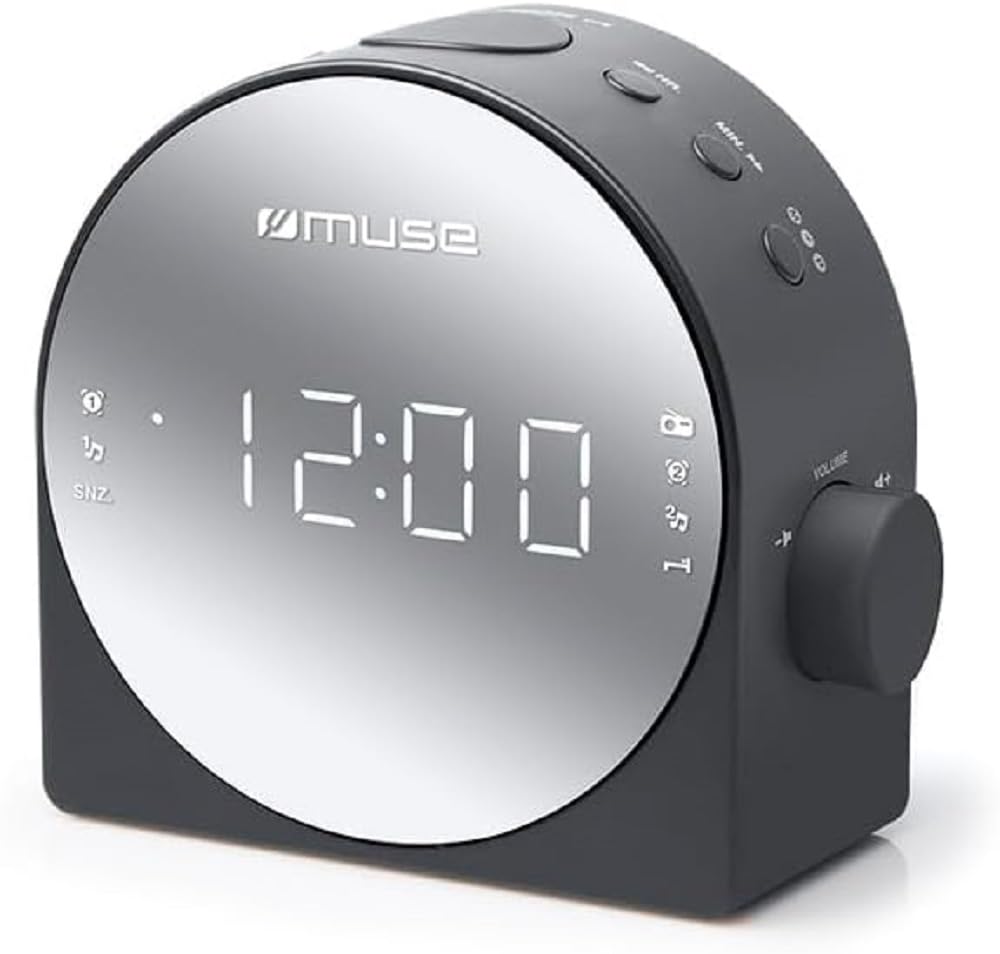
Figure 1: Front view of the MUSE M-186CMR, showing the digital display and control buttons.
3.3 Battery Backup (Not Included)
The unit requires 2 x AAA batteries (not included) for time and alarm settings backup during a power outage. Insert the batteries into the battery compartment located on the bottom of the unit, observing the correct polarity (+/-). These batteries do not power the unit for normal operation but preserve settings.
3.4 Antenna Setup
For optimal FM radio reception, fully extend the built-in wire antenna. For AM reception, the unit has a built-in ferrite bar antenna. Rotate the unit for the best AM reception.
4. Operation
4.1 Setting the Time
- Press and hold the TIME SET button. The hour digits will flash.
- Press the HOUR button repeatedly to adjust the hour.
- Press the MINUTE button repeatedly to adjust the minute.
- Press TIME SET again to confirm and exit time setting mode.
4.2 Setting Alarms (Alarm 1 & Alarm 2)
This unit features two independent alarms.
- Press and hold the ALARM 1 SET (or ALARM 2 SET) button. The alarm hour digits will flash.
- Press the HOUR button to set the desired alarm hour.
- Press the MINUTE button to set the desired alarm minute.
- Press ALARM 1 SET (or ALARM 2 SET) again to confirm the time.
- Immediately after setting the time, press the ALARM 1 MODE (or ALARM 2 MODE) button repeatedly to select the alarm source: Buzzer, Radio, or OFF. The corresponding indicator will light up on the display.
4.3 Radio Operation
4.3.1 Turning On/Off and Band Selection
- Press the RADIO ON/OFF button to turn the radio on.
- Press the BAND button to switch between FM and AM bands.
- Press RADIO ON/OFF again to turn the radio off.
4.3.2 Manual Tuning
- While the radio is on, press the TUNE + or TUNE - buttons briefly to adjust the frequency step by step.
4.3.3 Auto Scan Tuning
- While the radio is on, press and hold the TUNE + or TUNE - buttons for a few seconds. The radio will automatically scan for the next available station.
4.3.4 Setting and Recalling Presets
The unit can store a number of radio stations as presets.
- Tune to your desired station using manual or auto scan tuning.
- Press and hold the PRESET SET button. The preset number will flash.
- Press the PRESET + or PRESET - buttons to select the desired preset number (e.g., P01, P02).
- Press PRESET SET again to save the station to the selected preset.
- To recall a preset station, briefly press the PRESET + or PRESET - buttons.
4.4 Snooze and Sleep Function
4.4.1 Snooze
- When an alarm sounds, press the SNOOZE button. The alarm will temporarily stop and sound again after approximately 9 minutes.
4.4.2 Sleep Timer
- While the radio is on, press the SLEEP button repeatedly to cycle through sleep timer options (e.g., 90, 60, 30, 15 minutes, OFF). The radio will automatically turn off after the selected time.
4.5 Display Brightness
Press the DIMMER button repeatedly to adjust the brightness of the display to your preference (e.g., High, Medium, Low, Off).
5. Maintenance
5.1 Cleaning
To clean the unit, wipe it with a soft, dry cloth. Do not use abrasive cleaners, waxes, or solvents as these may damage the surface. Ensure the unit is unplugged before cleaning.
5.2 Storage
If you plan to store the unit for an extended period, unplug it from the power outlet and remove the backup batteries. Store it in a cool, dry place away from direct sunlight and extreme temperatures.
6. Troubleshooting
| Problem | Possible Cause | Solution |
|---|---|---|
| Unit does not power on. | Power cord not properly connected. | Ensure the power adapter is securely plugged into the unit and the wall outlet. |
| No sound from radio. | Volume too low; incorrect band/station; poor reception. | Increase volume. Check if the correct band (FM/AM) is selected. Adjust antenna position or relocate the unit for better reception. |
| Alarm does not sound. | Alarm not set; alarm volume too low; alarm mode set to OFF. | Verify alarm time and mode (Buzzer/Radio) are correctly set. Ensure alarm volume is audible. |
| Time/settings reset after power outage. | Backup batteries are missing or depleted. | Install new AAA batteries in the battery compartment. |
| Display is too dim or too bright. | Display brightness setting needs adjustment. | Press the DIMMER button to cycle through brightness levels. |
7. Specifications
- Model: M-186 CMR
- Power Source: AC 230V ~ 50Hz (Electric with cord)
- Battery Backup: 2 x AAA batteries (not included)
- Radio Bands: FM, AM (PLL Tuner)
- Alarms: Dual Alarm (Buzzer/Radio)
- Display: Digital LED
- Special Features: Snooze, Sleep Timer, Dimmer
- Dimensions (W x H x D): Approximately 11.6 x 5.6 x 11.58 cm
- Weight: Approximately 429 g
- Manufacturer: Muse
8. Warranty and Support
This product is covered by a standard manufacturer's warranty. For detailed warranty information, please refer to the documentation provided with your purchase or contact your retailer. For technical support, service, or inquiries, please visit the official Muse website or contact their customer service department.
Please retain your proof of purchase for warranty claims.