
1. Introduction
Thank you for choosing the AKAMATE Marine Boat Radio Receiver. This manual provides detailed instructions for the proper installation, operation, and maintenance of your new marine stereo. Please read this manual thoroughly before using the product to ensure optimal performance and safety. Keep this manual for future reference.

Image: Front view of the AKAMATE Marine Boat Radio Receiver, showcasing its display and control buttons.
2. Safety Information
Always observe the following safety precautions to avoid injury or damage to the unit:
- Ensure proper wiring and connections to prevent electrical short circuits.
- Do not operate the unit if it is damaged or malfunctioning.
- Keep the unit away from extreme temperatures and direct sunlight for prolonged periods.
- This unit is IPX5 water-resistant, meaning it can withstand water jets. However, it is not designed for submersion.
- Always disconnect power before performing any maintenance or installation.

Image: The marine radio unit shown with water and mud splashes, highlighting its IPX5 water and mudproof capabilities, which also helps prevent display fogging.
3. What's in the Box
Verify that all components are present before beginning installation:
- AKAMATE Marine Bluetooth Audio Receiver
- Installation Kits (mounting hardware)
- ISO Harness (wiring harness)
- User Manual (this document)

Image: Visual representation of the product packaging contents, including the marine radio, installation hardware, wiring harness, and user manual.
4. Product Overview
The AKAMATE Marine Boat Radio Receiver features a user-friendly design with a clear display and intuitive controls.
Key Features:
- 2.8'' LCD Display: Sunlight-viewable screen for clear visibility in various conditions.
- 7-Color Backlight Buttons: Customizable button illumination for enhanced aesthetics and visibility.
- Multi-function Knob: Central rotary knob for volume control and menu navigation.
- IPX5 Water Resistance: Designed to withstand water jets and harsh marine environments.
- AM/FM Radio: Store up to 30 preset stations (12 AM / 18 FM).
- Bluetooth Audio Streaming: Wireless music playback from compatible devices.
- USB 2.0 Port: Supports thumb drives up to 64GB for MP3, WMA, FLAC playback.
- RCA Aux Input: Connect external audio devices.
- RCA Outputs: For connecting external amplifiers and subwoofers.
- 5-Band Preset EQ: Audio customization options.

Image: The marine radio unit mounted on an ATV, highlighting its 2.8-inch clear LCD display, 7-color backlight buttons, and crisp knob for easy use in various lighting conditions.
5. Installation Guide
Proper installation is crucial for the performance and longevity of your marine stereo. It is recommended to have this unit installed by a qualified professional.
5.1 Mounting the Unit:
- Choose a suitable location on your boat or vehicle dashboard that is protected from direct water spray and excessive heat.
- Ensure there is sufficient depth behind the mounting surface for the unit (2.84 inches / 7.2 cm).
- Use a hole saw to create a circular opening of approximately 2.89 inches (7.34 cm) in diameter.
- Insert the unit into the opening and secure it using the provided installation kits.
5.2 Wiring Connections:
Refer to the wiring diagram below for correct connections. Always ensure the power source is disconnected before making any wiring connections.
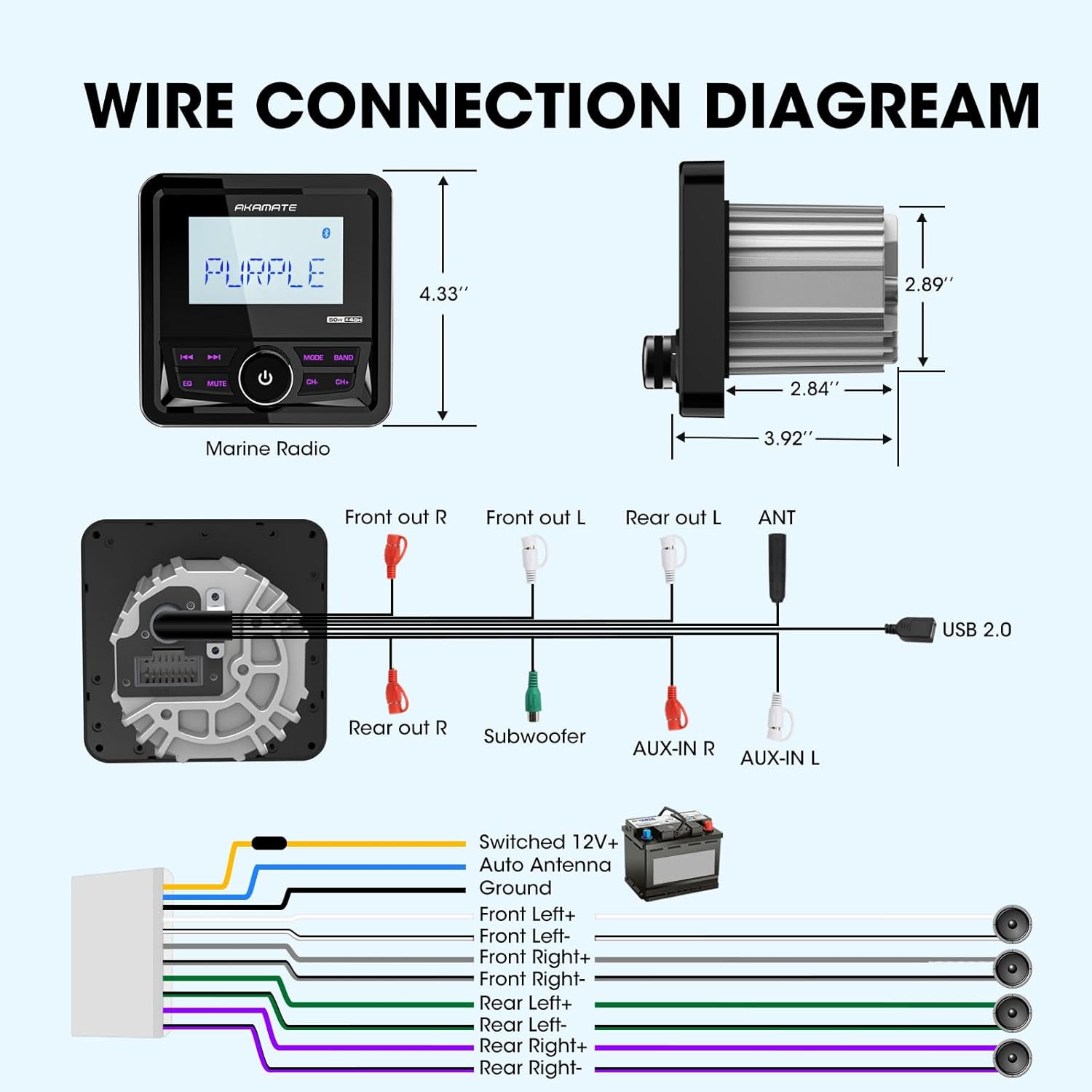
Image: A comprehensive wiring diagram illustrating connections for power, ground, speakers (Front Left/Right, Rear Left/Right), subwoofer, AUX-in, and USB 2.0.
- Power (Yellow): Connect to Switched 12V+ (Ignition).
- Ground (Black): Connect to a solid chassis ground point.
- Auto Antenna (Blue): Connect to power antenna or amplifier remote turn-on lead.
- Speaker Outputs (White, Gray, Green, Purple pairs): Connect to your boat's speakers. Ensure correct polarity (+/-).
- RCA Outputs (Red/White): Connect to external amplifiers for front, rear, and subwoofer channels.
- AUX-IN (Red/White): Connect external audio sources.
- USB 2.0: Connect USB storage devices.
6. Operating Instructions
6.1 Power On/Off:
Press the central knob to turn the unit ON or OFF.
6.2 Source Selection:
Press the "MODE" button to cycle through available sources: FM, AM, Bluetooth, USB, AUX.
6.3 Radio Operation (AM/FM):
- Tuning: Use the "CH-" and "CH+" buttons to manually tune or seek stations.
- Band Selection: Press the "BAND" button to switch between FM1, FM2, FM3, AM1, AM2.
- Preset Stations: The unit can store 18 FM and 12 AM preset stations. To save a station, tune to the desired frequency, then press and hold one of the numeric preset buttons (if available, or use the "EQ" button for auto-store if applicable, manual does not specify).

Image: The marine radio unit showing its AM/FM radio function and demonstrating Bluetooth audio streaming connectivity with a smartphone.
6.4 Bluetooth Operation:
- Pairing: Select "Bluetooth" mode. On your mobile device, search for "AKAMATE" (or similar name) in the Bluetooth settings and pair.
- Audio Streaming: Once paired, you can stream audio from your device to the stereo. Use the "CH-" and "CH+" buttons for track navigation (previous/next).
6.5 USB/AUX Operation:
- USB: Insert a USB flash drive (up to 64GB) into the USB port. The unit will automatically switch to USB mode and begin playback of supported audio files (MP3, WMA, FLAC). Use "CH-" and "CH+" for track navigation.
- AUX: Connect an external audio device to the AUX-IN ports using an appropriate cable. Select "AUX" mode to play audio from the connected device.

Image: The marine radio unit highlighting its input capabilities, including USB (up to 64GB), AUX-IN, and compatibility with MP3 players and smartphones, along with its 200 watts peak power output.
6.6 Audio Settings (EQ & Time Set):
- Preset EQ: Press the "EQ" button to cycle through preset equalizer modes (e.g., Rock, Pop, Classic, Flat). The unit features a 5-band preset EQ.
- Time Set: The unit allows for time setting in 12-hour format. Refer to the on-screen prompts or specific button combinations (often involving holding the "EQ" or "MUTE" button) to enter time setting mode.

Image: The marine radio unit displaying its 5-band preset EQ function and time setting capability. Below, examples of compatible vehicles like motorcycles, yachts, golf carts, and ATVs are shown.
7. Maintenance
To ensure the longevity and optimal performance of your AKAMATE Marine Boat Radio Receiver, follow these maintenance guidelines:
- Cleaning: Use a soft, damp cloth to wipe the unit's surface. Do not use abrasive cleaners or solvents.
- Connections: Periodically check all wiring connections to ensure they are secure and free from corrosion.
- Storage: If the unit will not be used for an extended period, store it in a cool, dry place.
- Water Exposure: While IPX5 rated, avoid prolonged exposure to direct high-pressure water jets. After exposure to saltwater, gently rinse with fresh water and dry thoroughly.
8. Troubleshooting
If you encounter issues with your unit, refer to the table below for common problems and solutions.
| Problem | Possible Cause | Solution |
|---|---|---|
| No Power | Loose power connection; Blown fuse; Vehicle battery low. | Check power and ground wires; Replace fuse; Charge vehicle battery. |
| No Sound | Speaker wires disconnected; Volume too low; Mute function active. | Check speaker connections; Increase volume; Deactivate mute. |
| Bluetooth Not Connecting | Device not in pairing mode; Unit not in Bluetooth mode; Interference. | Ensure device is discoverable; Select Bluetooth mode on unit; Move closer to unit. |
| USB Playback Error | Unsupported file format; USB drive corrupted; USB drive too large. | Ensure files are MP3/WMA/FLAC; Reformat USB drive; Use a drive up to 64GB. |
| Display Foggy | Condensation due to temperature changes. | This unit has anti-foggy features, but in extreme conditions, minor condensation may occur. It should clear up as temperatures equalize. Ensure proper sealing during installation. |
9. Specifications
| Feature | Specification |
|---|---|
| Model Number | Marine Boats Radio |
| Power Output | Up to 200 Watts Peak Power (4 channels) |
| Operating Voltage | DC 12V |
| Display Type | 2.8'' LCD Display |
| Water Resistance Rating | IPX5 |
| USB Support | USB 2.0, up to 64GB |
| Supported Audio Formats | MP3, WMA, FLAC, etc. |
| Bluetooth Version | Bluetooth 5.0 |
| Dimensions (L x W x H) | 4.33'' (length) x 2.89'' (body diameter) x 2.84'' (depth) |
| Item Weight | 1.2 pounds |
10. Warranty and Support
AKAMATE products are designed for reliability and performance. For warranty information, please refer to the warranty card included with your product or contact AKAMATE customer support.
If you require technical assistance or have questions regarding your product, please contact our customer support team through the official AKAMATE website or the retailer where you purchased the product. Please have your model number and purchase date ready when contacting support.
Note: Product specifications and features are subject to change without prior notice.


