
1. Setup and Battery Installation
This replacement remote control requires two (2) AAA batteries for operation. Batteries are not included with the remote control.
- Locate the battery compartment on the back of the remote control.
- Slide the battery compartment cover downwards or in the direction indicated by an arrow to open it.
- Insert two AAA Lithium batteries, ensuring the positive (+) and negative (-) terminals align correctly with the markings inside the compartment.
- Replace the battery compartment cover by sliding it back into position until it clicks securely.
Once batteries are installed, the remote control is ready for use. No additional programming is typically required for compatible models.

Image: Back of the remote control with the battery compartment cover.

Image: Remote control with the battery compartment open, illustrating battery insertion.
2. Operating Instructions
Point the remote control directly at the infrared receiver on your Klarstein Metrobreeze portable air conditioner. Ensure there are no obstructions between the remote and the air conditioner.
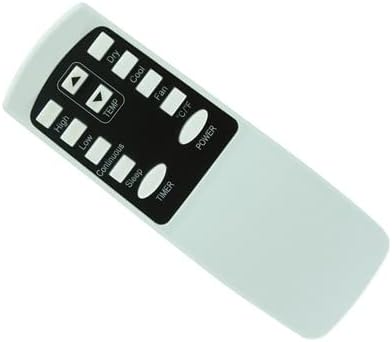
Image: Front of the remote control displaying various function buttons.
Button Functions:
- POWER: Turns the air conditioner ON or OFF.
- TEMP ▲/▼: Adjusts the temperature setting up or down.
- C/F: Toggles the temperature display between Celsius and Fahrenheit. This remote features a Celsius display.
- DRY: Activates the dehumidification mode.
- COOL: Activates the cooling mode.
- FAN: Activates the fan-only mode.
- HIGH: Sets the fan speed to high.
- LOW: Sets the fan speed to low.
- CONTINUOUS: Activates continuous operation mode (specific function may vary by AC model).
- SLEEP: Activates sleep mode for quieter operation and energy saving.
- TIMER: Sets the timer for automatic ON/OFF operation. Refer to your air conditioner's manual for detailed timer settings.
3. Maintenance
Proper maintenance ensures the longevity and optimal performance of your remote control.
- Cleaning: Wipe the remote control with a soft, dry cloth. Do not use liquid cleaners or abrasive materials, as they may damage the surface or internal components.
- Battery Replacement: Replace batteries when the remote's range decreases or if it becomes unresponsive. Always replace both batteries at the same time with new ones of the same type. Remove batteries if the remote will not be used for an extended period to prevent leakage.
- Storage: Store the remote control in a cool, dry place away from direct sunlight and extreme temperatures.
4. Troubleshooting
If you experience issues with your remote control, refer to the following common solutions:
- Remote Not Responding:
- Check if the batteries are inserted correctly with the correct polarity.
- Replace old batteries with new AAA Lithium batteries.
- Ensure there are no obstructions between the remote control and the air conditioner's infrared receiver.
- Verify that you are within the maximum operating range (approximately 10 meters).
- Some Functions Not Working:
- This is a replacement remote control and may not support all advanced functions of your original air conditioner remote. Basic functions are generally supported.
- Ensure your air conditioner model is listed as compatible. If your model number is not explicitly mentioned, some functions may not operate as expected.
5. Specifications
| Brand | Generic |
| Model Number | Easytry17631 |
| Compatible Devices | Klarstein Metrobreeze Las Vegas 9 2G Portable Air Conditioner (and specified models) |
| Connectivity Technology | Infrared (IR) |
| Controller Type | Button Control |
| Maximum Range | 10 Meters |
| Battery Type | 2 x AAA Lithium batteries (not included) |
| Special Feature | Temperature display in Celsius |
| Manufacturer | SZHKHXD |
6. Warranty Information
This product comes with a 90-day warranty from the date of purchase. The warranty covers manufacturing defects. Please retain your proof of purchase for any warranty claims.
7. Support
For further assistance or inquiries regarding compatibility, please contact the seller or manufacturer. It is recommended to verify compatibility before purchase if your specific air conditioner model is not explicitly listed.