
Introduction
This manual provides detailed instructions for the installation, operation, and maintenance of your ECOELER 6-Inch LED Motion Sensor Ceiling Light, Model CDR615C. This fixture features 16W power, 1000 lumens brightness, 3CCT selectable color temperature, and an adjustable motion sensor with timer countdown. Please read this manual thoroughly before installation and use to ensure proper function and safety.
Safety Information
Please observe the following safety precautions to prevent injury or damage:
- WARNING: Risk of Electric Shock. Disconnect power at the fuse or circuit breaker before installing or servicing.
- This product must be installed in accordance with the applicable installation code by a person familiar with the construction and operation of the product and the hazards involved.
- Ensure all electrical connections are secure and comply with local codes and ordinances.
- Do not attempt to modify the fixture. Any modifications may void the warranty and create safety hazards.
- Do not install near heat sources or in areas with excessive moisture. This fixture is rated for indoor use.
- Wear safety glasses and gloves during installation.
What's in the Box
Verify that all components are present before beginning installation:
- Motion sensor ceiling light fixture
- E26 Adapter (for recessed can installation)
- Mounting Hardware (screws, wire nuts)
- Instruction Manual (this document)

Image: Included components and dimensions of the light fixture (7.48 inches diameter, 1.45 inches height).
Product Features
The ECOELER LED Motion Sensor Ceiling Light is designed with advanced features for convenience and energy efficiency.

Image: Overview of product features including PIR Motion Sensor, 3 Color Temperatures, and Time Delay adjustment.
3CCT Selectable Color Temperature
This fixture offers three color temperature options: 3000K (Warm White), 4000K (Cool White), and 5000K (Daylight). You can easily select your preferred lighting ambiance by adjusting a switch located inside the lampshade. Note: This light is non-dimmable.

Image: Visual representation of 3000K, 4000K, and 5000K color temperatures.
Motion Sensor Functionality
The integrated Passive Infrared (PIR) motion sensor automatically detects movement within its range. The light will turn on when motion is sensed and ambient light conditions are dark enough. It will remain off in bright environments to save energy.
Adjustable Time Delay
The light features an adjustable time delay, allowing you to set how long the light remains on after motion stops. Options include 30 seconds, 1 minute, and 5 minutes.
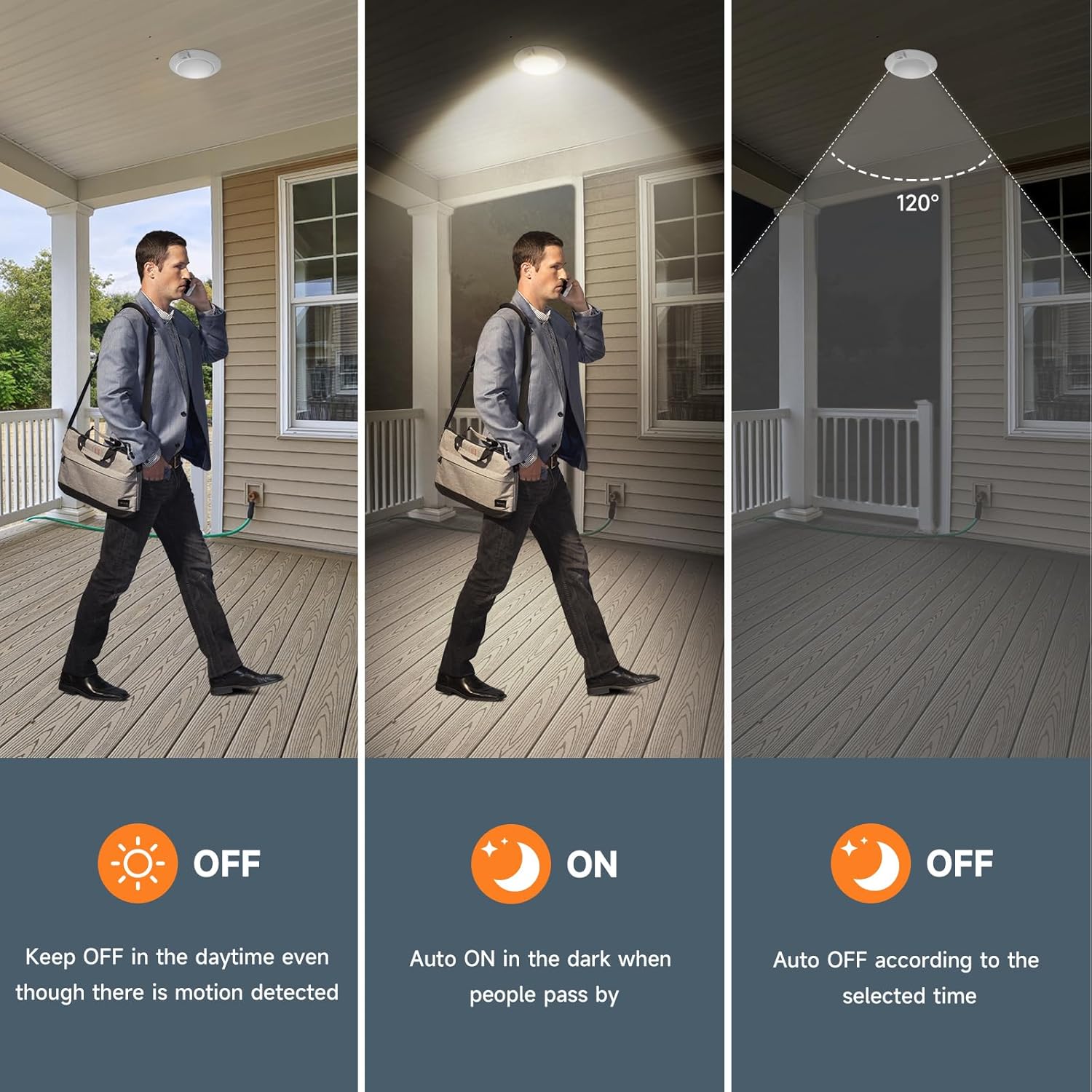
Image: A person walking under the light, illustrating the countdown timer for 30 seconds, 1 minute, and 5 minutes.
Installation Instructions
Before installation, ensure the power supply is turned off at the circuit breaker. This fixture can be installed in a junction box or a recessed can.

Image: Installation diagrams for Junction Box and Recessed Can.
Junction Box Installation (3.5 or 4-inch J-Box)
- Turn off power at the circuit breaker.
- Remove the existing fixture from the junction box.
- Connect the fixture's wires to the junction box wires using the provided wire nuts: black to black (live), white to white (neutral), and green/bare copper to green/bare copper (ground).
- Secure the fixture to the junction box using the provided screws.
- Ensure the fixture is flush with the ceiling.
- Restore power and test the light.
Recessed Can Installation (5 or 6-inch Can)
- Turn off power at the circuit breaker.
- If applicable, remove the existing bulb and trim from the recessed can.
- Screw the E26 adapter into the recessed can's socket.
- Connect the fixture's wires to the E26 adapter's wires using the provided wire nuts.
- Attach the spring tabs (if not pre-attached) to the fixture.
- Gently push the fixture into the recessed can until the spring tabs secure it in place.
- Restore power and test the light.
Operating Instructions
Adjusting Color Temperature (CCT)
To change the color temperature:
- Ensure the power is off.
- Carefully open or remove the lampshade.
- Locate the CCT selection switch on the fixture's circuit board.
- Slide the switch to your desired setting: 3000K, 4000K, or 5000K.
- Reattach the lampshade securely.
- Restore power.
Setting Time Delay
To adjust the time the light stays on after motion ceases:
- Ensure the power is off.
- Carefully open or remove the lampshade.
- Locate the time delay switch on the fixture's circuit board.
- Slide the switch to your desired setting: 30 seconds, 1 minute, or 5 minutes.
- Reattach the lampshade securely.
- Restore power.
Motion Sensor Operation
The motion sensor operates based on ambient light levels and detected movement:
- Daytime: The light will remain OFF even if motion is detected, conserving energy.
- Nighttime/Dark Environments: The light will automatically turn ON when motion is sensed within its detection range (9-16 feet).
- Automatic Shut-off: After motion stops, the light will turn OFF after the pre-set time delay (30s, 1min, or 5min).

Image: Visual guide to motion sensor behavior during day and night.
Maintenance
To ensure optimal performance and longevity of your ECOELER LED Motion Sensor Ceiling Light, follow these simple maintenance guidelines:
- Cleaning: Disconnect power before cleaning. Use a soft, dry, or slightly damp cloth to wipe the exterior of the fixture. Do not use abrasive cleaners or solvents, as they may damage the finish or electronic components.
- Inspection: Periodically check for any loose connections or signs of damage. If any issues are found, consult a qualified electrician.
- Bulb Replacement: This LED fixture does not have user-replaceable bulbs. The LED components are designed for long-term use.
Troubleshooting
If you encounter issues with your light, refer to the table below for common problems and solutions:
| Problem | Possible Cause | Solution |
|---|---|---|
| Light does not turn on. | No power; Sensor not detecting motion; Ambient light too bright; Incorrect wiring. | Check circuit breaker; Ensure motion is within range; Verify ambient light is dark enough; Check wiring connections. |
| Light stays on continuously. | Constant motion detected; Time delay set too long; Sensor malfunction. | Ensure no continuous motion; Adjust time delay setting; Contact support if issue persists. |
| Light flickers or dims. | Loose wiring; Voltage fluctuations; Fixture damage. | Check all wiring connections; Consult an electrician for voltage issues; Contact support if damaged. |
| Motion sensor is not responsive. | Sensor obstructed; Incorrect sensitivity; Ambient light too bright. | Clear any obstructions; Ensure ambient light is low; Sensor sensitivity is fixed for this model. |
Specifications
| Brand | ECOELER |
| Model Number | CDR615C |
| Wattage | 16 Watts |
| Brightness | 1000 Lumens |
| Color Temperature | 3000K Warm White, 4000K Cool White, 5000K Daylight (Selectable) |
| Voltage | 120 Volts |
| Control Method | Motion Sensor |
| Motion Sensor Range | 9-16 feet |
| Time Delay Settings | 30 seconds, 1 minute, 5 minutes (Adjustable) |
| Material | Acrylic, Aluminum |
| Dimensions (L x W x H) | 7.48" x 1.45" x 7.48" |
| Installation Type | Flush Mount (Junction Box or Recessed Can) |
| Certifications | ETL, FCC Listed |
| Indoor/Outdoor Usage | Indoor |
Warranty and Support
Warranty Information: All ECOELER products come with a 1-year warranty from the date of purchase. For any non-man-made damage under normal use, please contact our support team for a replacement solution.
Customer Support: If you have any questions, require assistance with installation, or need to claim your warranty, please visit the official ECOELER store or contact our customer service team. You can find more information and contact details on the ECOELER Brand Store.
