
EAZYRC 12101
EAZYRC 1/18 Colorado RC Monster Truck User Manual
Model: 12101 | Brand: EAZYRC
Introduction
Thank you for choosing the EAZYRC 1/18 Colorado RC Monster Truck. This high-performance 4x4 brushless remote control truck is designed for thrilling off-road experiences, reaching speeds of 45+ KPH. This manual provides essential information for the safe operation, maintenance, and optimal performance of your new RC vehicle. Please read it thoroughly before first use.
Safety Information
- Always operate the RC truck in open areas, away from people, pets, and obstacles.
- Do not operate near public roads, water, or in adverse weather conditions.
- Keep fingers, hair, and loose clothing away from moving parts.
- Ensure the battery is fully charged before each use and disconnect it when not in use.
- Adult supervision is recommended for users under 14 years of age.
- Do not attempt to modify the vehicle or its components, as this may void the warranty and cause damage.
Package Contents
Verify that all items listed below are included in your package:
- EAZYRC 1/18 Colorado RC Monster Truck (Red)
- 2.4 GHz Remote Control Transmitter
- 7.4V 1050mAh Li-Po Battery
- USB Charger Cable
- Wheelie Bar
- Screwdriver
- Hex Wrench
- Spare Body Pins
- Instruction Manual (this document)

Image: The EAZYRC 1/18 Colorado RC Monster Truck shown with its remote control, battery, charger, tools, and wheelie bar.
Product Overview
Familiarize yourself with the main components of your RC truck and remote control.
Vehicle Components

Image: Exploded view diagram highlighting key internal components such as the front crash kit with LED, upper and lower swing arm suspension, full metal oil-hydraulic shock absorbers, CVD tyre rotation assembly, 7.4V 1050mAh battery, honeycomb flat bottom nylon chassis, 45A ESC, 17g metal steering servo, cooling fan, and 2845 Brushless motor.
- Front Crash Kit (with LED): Provides protection and illumination.
- Upper and Lower Swing Arm Suspension: For flexible and durable handling.
- Full Metal Oil-Hydraulic Shock Absorbers: Ensures smooth rides over rough terrain.
- CVD Tyre Rotation Assembly: Durable drive system for efficient power transfer.
- 7.4V 1050mAh Battery: Powers the vehicle.
- Honeycomb Flat Bottom Nylon Chassis: Lightweight and robust base.
- 45A ESC (Electronic Speed Controller): Manages motor speed and direction.
- 17g Metal Steering Servo: Provides precise steering control.
- Cooling Fan: Helps dissipate heat from electronic components.
- 2845 Brushless Motor: High-performance motor for speed and power.

Image: A detailed view of the internal electronics and suspension system of the EAZYRC Colorado RC truck.
Remote Control Transmitter
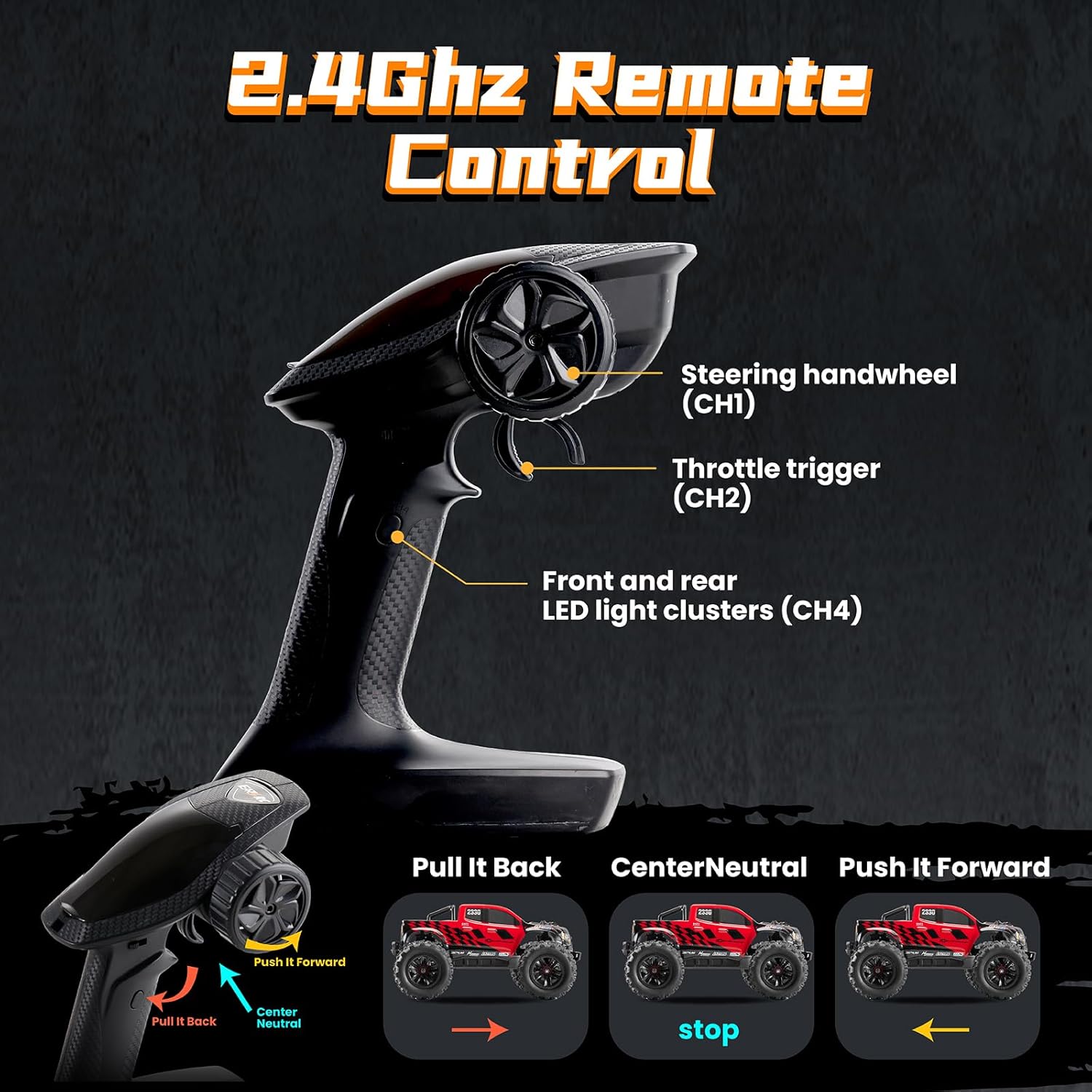
Image: Diagram illustrating the functions of the 2.4GHz remote control, including the steering handwheel (CH1), throttle trigger (CH2), and front and rear LED light clusters (CH4) control.
- Steering Handwheel (CH1): Controls left and right steering.
- Throttle Trigger (CH2): Pull to accelerate forward, push to brake/reverse.
- Front and Rear LED Light Clusters (CH4): Controls the vehicle's lights.
Setup
1. Charging the Li-Po Battery
Connect the provided USB charger cable to a USB power source (e.g., computer USB port, USB wall adapter). Connect the battery to the charger. The indicator light on the charger will show charging status (typically red for charging, green for fully charged). A full charge takes approximately 2-3 hours. Do not overcharge the battery.
2. Installing the Vehicle Battery
- Remove the body pins and lift the truck body.
- Locate the battery compartment.
- Insert the fully charged 7.4V 1050mAh Li-Po battery into the compartment.
- Connect the battery connector to the vehicle's power connector. Ensure the connection is secure.
- Carefully tuck the wires to avoid pinching and replace the truck body, securing it with the body pins.
3. Installing Remote Control Batteries
The remote control requires 4 AA batteries (not included). Open the battery compartment on the back of the remote control and insert the batteries, observing the correct polarity (+/-). Close the compartment cover securely.
4. Attaching the Wheelie Bar
The wheelie bar helps prevent the truck from flipping backward during rapid acceleration. To install:
- Locate the two screw holes on the rear bumper of the truck.
- Align the wheelie bar's mounting points with these holes. Note that the mounting piece on the wheelie bar can pivot to align with the bumper's angle. Adjust as necessary.
- Use the provided screws and screwdriver to secure the wheelie bar firmly to the bumper.

Image: The EAZYRC Colorado truck demonstrating its front LED lights, with a separate image of the wheelie bar component.
Operating Instructions
1. Pairing the Remote Control
- Turn on the remote control transmitter. The indicator light will blink.
- Turn on the RC truck by pressing the power button on the ESC.
- The remote control and truck should automatically pair. The indicator light on the remote will become solid when paired.
2. Basic Driving Controls
- Forward: Pull the throttle trigger towards you.
- Brake/Reverse: Push the throttle trigger away from you.
- Steering: Rotate the steering handwheel left or right.
3. Advanced Maneuvers and Terrain
The EAZYRC Colorado is built for various terrains and stunts:

Image: A collage showcasing the EAZYRC Colorado performing various stunts such as violent drifting, backflips, jumping, head lifts, hill climbs, and handstands.
- Violent Drifting: Achieved by combining steering and throttle control on loose surfaces.
- Backflip & Jumping: Utilize ramps or natural inclines with full throttle. The wheelie bar can assist with controlled backflips.
- Head Lifts & Handstands: Requires precise throttle control and weight transfer.
- Hill Climb: The 4x4 drivetrain and powerful brushless motor allow for effective climbing on inclines.

Image: Three EAZYRC Colorado RC trucks (red, white, blue) displayed on a sandy, outdoor terrain, highlighting their ready-to-run (RTR) nature, 2.4GHz remote control, metal shock absorbers, soft plastic body, and stiff chassis.
4. Tips for Optimal Performance
- Always ensure the battery is fully charged for maximum run time and power.
- Practice in open spaces to get accustomed to the truck's speed and handling.
- Adjust steering trim on the remote control if the truck does not drive straight.
- Avoid prolonged operation in wet conditions to protect electronics.
Maintenance
1. Cleaning the Vehicle
After each use, especially in dirty or dusty conditions, clean the truck to maintain performance and longevity. Use a soft brush or compressed air to remove dirt and debris from the chassis, suspension, and motor area. Wipe the body with a damp cloth.
2. Battery Care and Storage
- Store Li-Po batteries in a cool, dry place, away from direct sunlight and extreme temperatures.
- Do not store fully charged or completely depleted batteries for extended periods. Charge to storage voltage (around 3.8V per cell) if storing for more than a few days.
- Inspect batteries for any swelling or damage before and after each use. Discontinue use immediately if damaged.
3. Checking for Wear and Tear
Regularly inspect the following components for signs of wear or damage:
- Tires: Check for punctures, tears, or excessive wear on the treads.
- Suspension: Ensure shock absorbers are functioning correctly and no links are bent or broken.
- Gears & Drivetrain: Listen for unusual noises during operation, which may indicate worn gears.
- Wiring & Connectors: Verify all wires are securely connected and free from fraying or damage.
Troubleshooting
| Problem | Possible Cause | Solution |
|---|---|---|
| Truck does not respond to remote. | Battery low in truck or remote; Not paired; Power switch off. | Charge truck battery; Replace remote batteries; Ensure both are powered on and paired. |
| Short run time. | Battery not fully charged; Old/damaged battery. | Ensure full charge; Consider replacing battery if performance degrades. |
| Truck pulls to one side. | Steering trim needs adjustment; Damaged steering components. | Adjust steering trim on remote; Inspect steering servo and linkages. |
| Motor stops or overheats. | Overuse; Obstruction; ESC overheating. | Allow truck to cool down; Check for debris in drivetrain; Ensure proper ventilation. |
Specifications
- Product Dimensions: 12 x 8.7 x 5.5 inches
- Item Weight: 4.84 pounds
- Model Number: 12101
- Manufacturer: EAZYRC
- Top Speed: 45+ KPH
- Drive System: 4x4
- Motor Type: Brushless
- Battery: 7.4V 1050mAh Li-Po
- Remote Control Frequency: 2.4 GHz

Image: Front and side view of the EAZYRC Colorado RC truck with dimensions: 222mm width, 140mm height, and 310mm length.
Warranty and Support
For warranty information, technical support, or replacement parts, please contact EAZYRC customer service through their official website or the retailer where the product was purchased. Keep your proof of purchase for warranty claims.
Visit the official EAZYRC Store for more information: EAZYRC Store
Related Documents - 12101
 |
EAZYRC 1:18 Chevrolet Colorado Instruction Manual This manual provides instructions for assembling, operating, and maintaining the EAZYRC 1:18 Chevrolet Colorado remote control monster truck. It includes details on charging, transmitter and receiver setup, controls, specifications, features, and safety precautions. |
 |
EAZYRC 1:18 Chevrolet Colorado RC Monster Truck Instruction Manual Comprehensive instruction manual for the EAZYRC 1:18 Chevrolet Colorado RC monster truck, covering assembly, operation, charging, specifications, and safety precautions. |
 |
EAZYRC 1:18 Chevrolet Colorado Instruction Manual Comprehensive instruction manual for the EAZYRC 1:18 scale Chevrolet Colorado RC monster truck, detailing assembly, operation, charging, specifications, and spare parts. |
 |
EAZYRC Patriot 1/18th Scale RC Truck Instruction Manual Comprehensive instruction manual for the EAZYRC Patriot 1/18th scale RC truck, covering setup, operation, battery care, safety warnings, spare parts, and distributor information. |
 |
EAZYRC 1:18 Glacier RC Car: Instruction Manual User manual for the EAZYRC 1:18 Glacier RC remote control car, covering setup, operation, safety, battery care, and spare parts. Features vintage American pickup truck design. |
 |
EazyRC 1:18 Glacier Instruction Manual This document provides instructions for the EazyRC 1:18 Glacier RC car, covering battery installation, operating procedures, warnings, gear mesh settings, battery charging, and a spare parts list. |