
1. Introduction
This manual provides comprehensive instructions for the safe and effective use of your RayHong RS500SR Portable Digital Video Magnifier. Designed to assist individuals with visual impairments such as macular degeneration, low vision, color blindness, and amblyopia, this device offers adjustable magnification and various display modes to enhance reading and viewing experiences.
2. Product Overview
The RayHong RS500SR is a 5.0-inch portable digital video magnifier featuring a high-resolution LCD screen and intuitive controls. It includes a foldable handle and bracket for versatile use.
2.1 Device Components and Controls
Familiarize yourself with the buttons and ports on your device:
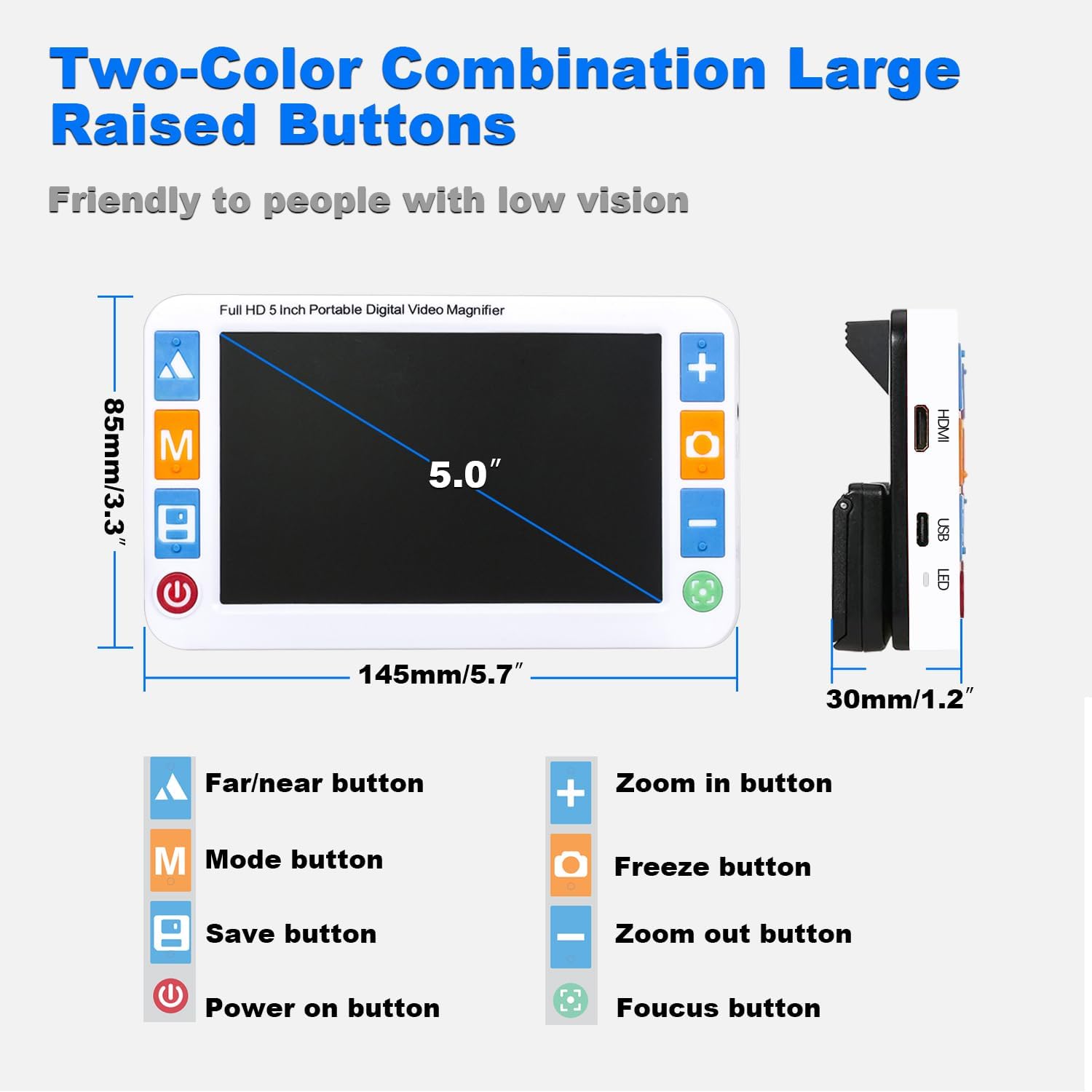
Image: The RayHong RS500SR device showing its 5.0-inch screen, dimensions (145mm/5.7" length, 85mm/3.3" width, 30mm/1.2" thickness), and labeled buttons. Buttons include Far/Near, Mode, Save, Power On, Zoom In, Freeze, Zoom Out, and Focus. Side ports for HDMI, USB, and LED are also visible.
- Far/Near Button: Switches between far-view and near-view cameras.
- Mode Button: Cycles through various color display modes.
- Save Button: Captures and saves the current image.
- Power On/Off Button: Turns the device on or off.
- Zoom In Button (+): Increases magnification.
- Freeze Button: Freezes the current image on the screen.
- Zoom Out Button (-): Decreases magnification.
- Focus Button: Adjusts the focus.
- HDMI Port: For connecting to an external display via HDMI cable.
- USB Port: For charging and data transfer.
3. Setup
3.1 Charging the Device
Before first use, fully charge the device using the provided USB cable and a compatible power adapter. The device is equipped with a 2500mAh Lithium Polymer battery.
3.2 Powering On/Off
- To power on, press and hold the Power On/Off button until the screen illuminates.
- To power off, press and hold the Power On/Off button until the screen turns off.
3.3 Adjusting the Foldable Handle and Bracket
The device features an integrated foldable handle and bracket for comfortable viewing angles.

Image: A person is shown holding the RayHong RS500SR digital magnifier, which has its foldable handle extended. The device is positioned over a newspaper, demonstrating its use for reading. The image also illustrates the 180-degree rotatable handle and the 45-degree bracket angle for comfortable reading posture.
- Handle: The handle can be rotated 180 degrees and installed for either left-handed or right-handed use. Extend it for handheld operation.
- Bracket: The integrated bracket allows the device to be placed at a 45-degree angle on a surface, providing a stable and comfortable viewing position without needing to hunch over.
4. Operating Instructions
4.1 Magnification Adjustment
The device offers 2X to 32X magnification.
- Press the Zoom In (+) button to increase the magnification level.
- Press the Zoom Out (-) button to decrease the magnification level.
4.2 Switching Color Modes
The device supports 26 different color modes to optimize contrast and readability for various visual conditions.
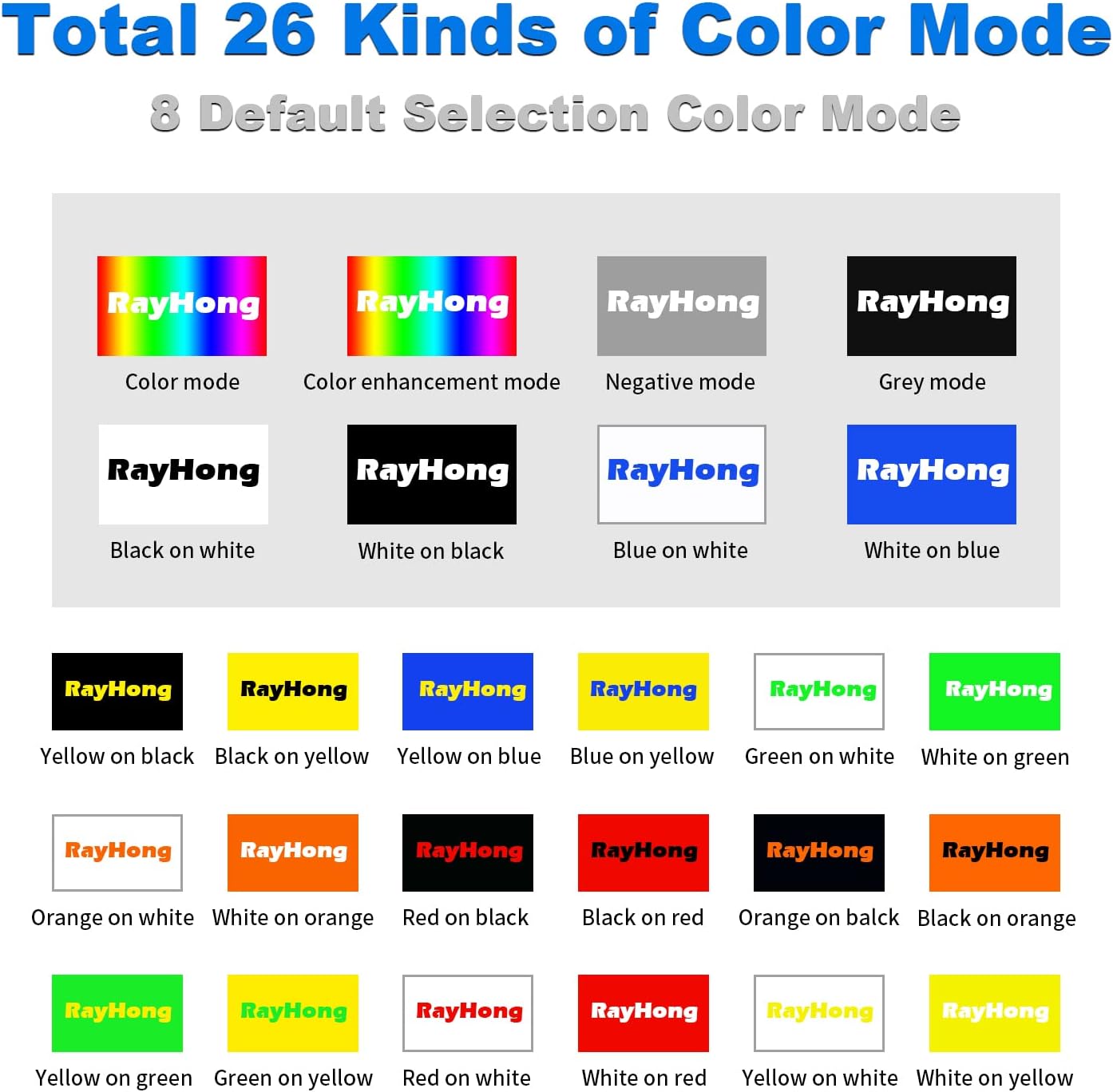
Image: A visual chart illustrating 26 distinct color modes available on the RayHong RS500SR digital magnifier. These include default selections like Color mode, Color enhancement mode, Negative mode, Grey mode, Black on white, White on black, Blue on white, White on blue, and various combinations such as Yellow on black, Red on white, etc.
Press the Mode (M) button repeatedly to cycle through the available color modes. The device will remember your last selected mode upon shutdown.
4.3 Far/Near Camera Switching
The device can switch between a near-view camera for reading close objects and a far-view camera for distant objects.

Image: The RayHong RS500SR digital magnifier displaying two scenarios: the top image shows the device magnifying strawberries (near view), and the bottom image shows it magnifying a distant exit sign in a subway station (far view). An arrow indicates the ability to switch between these views.
Press the Far/Near button (triangle icon) to toggle between the near and far camera views.
4.4 Image Freeze Function
To temporarily freeze the image on the screen for closer inspection:
- Position the magnifier over the desired text or object.
- Press the Freeze button (camera icon). The image will be frozen.
- Press the Freeze button again to unfreeze and resume live viewing.
4.5 Connecting to a Television
For a larger display, the device can be connected to a television using an AV or HDMI cable.
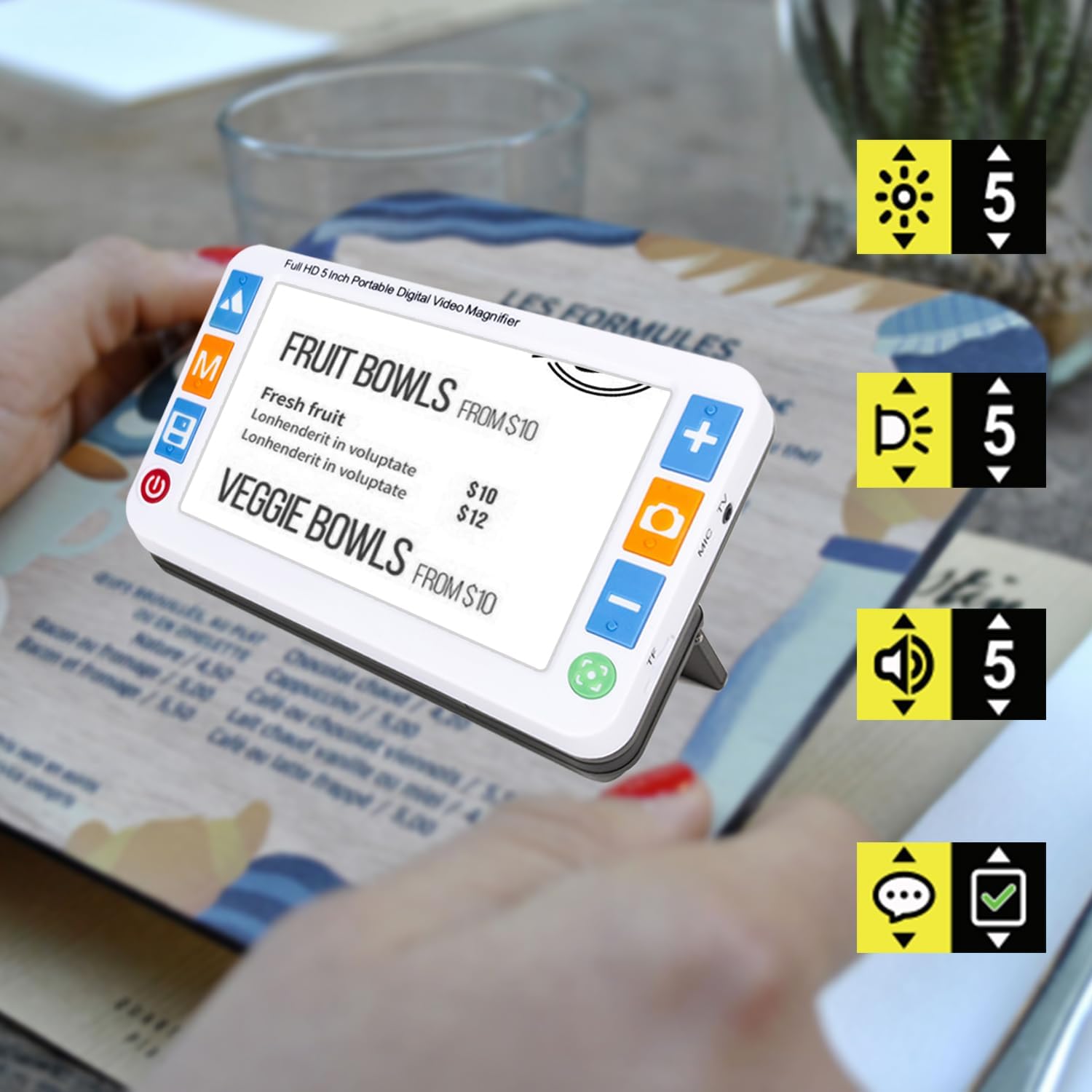
Image: A diagram illustrating two methods of connecting the RayHong RS500SR digital magnifier to a television. One method uses an AV cable (yellow, white, red connectors), and the other uses an HDMI cable. The image also shows the magnifier displaying magnified text on a large TV screen.
- AV Connection: Connect the magnifier to your TV using an AV video cable for a larger display.
- HDMI Connection: Connect the magnifier to your TV using an HDMI cable for a clearer and more fluid display compared to AV video cable.
- When the magnifier enters video output mode, the device's LCD screen will automatically turn off.
5. Maintenance
5.1 Cleaning
- Use a soft, lint-free cloth to clean the screen and body of the device.
- Do not use liquid cleaners, aerosols, or abrasive solvents.
5.2 Storage
- Store the device in a cool, dry place away from direct sunlight and extreme temperatures.
- Keep the device away from dust and moisture.
6. Troubleshooting
If you encounter issues with your RayHong RS500SR, please refer to the following common problems and solutions:
| Problem | Possible Cause | Solution |
|---|---|---|
| Device does not power on. | Low battery or power button not pressed correctly. | Charge the device fully. Ensure the power button is pressed and held until the screen lights up. |
| Image is blurry. | Incorrect focus or distance from object. | Adjust the distance between the device and the object. Use the Focus button to fine-tune the image clarity. |
| No image on TV when connected. | Incorrect cable connection or TV input. | Ensure AV or HDMI cable is securely connected to both the magnifier and the TV. Select the correct input source on your TV. |
| Screen is too dark/bright. | Brightness settings need adjustment. | Refer to the device's on-screen menu or dedicated buttons (if available) to adjust screen brightness. |
7. Specifications
Key technical specifications for the RayHong RS500SR Portable Digital Video Magnifier:
- Brand: RayHong
- Model Number: RS500SR
- Screen Size: 5.0 inches
- Display Resolution: 800*480 HD LCD
- Magnification Strength: 2X-32X
- Color Modes: 26
- Battery: 2500mAh Lithium Polymer (rechargeable)
- Product Dimensions: 5.71"L x 3.35"W (approx. 145mm x 85mm)
- Item Weight: 9.5 ounces (approx. 270 grams)
- Lens Material: Glass
- Connectivity: USB, HDMI, AV
8. Warranty and Support
For information regarding warranty coverage or technical support, please contact RayHong customer service directly. Details may be available on the manufacturer's official website or through your point of purchase.