
1. Introduction
The Chshn Electric Smart Curtains System is designed to automate your window treatments, offering convenience and enhanced control over your home environment. This system features a motorized curtain rod compatible with various smart home platforms, allowing for voice, remote, and app-based operation. Its robust design ensures smooth and quiet performance, while smart functionalities provide adaptable and energy-efficient solutions for modern living spaces.
2. Product Components
The Chshn Electric Smart Curtains System includes the following key components:
- Motorized Curtain Rod: Constructed from thickened aluminum alloy, designed for durability and smooth operation.
- Drive Belt: Features an 8-steel wire, 12mm wide belt for reliable movement.
- Load-Bearing Runners: High-quality runners and stainless steel accessories ensure efficient curtain travel.
- DC Motor: Engineered for gentle starting and stopping, ensuring quiet performance.
- Remote Control: For direct control of the curtain system.
- Installation Accessories: Includes all necessary hardware for assembly and mounting.

Figure 2.1: Overview of the Chshn Electric Smart Curtains System, showing the motorized rod, remote control, and compatibility with smart home devices and mobile applications.

Figure 2.2: Detailed view of key components, including the stainless steel drive shaft, the durable 8-steel wire belt, the 2.1mm thick aluminum track, and the concealed motor design for an elegant appearance.
3. Specifications
| Feature | Specification |
|---|---|
| Product Dimensions | 86 x 180 x 180 inches (for 86-inch model) |
| Item Weight | 6.98 pounds |
| Manufacturer | Chshn |
| Item Model Number | 86 inches |
| Batteries Required | No |
| Color | Chrome |
| Material | Metal and Fabric |
| Mounting Type | Ceiling Mounted (Wall mounting options available upon request) |
| UPC | 791126778705 |
| Voltage | 100-240V AC |
| Motor Size | 289x51x60mm |
| Speed | 18cm/s |
| Decibel | 30db |
| Protection Class | IP41 |
| Insulation Class | E |
| Radio Frequency | 433.92MHz |
| Maximum Load (Single) | 132lbs |
| Maximum Load (Double) | 264lbs |

Figure 3.1: Detailed technical specifications of the curtain system's motor.
4. Installation
The Chshn Electric Smart Curtains System is designed for DIY installation. Please follow these steps carefully. An installation video is available for visual guidance.
4.1. Track Assembly
Join the aluminum profiles to form the desired track length. Ensure all connections are tight and without gaps. Use the provided allen wrench to secure the screws on both sides of the joints.
Video 4.1: Detailed installation guide for the Chshn motorized curtain rod, demonstrating the assembly process for center opening configurations.
4.2. Belt Measurement and Insertion
Measure the correct length of the belt using the black measurement tool provided. Straighten the belt along the track and cut it where indicated. Attach the belt buckles to the ends of the belt and secure them to the carriers. Insert the belts with carriers into the track, sliding them until the carriers reach the end of the track. Ensure both belts are of the same length.
4.3. Carrier Assembly and Runner Insertion
Assemble the two carriers together using the allen wrench. Move the carriers back and forth to ensure smooth operation, especially at the track joints. Insert the appropriate number of runners into the track (approximately 8 runners per 1 meter of track length). Ensure the runners are evenly distributed on each side.
4.4. Gear Box Fastening and Tension Test
Use the loop stop to fasten the gear box. Pull the gear box slightly to test the belt tension, ensuring the belt is not loose. After confirming the tightness, securely fasten the gear box.
4.5. Mounting Options
The system supports both ceiling mounting and wall mounting. For ceiling mounting, ensure adequate space is reserved for the curtain box (more than 10cm for single, more than 20cm for double). If wall brackets are needed, please contact customer service for support.

Figure 4.1: Illustration of ceiling and wall mounting options, including recommended space for curtain boxes and various curtain opening styles.

Figure 4.2: Example of a dual track Chshn smart curtain system installed with a ceiling mount.
5. Operating Instructions
The Chshn Smart Curtains System offers multiple convenient control methods:
5.1. Voice Control
The system is compatible with popular voice assistants such as Amazon Alexa, Google Assistant, and Apple Siri. Once integrated, you can control your curtains with simple voice commands (e.g., "Alexa, open curtains"). No additional hub is required, only a 2.4Ghz internet connection.
5.2. Remote Control
Use the provided remote control for direct and immediate operation of your curtains. One remote can control multiple smart curtains.
5.3. Mobile App Control (Tuya App)
Download and install the Tuya App on your smartphone or tablet. The app allows for comprehensive control, including opening/closing curtains, setting specific positions, and configuring advanced features like timing settings and automations based on weather conditions. You can also share device control with family members through the app.

Figure 5.1: Smart Curtain control options including TuyaSmart App, Amazon Alexa, and Google Assistant.

Figure 5.2: Remote control via TuyaSmart App, enabling control from anywhere.

Figure 5.3: Hands-free voice command functionality with Amazon Alexa and Google Assistant.

Figure 5.4: Smart Timer Setting feature for automated curtain operation.
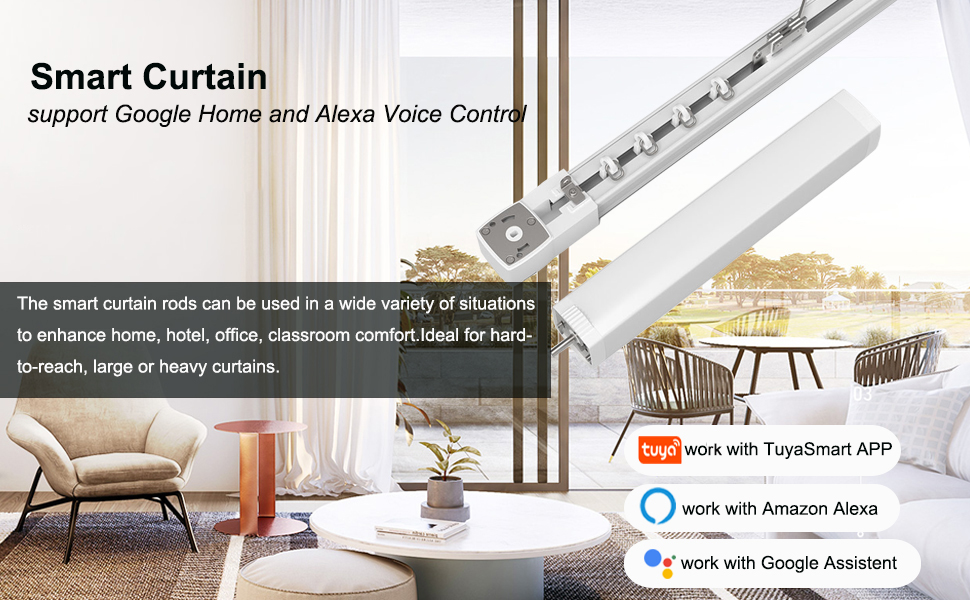
Figure 5.5: Curtain Position Setting via mobile app, allowing precise control over opening and closing.
5.4. Smart Functions
- Manual Pull Auto-Run: When powered on, pull the curtains by hand for 10cm, and they will automatically continue to open or close.
- Manual Operation (Power Off): The curtains can be operated manually even when power is off.
- Obstacle Stop: The motor will automatically stop if it encounters an obstacle, preventing damage.
- Automatic Travel Limit Configuration: The system automatically configures and remembers the travel limits for smooth operation.
6. Maintenance
To ensure the longevity and optimal performance of your Chshn Electric Smart Curtains System, follow these maintenance guidelines:
- Regular Cleaning: Periodically wipe the curtain rod and motor housing with a soft, dry cloth to remove dust and debris. Avoid using abrasive cleaners or solvents.
- Track Inspection: Inspect the curtain track regularly for any obstructions or signs of wear. Ensure the runners move freely.
- Belt Check: Occasionally check the drive belt for any signs of fraying or damage. Ensure it remains properly tensioned.
- Lubrication: The system is designed for low maintenance. Avoid applying lubricants unless specifically instructed by customer support, as this may attract dust and hinder performance.
- Power Supply: Ensure the power supply is stable and free from fluctuations.
7. Troubleshooting
If you encounter any issues with your Chshn Electric Smart Curtains System, refer to the following common troubleshooting steps:
| Problem | Possible Cause | Solution |
|---|---|---|
| Curtains not moving | No power; motor disconnected; obstacle in track; remote/app issue. | Check power connection. Ensure motor is securely connected. Remove any obstructions from the track. Verify remote batteries or app connectivity. |
| Curtains stop unexpectedly | Obstacle detected; power interruption; travel limits not set correctly. | Check for and remove obstacles. Verify stable power supply. Re-calibrate travel limits if necessary (refer to app instructions). |
| No response from voice commands | No internet connection; incorrect voice assistant setup; microphone issue. | Ensure 2.4Ghz Wi-Fi is active and stable. Check voice assistant app settings and device linking. Confirm voice assistant device microphone is working. |
| No response from remote control | Remote batteries low/dead; remote not paired. | Replace remote control batteries. Refer to pairing instructions in the full manual if the remote is new or has lost connection. |
| App connectivity issues | Wi-Fi signal weak/disconnected; incorrect app settings; outdated app version. | Ensure strong 2.4Ghz Wi-Fi signal. Restart router and smart curtain system. Update Tuya App to the latest version. Re-add device in app if necessary. |
If the problem persists after attempting these solutions, please contact Chshn customer service for further assistance.
8. Warranty and Support
Chshn is committed to providing high-quality products and excellent customer service. The Electric Smart Curtains System comes with a 3-year warranty and lifelong maintenance support.
For any problems related to functions, installation, or general inquiries, please do not hesitate to contact our VIP Customer Service. We aim to respond within 24 hours and can offer parts, replacement, or a refund as appropriate.
Contact Information: Please refer to the contact details provided on your product packaging or the official Chshn website for the most up-to-date support channels.