1. Product Overview
The FIFISH V-EVO Underwater Drone by QYSEA is an advanced remotely operated vehicle (ROV) designed for underwater exploration, content creation, inspection, and aquaculture applications. It features a 4K 60FPS camera system, 360° omnidirectional mobility, and QYSEA's Posture Lock technology for precise control.
This package includes the QYSEA Robotic Arm with Parallel Gripper, enhancing the drone's capabilities for object manipulation and sample collection underwater. The V-EVO is capable of operating at depths up to 328 feet (100 meters) and reaching speeds of up to three knots (5 feet per second).

Image 1.1: The FIFISH V-EVO Underwater Drone equipped with the Robotic Arm and Parallel Gripper.

Image 1.2: Front view of the FIFISH V-EVO, showcasing its camera and LED lights.
2. What's in the Box
Verify that all components are present in your package:
- 1x FIFISH V-EVO Underwater Drone with 1x 97.2Wh Battery
- 2x 2500 Lumen LED Lights (integrated)
- 1x 64GB Storage MicroSD Card (integrated)
- 1x Q-Interface
- 1x Remote Controller
- 1x V-EVO AC Adapter
- 1x Remote Control AC Adapter
- 1x 100m Tether with Manual Spool
- 1x FIFISH V-EVO Robotic Arm
- 1x FIFISH V-EVO Parallel Gripper
- 1x Data Download Cable
- 1x Limited 1-Year Manufacturer Warranty Information
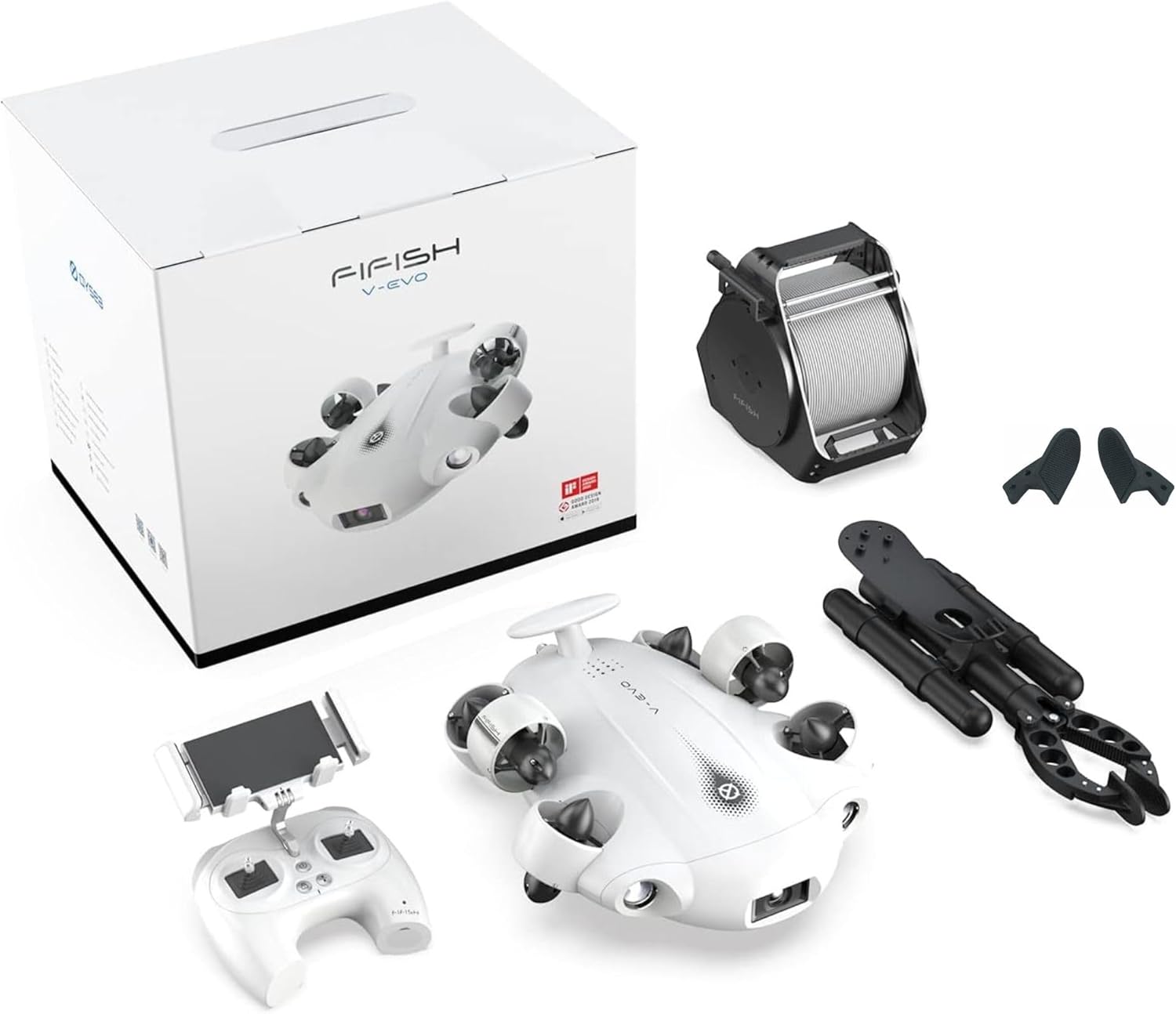
Image 2.1: All components included in the FIFISH V-EVO Underwater Drone ARM Package.
3. Setup Guide
3.1 Initial Charging
Before first use, ensure both the FIFISH V-EVO drone and the remote controller are fully charged using their respective AC adapters. The drone's battery is 97.2Wh Lithium Polymer. Charging indicators will typically show solid green when fully charged.
3.2 Attaching the Robotic Arm and Parallel Gripper
The Robotic Arm and Parallel Gripper are designed for easy attachment to the FIFISH V-EVO. Locate the attachment port on the underside of the drone. Align the Robotic Arm with the port and secure it according to the provided diagrams in the quick start guide (not included in this manual). Ensure the connection is firm and watertight.

Image 3.1: The FIFISH V-EVO Robotic Arm, ready for attachment.

Image 3.2: Close-up of the Parallel Gripper pads, designed for secure object handling.
3.3 Connecting Tether and Remote Controller
- Unwind the 100m tether from the manual spool.
- Connect one end of the tether to the FIFISH V-EVO drone and the other end to the remote controller. Ensure connections are secure and sealed to prevent water ingress.
- Mount your smartphone onto the dual-joystick remote controller. The smartphone acts as the display for live video feed and control interface.
- Power on the drone and the remote controller. Follow the on-screen instructions on your smartphone to establish a connection via Wi-Fi.
4. Operating Instructions
4.1 Drone Control and Mobility
The FIFISH V-EVO offers 360° omnidirectional mobility with six degrees of freedom (6-DOF), allowing for versatile movement including climbing, diving, and rolling. Use the dual joysticks on the remote controller for intuitive navigation.
- Posture Lock: This feature allows the drone to maintain precise angles within 0.1° while in motion, providing stable footage and control.
- AI Vision Lock: The AI Vision Lock feature enables the drone to identify and track subjects, keeping them securely in focus by adaptively and automatically adjusting its position.
4.2 Camera Operation
The V-EVO is equipped with a high-performance camera system:
- Resolution: Captures 4K video at 60 frames per second and 12 MP still images.
- Sensor: Features a 1" CMOS sensor for enhanced image quality in various lighting conditions.
- Lighting: Two powerful 2500-lumen LED lights illuminate underwater environments, ensuring clear visibility.
- Image Stabilization: Electronic image stabilization helps maintain smooth and steady footage.
4.3 Robotic Arm Usage
The Robotic Arm with Parallel Gripper allows for interaction with the underwater environment. The gripper can open up to 4.7 inches wide and is capable of holding items weighing up to 15.4 pounds. Use the dedicated controls on the remote controller to operate the arm for grabbing objects or collecting samples.
4.4 Operational Videos
Video 4.1: General operation and features of the FIFISH V-EVO Underwater Drone. (Duration: 5:00)
Video 4.2: Demonstration of specific functionalities or advanced controls. (Duration: 2:30)
Video 4.3: Detailed tutorial on operating the drone and its accessories. (Duration: 6:38)
5. Maintenance
5.1 Post-Dive Cleaning
After each use in water, especially saltwater, rinse the entire drone, tether, and robotic arm thoroughly with fresh water. This helps prevent corrosion and buildup of salt or debris. Pay close attention to propellers, seals, and connection points.
5.2 Battery Care
The FIFISH V-EVO uses Lithium Polymer batteries. To prolong battery life:
- Avoid fully discharging the battery.
- Store the drone with the battery charged to approximately 50-60% if not used for extended periods.
- Charge in a cool, dry environment.
- Do not expose to extreme temperatures.
5.3 General Inspection and Storage
Regularly inspect the drone for any signs of wear, damage, or loose components. Check propellers for entanglement or damage. Store the drone and its accessories in a dry, cool place, away from direct sunlight and extreme temperatures. Ensure all ports are clean and dry before storage.
6. Troubleshooting
6.1 No Power
- Ensure the drone and remote controller are fully charged.
- Verify all power buttons are pressed correctly.
6.2 Loss of Connection
- Check the tether connections at both the drone and the remote controller for security.
- Ensure your smartphone's Wi-Fi is enabled and connected to the drone's network.
- Restart both the drone and the remote controller.
6.3 Drone Not Responding to Controls
- Confirm the remote controller battery is charged.
- Recalibrate the joysticks if necessary (refer to the in-app settings).
- Check for any physical obstructions to the propellers.
6.4 Image or Video Quality Issues
- Clean the camera lens and LED lights.
- Ensure sufficient lighting in the underwater environment.
- Check camera settings in the control app (resolution, frame rate).
7. Specifications
| Feature | Detail |
|---|---|
| Brand | FIFISH |
| Model Name | FIFISH V-EVO |
| Special Feature | Robotic Arm, Parallel Gripper |
| Age Range (Description) | Adult |
| Color | White |
| Video Capture Resolution | 4K |
| Effective Still Resolution | 12 MP |
| Connectivity Technology | Wi-Fi |
| Included Components | ROV, 97.2Wh battery, 2x 2500 lumen LED, 64GB storage, Q-Interface, Remote Controller, 2x Adaptors, 100m Tether with manual spool, Robotic Arm, Parallel Gripper, Data download cable |
| Skill Level | Intermediate |
| Item Weight | 10 Kilograms (22 pounds) |
| Battery Capacity | 9000 Milliamp Hours |
| Video Capture Format | 4K |
| Remote Control Technology | Wi-Fi |
| Control Type | Control |
| Maximum Range | 100 Meters (Tether length) |
| Material | Lightweight and Durable Composite |
| Wireless Communication Technology | Wi-Fi |
| Battery Cell Composition | Lithium Polymer |
| Are Batteries Included | Yes |
| Supported Image Format | JPEG, RAW |
| Video Output Resolution | 4K |
| Remote Control Included? | Yes |
| Optical Sensor Technology | CMOS |
| Rechargeable Battery Included | Yes |
| Product Dimensions | 15"L x 13"W x 5.6"H |
| UPC | 768434015488 |
| Manufacturer | QYSEA |
8. Warranty and Support
8.1 Manufacturer's Warranty
The FIFISH V-EVO Underwater Drone ARM Package comes with a Limited 1-Year Manufacturer Warranty. This warranty covers defects in materials and workmanship under normal use. Please retain your proof of purchase for warranty claims.
8.2 Technical Support
For technical assistance, troubleshooting beyond this manual, or warranty inquiries, please contact QYSEA customer support. Refer to the official QYSEA website or product packaging for the most current contact information.


