
1. Introduction
This instruction manual provides detailed guidance for the use and care of your Sealayer KS-MI02V universal remote control. This remote is designed to be compatible with various Mitsubishi air conditioner models, offering a convenient replacement for your original remote.
The KS-MI02V remote features an ergonomic design for comfortable handling and responsive buttons for precise control. It operates using infrared technology.
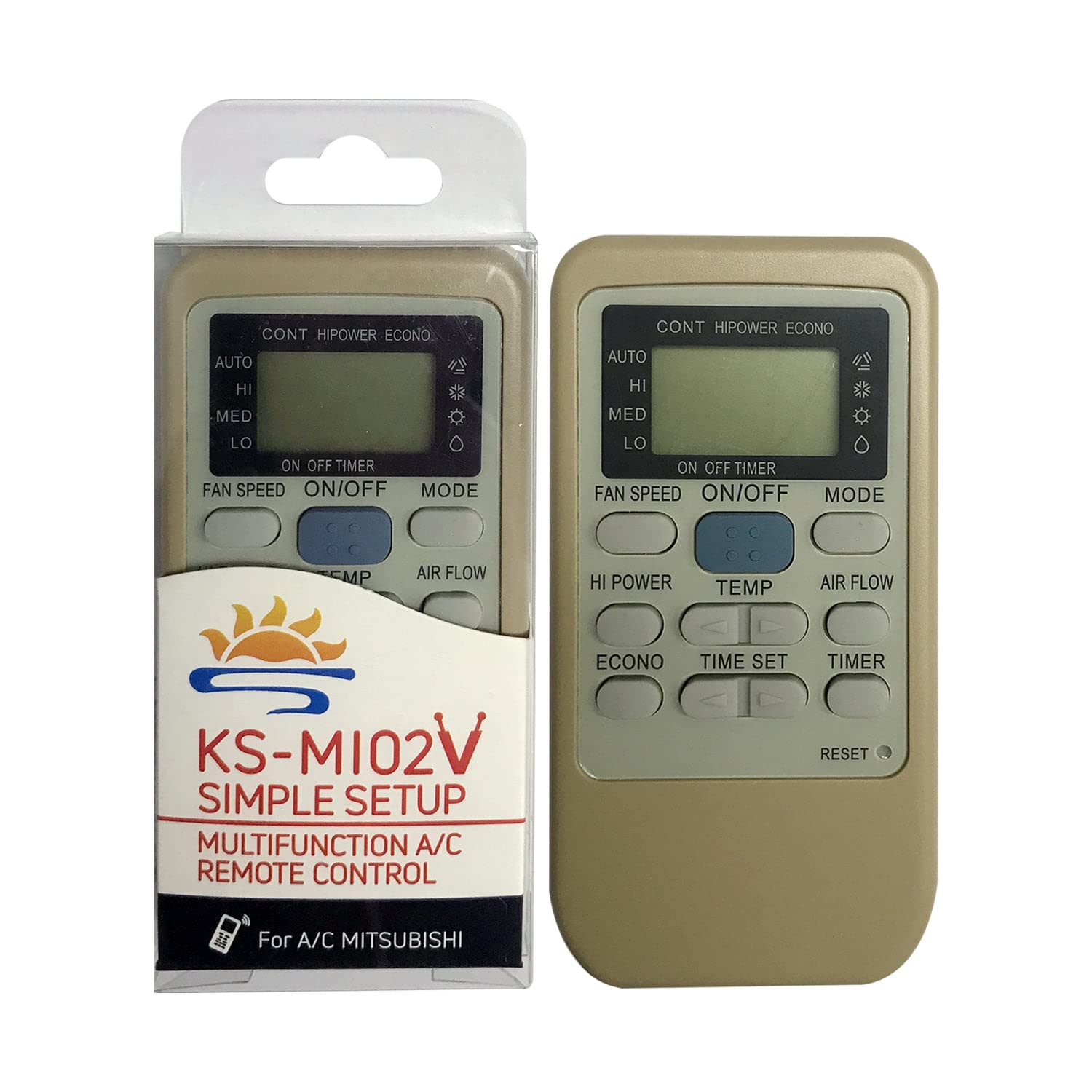
Figure 1: Front view of the KS-MI02V remote control.
2. Setup
2.1 Battery Installation
- Open the battery compartment cover located on the back of the remote control.
- Insert two (2) AAA batteries, ensuring the correct polarity (+/-) as indicated inside the compartment. Batteries are not included.
- Close the battery compartment cover securely.
2.2 Initial Setup (Auto Search)
The KS-MI02V remote typically requires no programming. However, if it does not operate your air conditioner immediately, follow these steps for auto search:
- Point the remote control towards your Mitsubishi air conditioner unit.
- Press and hold the ON/OFF button on the remote. The remote will begin an automatic code search.
- Continue holding the ON/OFF button until your air conditioner unit turns on or off. This indicates that a compatible code has been found.
- Immediately release the ON/OFF button.
- Test other functions (e.g., temperature adjustment, mode change) to ensure full compatibility. If only a few buttons work, repeat the setup process.

Figure 2: Front and back of the remote, showing battery compartment and setup guide.
2.3 Environment Protection Mode (EP Mode)
This remote includes an Environment Protection (EP) mode, which is special for public areas. To switch to EP mode:
- Press and hold the MODE button for 10 seconds.
- In EP mode, the air conditioner will only operate within specific temperature ranges: Cool (26-30°C) and Heat (18-25°C).
2.4 Restore Factory Mode
To restore the remote to its default factory settings:
- Press and hold the ON/OFF button and the MODE button simultaneously for 5 seconds.
- The display will flash 1 time and then return to the default state.
3. Operating Instructions
Familiarize yourself with the buttons on your remote control to effectively operate your air conditioner.
| Button | Function |
|---|---|
| ON/OFF | Turns the air conditioner unit on or off. |
| FAN SPEED | Cycles through fan speed settings: Auto, High (HI), Medium (MED), Low (LO). |
| MODE | Selects the operating mode: Cool (snowflake icon), Dry (water drop icon), Fan (fan icon), Heat (sun icon), Auto. |
| TEMP ▲ / ▼ | Adjusts the desired temperature up or down. |
| HI POWER | Activates a high-power operation for rapid cooling or heating. |
| ECONO | Activates economy mode for energy-efficient operation. |
| TIME SET ▲ / ▼ | Adjusts the time for timer functions. |
| TIMER | Sets or cancels the on/off timer function. |
| AIR FLOW | Adjusts the direction or swing of the air flow. |
| RESET | Resets the remote control to its default settings (often a small recessed button requiring a pointed object). |
4. Maintenance
4.1 Battery Care
- Always use fresh AAA batteries for optimal performance.
- Avoid mixing old and new batteries, or different types of batteries, as this can impair performance and potentially damage the remote.
- If the remote control starts to lose sensitivity or becomes unresponsive, it is time to replace the batteries.
- Remove batteries if the remote will not be used for an extended period to prevent leakage.
4.2 Cleaning
Wipe the remote control with a soft, dry cloth. Do not use liquid cleaners or abrasive materials.
5. Troubleshooting
| Problem | Possible Cause | Solution |
|---|---|---|
| Remote is unresponsive. | Low or depleted batteries, incorrect battery installation. | Reinstall batteries, ensuring correct polarity. Replace with fresh AAA batteries. |
| Remote loses sensitivity. | Batteries are weak. | Replace with fresh AAA batteries. |
| Only a few buttons work after setup. | Incomplete or incorrect code search. | Repeat the initial setup (auto search) process carefully. Ensure the remote is pointed directly at the AC unit. |
| Remote does not control the AC unit. | Remote is not paired, AC unit is out of range, or infrared sensor is obstructed. | Ensure direct line of sight to the AC unit. Repeat the initial setup process. Check AC unit's power supply. |
6. Specifications
- Model Number: KS-MI02V
- Brand: Sealayer
- Product Dimensions: 4.92 x 2.56 x 0.98 inches
- Item Weight: 2.47 ounces
- Special Feature: Universal compatibility
- Max Number of Supported Devices: 1
- Compatible Devices: Air Conditioner
- Connectivity Technology: Infrared
7. Support
For any questions or assistance regarding your Sealayer KS-MI02V universal remote control, please contact the seller directly through your order platform. Your satisfaction is important to us.