
1. Introduction
Thank you for choosing the Aiwa MI-X 440-Enigma Beta Portable Bluetooth Speaker. This device is designed to provide high-quality audio with versatile connectivity options, including Bluetooth, USB, AUX, and TF card playback. It features an 80W audio output, a long-lasting battery, and a wireless microphone for karaoke and live performances. This manual will guide you through the setup, operation, and maintenance of your speaker.
2. Package Contents
Please ensure all items listed below are present in your package:
- Aiwa MI-X 440-Enigma Beta Portable Bluetooth Speaker
- Wireless Microphone (1)
- Remote Control (1)
- DC15V 1.6A Charger (1)
- 3.5mm Audio Cable
- Apple Audio Cable (1)
- Android Audio Cable (1)
- User Manual (This document)
- Warranty Card
3. Product Overview
The Aiwa MI-X 440-Enigma Beta speaker combines powerful audio with a robust design, featuring intuitive controls and multiple connectivity options.

Figure 3.1: Front view of the Aiwa MI-X 440-Enigma Beta speaker, showing the main grille and control panel.

Figure 3.2: Angled view of the speaker, detailing the control knobs for guitar volume, mic volume, echo, treble, and bass, along with playback controls and digital display.

Figure 3.3: Rear view of the speaker, illustrating the power input, USB port, AUX input, Live/Monitor switch, and power switch.
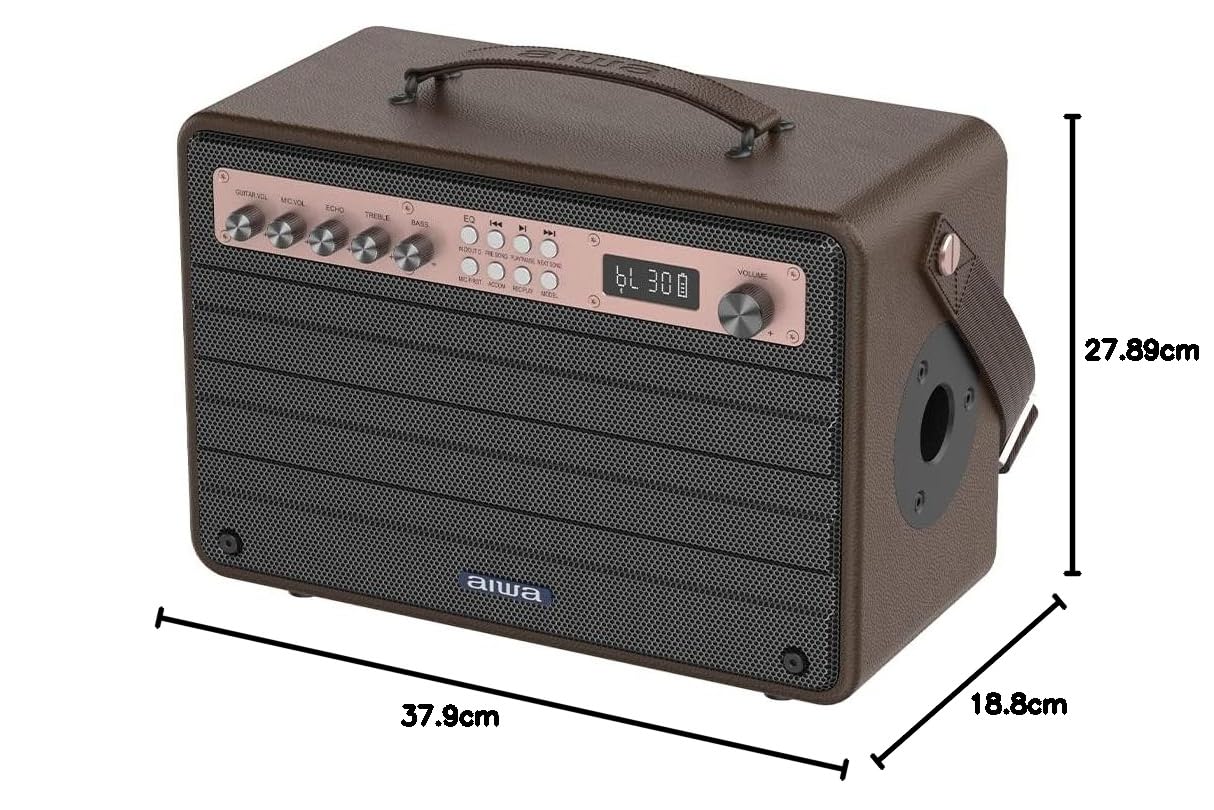
Figure 3.4: Speaker dimensions: 37.9 cm (width) x 27.89 cm (height) x 18.8 cm (depth).
4. Initial Setup
4.1. Charging the Speaker
Before first use, fully charge the speaker. Connect the provided DC15V 1.6A charger to the speaker's DC IN port and plug it into a power outlet. The charging indicator will illuminate. Once fully charged, the indicator may change color or turn off, depending on the model. A full charge provides up to 9 hours of playtime at 100% volume.
4.2. Powering On/Off
Locate the power switch on the rear panel of the speaker. Flip the switch to the 'ON' position to power on the device. To power off, flip the switch to the 'OFF' position.
5. Operating Instructions
5.1. Bluetooth Pairing
- Power on the speaker. The digital display will show 'BT' or a similar indicator, signifying Bluetooth mode.
- On your mobile device, enable Bluetooth and search for available devices.
- Select 'AIWA MI-X 440' from the list of devices.
- Once paired, the speaker will emit an audible confirmation, and the display will indicate a successful connection.
5.2. TWS Dual-Link Technology
To achieve true wireless stereo sound, you can pair two MI-X 440-Enigma Beta speakers:
- Ensure both speakers are powered on and in Bluetooth mode, but not yet paired with any device.
- On one speaker (this will be the primary speaker), press and hold the TWS button. The speaker will emit a pairing tone.
- The primary speaker will automatically search for and connect to the secondary speaker.
- Once connected, the primary speaker's display will show 'BT' and the secondary speaker's display will show 'SLAVE'.
- Now, connect your mobile device to the primary speaker via Bluetooth as described in section 5.1. Audio will play in stereo through both speakers.
5.3. USB/AUX/TF Card Playback
The speaker supports playback from USB drives, TF cards, and external devices via AUX input.
- USB/TF Card: Insert a USB drive or TF card into the respective port. The speaker will automatically switch to USB/TF mode and begin playing compatible audio files. Use the playback controls (Play/Pause, Next/Previous) on the speaker or remote.
- AUX Input: Connect an external audio device (e.g., smartphone, tablet) to the speaker's AUX port using the provided 3.5mm audio cable. The speaker will automatically switch to AUX mode. Control playback from your connected device.
5.4. Using the Wireless Microphone
The included wireless microphone is ideal for karaoke and vocal performances.
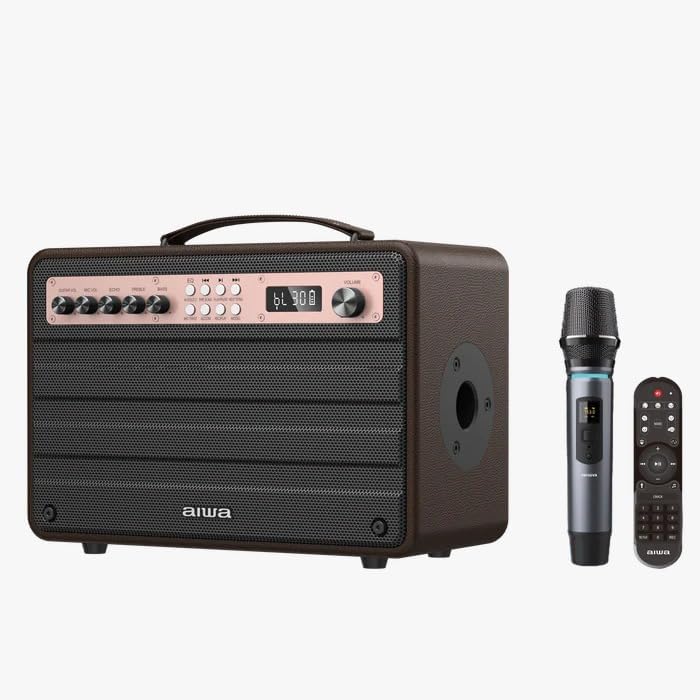
Figure 5.1: Speaker with wireless microphone and remote control.
- Ensure the microphone is charged (it features Type-C charging).
- Power on the microphone. It will automatically pair with the speaker.
- Adjust the 'MIC VOL' knob on the speaker's control panel to set the microphone's volume.
- Use the 'ECHO' knob to add reverberation to your vocals.
- The 'Mic Priority' function (accessible via a button on the control panel) will lower the music volume when the microphone is in use, making vocals clearer.
5.5. Guitar Input
Connect your guitar to the 'GUITAR IN' port on the speaker. Adjust the 'GUITAR VOL' knob to control the guitar's volume.
5.6. Audio Controls
The speaker features several controls to customize your audio experience:
- VOLUME: Master volume control for all audio output.
- BASS: Adjusts the low-frequency audio output.
- TREBLE: Adjusts the high-frequency audio output.
- ECHO: Controls the echo effect for the microphone.
- MIC VOL: Adjusts the volume of the wireless microphone.
- GUITAR VOL: Adjusts the volume of the connected guitar.
- Indoor/Outdoor Mode: Press the dedicated button to switch between sound profiles optimized for indoor or outdoor environments.
- Equalizers (EQ): Use the EQ button to cycle through preset equalizer modes for different music genres.
5.7. Remote Control
The included remote control provides convenient access to various functions, including power, mode selection, playback controls, volume adjustment, EQ settings, and more.
6. Care and Maintenance
- Cleaning: Use a soft, dry cloth to clean the speaker's surface. Do not use abrasive cleaners or solvents.
- Storage: Store the speaker in a cool, dry place away from direct sunlight and extreme temperatures.
- Battery Care: To prolong battery life, avoid fully discharging the battery frequently. Charge the speaker regularly, even if not in use for extended periods.
- Water Exposure: This speaker is not waterproof. Avoid exposure to water or excessive moisture.
7. Troubleshooting Guide
| Problem | Possible Cause | Solution |
|---|---|---|
| Speaker does not power on. | Low battery; Power switch off. | Charge the speaker; Ensure power switch is in 'ON' position. |
| No sound from speaker. | Volume too low; Incorrect input mode; Device not paired. | Increase volume; Select correct input mode (BT, AUX, USB, TF); Re-pair Bluetooth device. |
| Bluetooth pairing fails. | Speaker not in pairing mode; Device too far; Interference. | Ensure speaker is in BT mode; Move device closer; Turn off other Bluetooth devices. |
| Microphone not working. | Microphone off; Low mic volume; Microphone not paired. | Power on microphone; Increase 'MIC VOL'; Ensure microphone is paired with speaker. |
| TWS pairing fails. | Speakers already paired to a device; Incorrect TWS procedure. | Ensure both speakers are unpaired from other devices; Follow TWS pairing steps carefully. |
8. Technical Specifications
| Feature | Specification |
|---|---|
| Model Number | MI-X 440-Enigma Beta |
| Output Wattage | 80 Watts |
| Power Source | Battery Powered |
| Battery Capacity | 15000mAh (Li-Ion) |
| Playtime | Up to 9 hours (at 100% volume) |
| Connectivity | Bluetooth, USB, AUX, TF Card |
| Special Features | Wireless Microphone, Guitar Input, TWS Dual-Link, Mic Priority, Indoor/Outdoor Mode, Bass/Treble Control, Equalizers |
| Compatible Devices | Guitar, Smartphone, Tablet |
| Material | Wood |
| Product Dimensions (LxWxH) | 27.9 x 27.9 x 18.8 cm |
| Item Weight | 6.8 kg |
9. Warranty Information and Customer Support
9.1. Warranty
This Aiwa MI-X 440-Enigma Beta speaker comes with a 1 Year Warranty from the date of purchase. Please refer to the included Warranty Card for detailed terms and conditions. Keep your purchase receipt as proof of purchase for warranty claims.
9.2. Customer Support
For any product-related queries, technical assistance, or warranty support, please contact Aiwa customer service:
- Importer: AIWA INDIA SALES & SERVICES PRIVATE LIMITED
- Address: 2E/26, Jhandewalan Extn, New Delhi -110055
- Contact Number: 1800-120-5619
- Email: getintouch@aiwaindia.com