
Introduction
This manual provides instructions for the SNOODU 7-color backlit trackpad keyboard case, designed for Samsung Galaxy Tab S7 FE, S7 Plus, and S8 Plus 12.4-inch tablets. It covers setup, operation, maintenance, and product specifications to ensure optimal use of your device.
What's in the Box
- 1 x Bluetooth Keyboard for Samsung Tab S7 FE/S7plus/S8plus 12.4 inch
- 1 x Case with Pencil Holder
- 1 x USB Cable
- 1 x User Manual
Compatibility
This keyboard case is compatible with the following Samsung Galaxy Tab 12.4-inch models:
- Samsung Galaxy Tab S7 FE 12.4" 2021 (Models: SM-T730/T733/T736/T738)
- Samsung Galaxy Tab S7+ S7 Plus 12.4" 2020 (Models: SM-T970/T975/T976/T978)
- Samsung Galaxy Tab S8+ S8 Plus 12.4" 2022 (Models: SM-X800/X806)
Ensure your tablet model matches one of the listed compatible devices for proper fit and function.

This image illustrates the compatible Samsung Galaxy Tab models: S7 FE 12.4", S8 Plus 12.4", and S7 Plus 12.4".
Setup Instructions
1. Installing Your Tablet
- Carefully place your Samsung Galaxy Tab into the protective case. Ensure all ports and buttons align correctly with the case cutouts.
- The case features a flexible rotating shaft design. Adjust the tablet to your desired viewing angle.
This image demonstrates the process of inserting the tablet into the keyboard case.

This image illustrates the flexible rotating shaft design, allowing for multiple viewing angles.
2. Bluetooth Pairing
- Ensure the keyboard is charged using the provided USB cable.
- Turn on the keyboard using the power switch located on the side.
- On your Samsung Galaxy Tab, go to Settings > Connections > Bluetooth. Turn Bluetooth on.
- The tablet will search for available devices. Select "BT 5.1 Keyboard" from the list.
- Confirm the pairing request on your tablet. Once connected, the keyboard is ready for use.
This video demonstrates the Bluetooth pairing process for the keyboard with a Samsung Galaxy Tab.

Remove the protective film from the trackpad before use for optimal performance.
Operating Instructions
Keyboard Functions
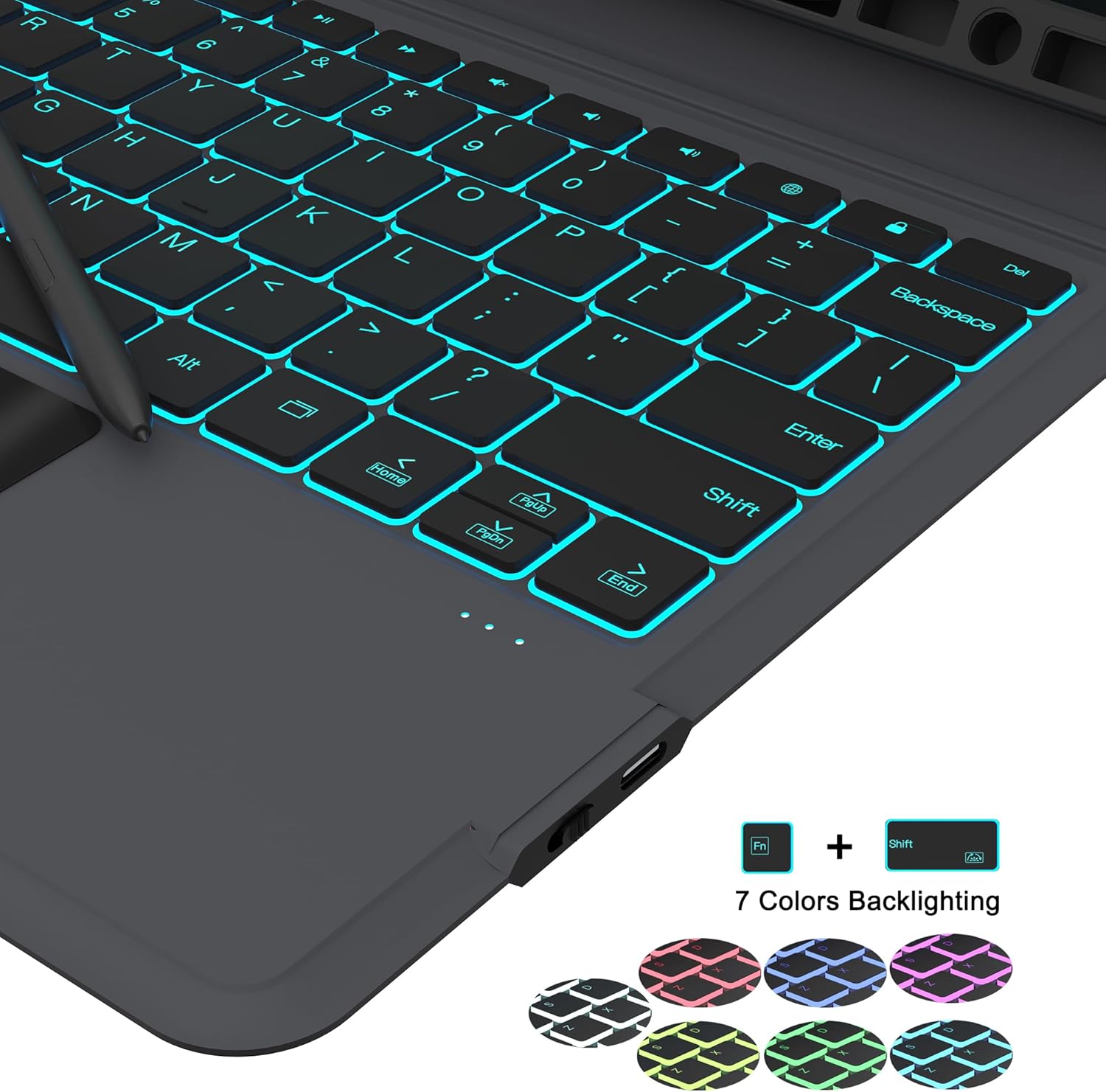
- Backlight Control: The keyboard features 7-color backlighting with 3 adjustable brightness levels. Use the dedicated backlight keys (often Fn + light bulb icon or similar) to cycle through colors and adjust brightness.
- Shortcut Keys: A full row of shortcut keys is available for quick access to common functions like media control, volume, and screen brightness.

The keyboard features 7-color backlighting for enhanced visibility in various lighting conditions.

Dedicated Android OS shortcut keys provide quick access to tablet functions.
Trackpad Usage
The integrated multi-touch trackpad allows for precise control and navigation of your tablet, similar to a laptop. It supports various gestures:
- Move Mouse: Single finger drag.
- Swipe Two Fingers: Scroll up or down.
- Mouse Left Button: Single tap.
- Switch Activity Center: Three-finger swipe up (or similar gesture depending on tablet settings).

This image details the multifunctional trackpad and its gesture controls.
Auto Sleep/Wake Function
The case features an auto sleep/wake function to conserve battery life. When the case is closed, the tablet will automatically go to sleep. Opening the case will wake the tablet.

The auto sleep/wake function helps preserve tablet battery life.
Maintenance
- Cleaning: Use a soft, damp cloth to clean the exterior of the case and keyboard. Avoid harsh chemicals or abrasive materials.
- Charging: Charge the keyboard regularly using the provided USB-C cable to maintain optimal battery performance.
- Storage: When not in use, keep the keyboard case closed to protect the tablet and keyboard.
Troubleshooting
| Problem | Solution |
|---|---|
| Keyboard not connecting via Bluetooth. |
|
| Keys are not responding. |
|
| Trackpad is unresponsive. |
|
Specifications
| Feature | Detail |
|---|---|
| Brand | SNOODU |
| Compatible Devices | Samsung Galaxy Tab S7 FE 12.4", S7+ S7 Plus 12.4", S8+ S8 Plus 12.4" |
| Connectivity Technology | Bluetooth |
| Keyboard Description | Wireless, Flexible |
| Special Features | Backlit (7-color), Hotkeys and Media Keys, Rechargeable, Trackpad, Waterproof (material) |
| Color | 7-color Backlit (RGB) |
| Material | Acrylonitrile Butadiene Styrene (ABS) |
| Item Weight | 2.07 pounds |
| Package Dimensions | 12.76 x 8.35 x 1.26 inches |
| Batteries | 1 Lithium Polymer battery (included) |
Warranty and Support
For warranty information and customer support, please refer to the documentation included with your product or contact SNOODU customer service directly. Keep your purchase receipt for warranty claims.