
1. Introduction
This manual provides comprehensive instructions for the installation, operation, and maintenance of your CERO TP01 Filter Replacement. This filter is engineered to maintain the air purification performance of compatible Dyson Tower Purifier Pure Cool Link models, ensuring a clean and fresh environment.

Image: Two CERO TP01 replacement filters, one upright and one on its side, with a small cleaning brush. These filters are designed to replace original Dyson filters.
2. Compatibility
The CERO TP01 Filter Replacement is specifically designed to be compatible with the following Dyson Tower Purifier Pure Cool Link models:
- Dyson Pure Cool Link TP01
- Dyson Pure Cool Link TP02
- Dyson Pure Cool Link TP03
- Dyson Pure Cool Link AM11
- Dyson Pure Cool Link BP01
It replaces original part numbers: 968126-03, 305158-01, 305159-01, 308400-01, 308401-01.
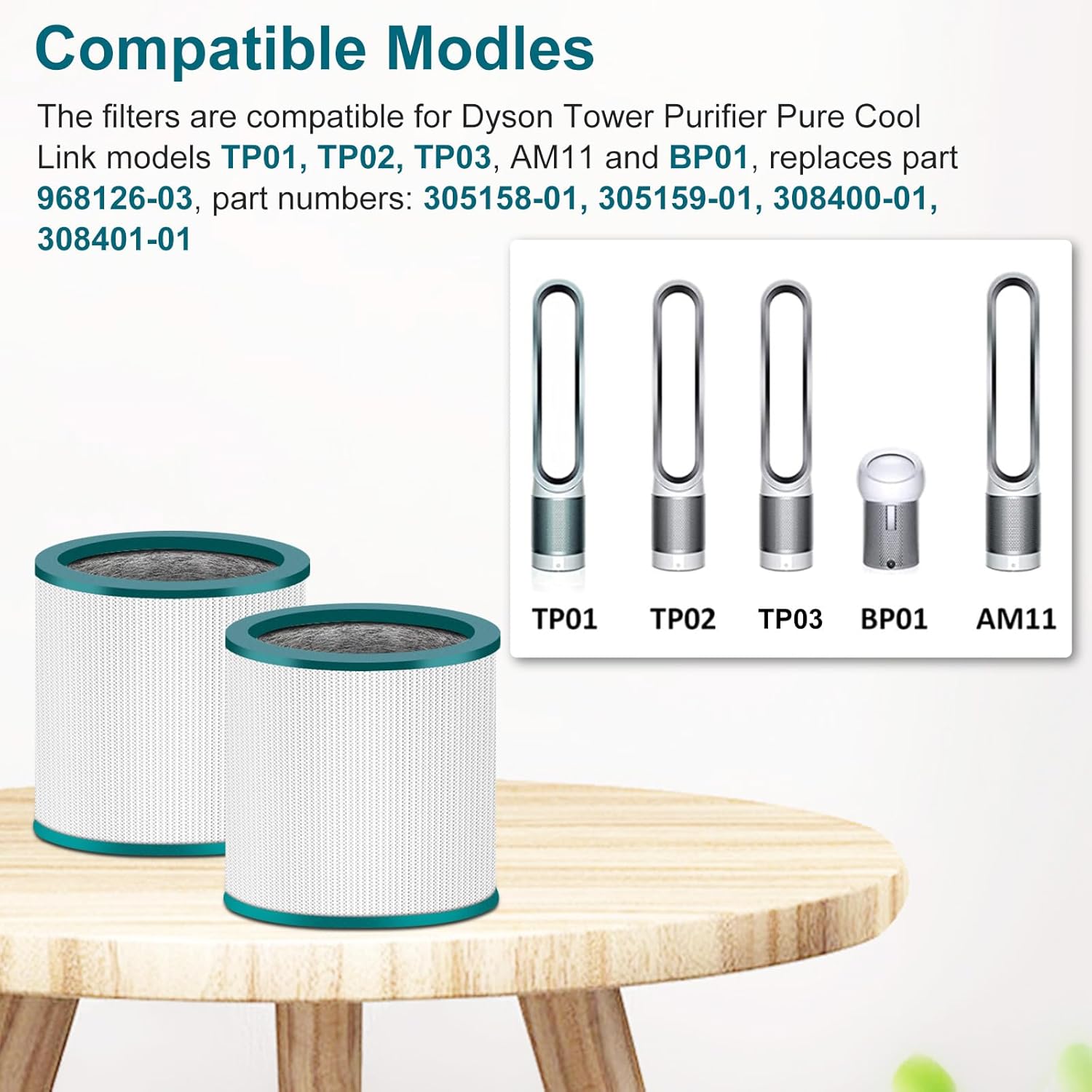
Image: A visual representation of the CERO replacement filters alongside images of compatible Dyson air purifier models, including TP01, TP02, TP03, BP01, and AM11, confirming broad compatibility.
3. Features and Filtration Technology
The CERO TP01 Filter Replacement incorporates a multi-stage filtration system designed to capture a wide range of airborne impurities and odors.
High Efficiency Filtration
The filter replacements include an H13 true filter, a fine preliminary filter, and a high-efficiency activated carbon filter. This combination effectively captures 99.97% of impurities, providing a clean and fresh environment.

Image: A magnified view highlighting the activated carbon layer and the true filter material within the CERO replacement filter, illustrating its high-efficiency design.
3-Stage Filtration System
- Fine Pre-Filter: Traps large particles of contaminants such as dust and pet dander.
- True Filter: Captures even finer particles, including allergens and pollutants as small as 0.3 microns.
- Activated Carbon Filters: Designed to absorb odors, volatile organic compounds (VOCs), and fumes, ensuring air freshness.

Image: A detailed diagram showing the three distinct layers of the CERO filter: the fine pre-filter, the true filter, and the activated carbon filter, explaining their respective functions in purifying the air.
4. Setup and Installation
Replacing the CERO TP01 filter is a straightforward process that does not require any special tools. Follow these steps for proper installation:
- Prepare the New Filter: Unpack the new CERO TP01 filter.
- Remove Old Filter: Turn off and unplug your Dyson air purifier. Carefully remove the top part of the air purifier to access the old filter. Dispose of the old filter responsibly.
- Insert New Filter: Place the new filter into the housing of the air purifier. Ensure it is seated correctly and securely.
- Reassemble: Place the housing part into the air purifier groover, then install the top part of the air purifier, ensuring all components are properly aligned and locked into place.
- Reset Filter Life Indicator: Refer to your Dyson air purifier's original manual for instructions on how to reset the filter life indicator, if applicable.

Image: A circular diagram illustrating the four steps for easy filter installation: 1. New filter, 2. Put the new filter into the housing, 3. Place housing part into the air purifier groover, 4. Install the top part of air purifier.
5. Operating and Maintenance
Filter Replacement Frequency
For optimal performance and to maintain air quality, it is recommended to replace the CERO TP01 filter every 6 months. This duration may vary depending on usage intensity and air quality conditions in your environment.
Cleaning
The CERO TP01 filter is designed for replacement, not cleaning. Do not attempt to wash or clean the filter as this may damage its filtration capabilities and reduce its effectiveness. Using a damaged or improperly cleaned filter can negatively impact air purifier performance.
6. Specifications
| Brand | CERO |
| Model Name | TP01 Filter Replacement |
| Compatible Devices | Dyson Tower Purifier Pure Cool Link TP01, TP02, TP03, AM11, BP01 |
| Item Weight | Approximately 1.59 pounds |
| Product Dimensions | Approximately 15 x 7 x 7 inches |
| Filtration Type | H13 True Filter, Fine Pre-Filter, Activated Carbon Filter |
| Reusability | No (Disposable) |
| Number of Pieces | 2 (per package) |
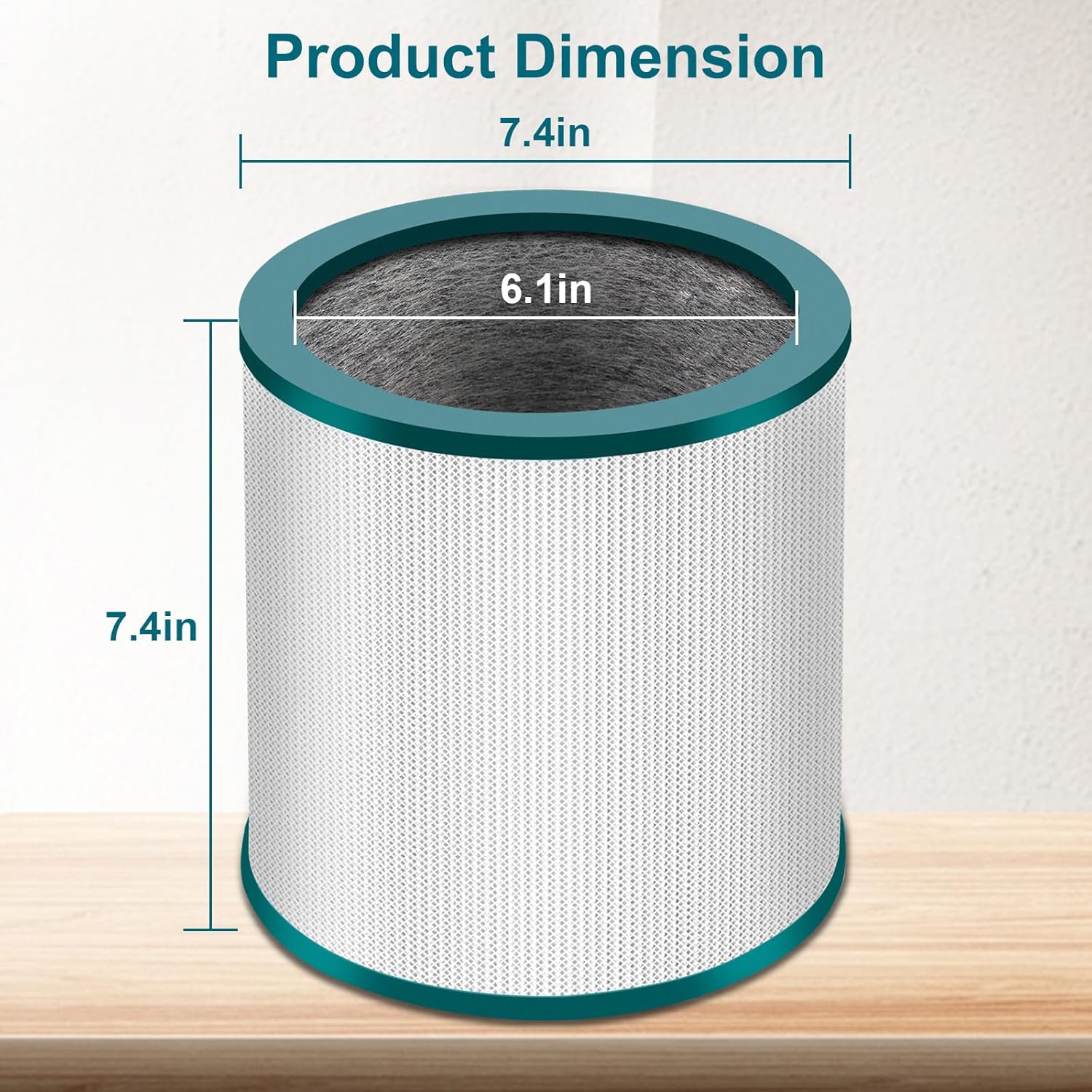
Image: A diagram illustrating the key dimensions of the CERO TP01 filter, showing a height of 7.4 inches and a diameter of 7.4 inches, with an inner diameter of 6.1 inches.
7. Troubleshooting
If you experience issues with your air purifier after installing the CERO TP01 filter, consider the following:
- Reduced Airflow: Ensure the filter is installed correctly and not obstructed. If the filter is old, it may be clogged and require replacement.
- Unusual Odors: A new filter may emit a slight odor initially, which should dissipate quickly. Persistent or strong odors may indicate the filter needs replacement, especially if it has been in use for over 6 months.
- Increased Noise: Verify that the filter is seated properly within the air purifier's housing. A loose filter can cause vibrations and increased noise.
- Filter Life Indicator Not Resetting: Consult your Dyson air purifier's original manual for specific instructions on how to reset the filter life indicator. This process is typically manual.
8. Warranty and Support
For specific warranty information regarding your CERO TP01 Filter Replacement, please refer to the documentation included with your purchase or contact CERO customer support directly. Support contact details can typically be found on the product packaging or the official CERO website.