
1. Introduction
Thank you for choosing the GAIATOP Portable Handheld Fan. This device is designed for personal cooling and offers versatile functionality as a handheld fan, a desktop fan, and a portable power bank. Its compact, foldable design makes it an ideal companion for travel, outdoor activities, or daily use. Please read this manual carefully to ensure proper use and maintenance of your fan.
2. Product Overview
The GAIATOP Portable Handheld Fan (Model Fan-FS08) features a unique 3-in-1 design, allowing it to adapt to various cooling needs. It is equipped with soft TPE blades for safety and a rechargeable lithium-ion battery.
2.1 Components
- GAIATOP Portable Handheld Fan Unit
- USB Type-C Charging Cable
- User Manual (this document)

The fan's compact size and lightweight design allow it to fit easily into pockets, purses, or bags, making it highly portable.

3. Setup
3.1 Initial Charging
Before first use, fully charge the fan. Connect the provided USB Type-C cable to the fan's charging port and the other end to a compatible USB power source (e.g., wall adapter, computer USB port). The charging indicator light will illuminate during charging and change when fully charged.
3.2 Opening the Fan
The fan features a foldable design. To open it:
- Method 1: Locate the small gap between the cover and the fan body at the top. Gently pull to open.
- Method 2: Press the base slightly where the control button is located, then pull off the exposed top section.

4. Operating Instructions
4.1 Power On/Off and Speed Control
The fan has two speed settings:
- First short press: Turns the fan on to Speed 1 (low).
- Second short press: Switches to Speed 2 (high).
- Third short press: Turns the fan off.

4.2 Fan Modes (3-in-1 Functionality)
The fan's foldable design allows for three primary uses:
- Handheld Fan: Unfold the fan to 180° for portable use.
- Desktop Fan: Fold the fan to 90° or 270° to stand it on a flat surface.
- Power Bank: When folded, the fan can function as a backup power bank.

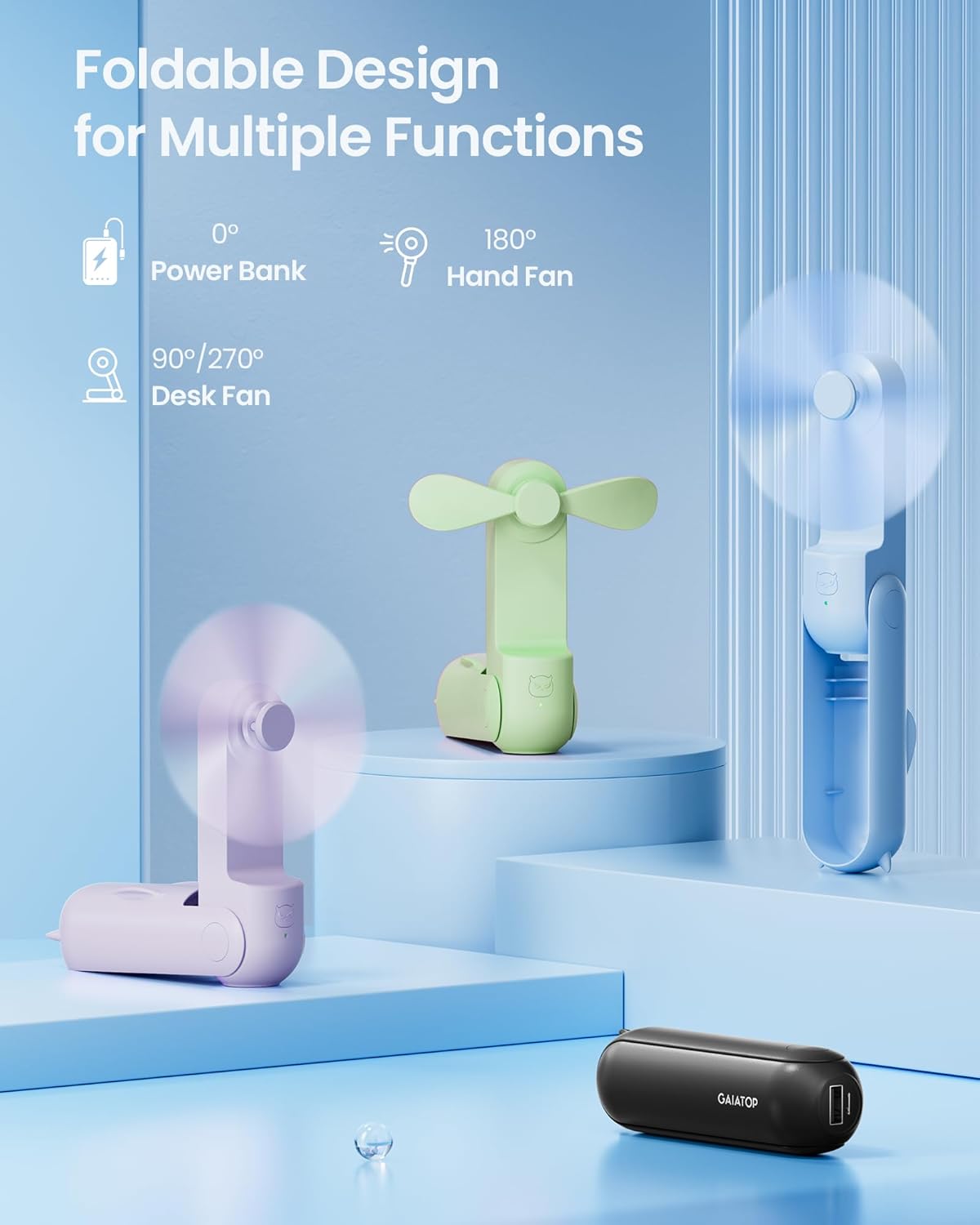
5. Power Bank Function
To use the fan as a power bank, ensure it is charged. Connect your device (e.g., smartphone) to the fan's USB-A output port using your device's charging cable. The fan will begin charging your device. This feature is useful for emergency power needs.
6. Maintenance
6.1 Cleaning
To clean the fan, ensure it is turned off. Gently wipe the exterior with a soft, dry cloth. Do not use harsh chemicals or abrasive materials. Avoid immersing the fan in water.
6.2 Storage
Store the fan in a dry place when not in use. Keep it away from extreme temperatures and direct sunlight.
7. Troubleshooting
- Fan not turning on: Ensure the fan is charged. Connect it to a power source using the USB Type-C cable and allow it to charge for at least 30 minutes before attempting to turn it on again.
- Fan not charging: Check the USB Type-C cable and the power source. Try a different cable or power adapter. Ensure the cable is securely connected to both the fan and the power source.
- Weak airflow: Ensure the fan is fully charged. If the battery is low, the fan's performance may decrease.
- Difficulty opening/closing: Ensure the blades are properly aligned before closing. Refer to the opening methods in Section 3.2. Do not force the fan open or closed.
8. Specifications
| Feature | Specification |
|---|---|
| Brand | Gaiatop |
| Model Name | Fan-FS08 |
| Product Dimensions | 1.4"D x 1.5"W x 4.26"H |
| Item Weight | 4.8 ounces |
| Power Source | Battery Powered |
| Battery Type | 1 Lithium Ion battery (included) |
| Charging Port | USB Type C |
| Output Voltage | 5 Volts |
| Wattage | 1.5 watts |
| Number of Blades | 2 |
| Number of Power Levels | 2 |
| Control Method | Push Button |
| Cooling Time (Max) | 17 Hours (Speed 1) |
9. Safety Information
- The fan features touchable and soft TPE blades designed to stop automatically upon contact, enhancing user safety.
- Equipped with surge and short circuit protection to prevent damage to the device and connected electronics.
- Keep the fan away from water and excessive moisture.
- Do not attempt to disassemble or modify the fan.
- Keep out of reach of small children.
10. Warranty and Support
For any product inquiries, technical support, or warranty claims, please contact Gaiatop customer service. Refer to the product packaging or the official Gaiatop website for the most current contact information. Please have your model number (Fan-FS08) and purchase details ready when contacting support.


