
1. Introduction
The FIVE SENSES Atomic! Talking Watch is designed for ease of use and accuracy, automatically setting itself via the Radio Atomic Clock Signal. It provides clear voice announcements of time, date, and other functions, making it ideal for individuals with visual impairments or those who prefer audible timekeeping.
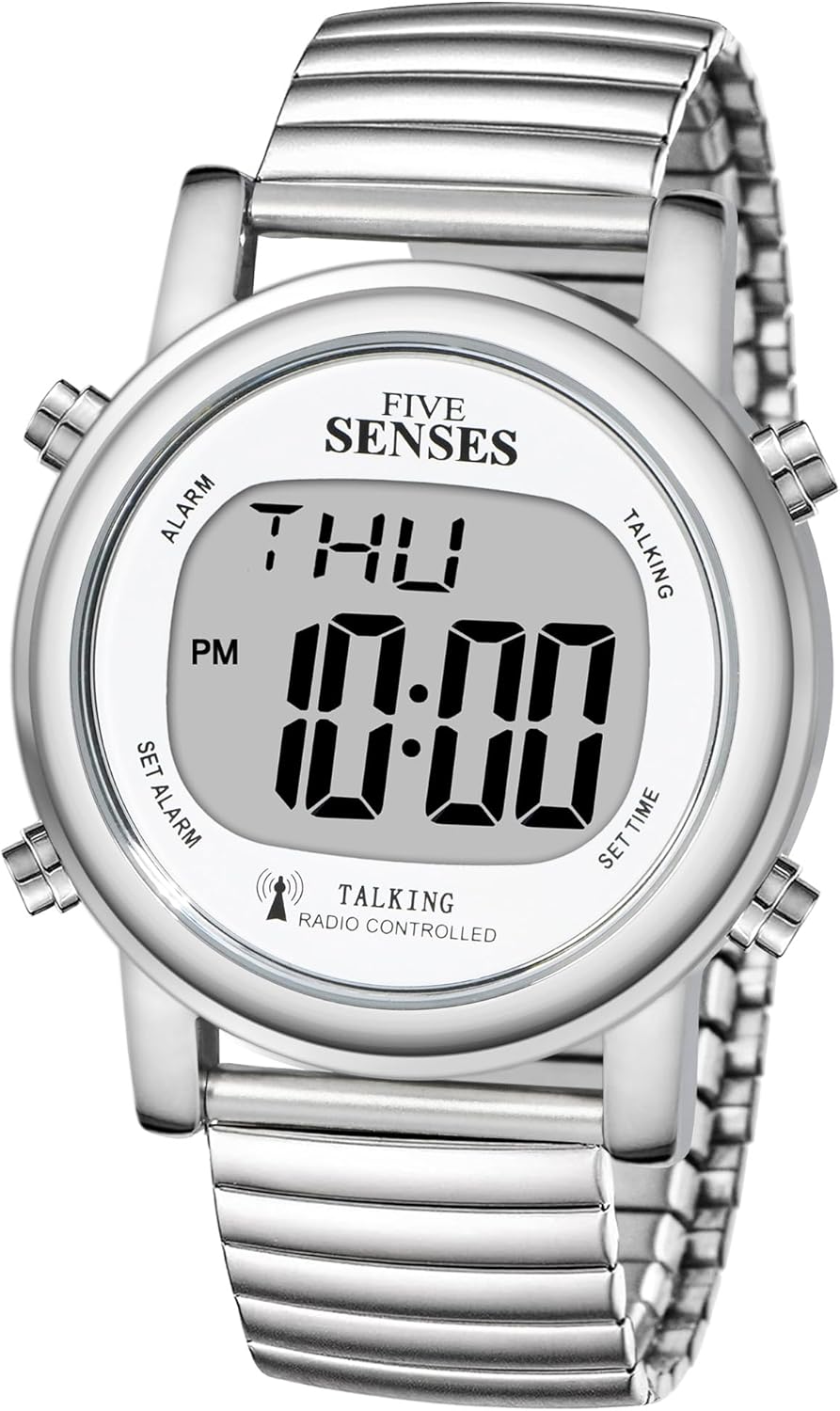
Figure 1: Front view of the FIVE SENSES Atomic! Talking Watch.
This image displays the silver-colored FIVE SENSES Atomic! Talking Watch. It features a large digital LCD display showing the day of the week and time, with 'PM' and a radio signal icon visible. Four buttons are positioned around the watch case at approximately the 2, 4, 8, and 10 o'clock positions, labeled 'ALARM', 'SET ALARM', 'TALKING', and 'SET TIME' respectively. The watch has an elastic stainless-steel band.
2. Product Overview
2.1 Key Features
- Automatic Time Setting: Syncs with the Radio Atomic Clock Signal for precise time and date, including Daylight Saving Time adjustments.
- Clear Voice Announcements: Announces time, date, day, month, year, alarm status, and signal reception status in a pleasant male voice.
- Easy-to-Read Display: Features large LCD digits for clear visibility in various lighting conditions.
- Durable Design: Elegant round metal watch case with a sleek elastic stainless-steel band.
- Long Battery Life: Operates on a single CR2032 battery (included).

Figure 2: Diagram illustrating key features.
This diagram highlights several key features of the watch, including its radio-controlled self-setting capability, automatic Daylight Saving Time (DST) and World Time (WT) switching, clear and loud male voice, big numbers for easy visibility, alarm and hourly chime functions, and long battery life. A small image of the watch is shown on the left, and a hand wearing the watch is on the right.
2.2 Watch Components
- LCD Display: Shows time, date, and other indicators.
- 2 o'clock button (TALKING): Used for time announcement and setting.
- 4 o'clock button (SET TIME): Used for date announcement and setting.
- 8 o'clock button (SET ALARM): Used for alarm setting and alarm ON/OFF.
- 10 o'clock button (ALARM): Used for alarm status announcement and alarm ON/OFF.
3. Initial Setup
3.1 Waking Up the Watch
The watch may be in a sleep power-saving mode upon arrival. To wake it up:
- Hold the 2 o'clock button (TALKING) for approximately 3 seconds.
- The display will activate, and the watch will begin running.
3.2 Setting Time Zone
Your watch is ready to use after setting the correct time zone. This setting is crucial for proper atomic signal reception and display.
- Hold the 4 o'clock button (SET TIME) until the watch announces "Global Signal Selection".
- Press the 2 o'clock button (TALKING) repeatedly to cycle through the available time zones (e.g., USA Pacific, USA Mountain, USA Central, USA Eastern, UK, Germany, Japan).
- Once your desired time zone is announced, press the 4 o'clock button (SET TIME) to confirm. The watch will then confirm the current time based on the selected zone.
3.3 Automatic Time Setting (Atomic Radio Signal)
The watch is designed to automatically synchronize and set itself (including Daylight Saving Time) every night. For optimal reception:
- Place your watch with its face upside down near a non-metallic window overnight.
- This position helps the watch pick up the Atomic radio signal more effectively.

Figure 3: Watch receiving USA atomic signal.
This image shows the watch with a radio signal icon, indicating it receives the USA signal to set the time automatically. Text states "Receives USA signal, set the time automatically".
3.4 Manual Time Setting
Manual time setting is an option if the watch is being used in an area where the atomic signal is not available or if you prefer to set it manually.
- Hold the 4 o'clock button (SET TIME) until the watch announces "Set Time". The hour display will begin flashing.
- Press the 2 o'clock button (TALKING) repeatedly to adjust the hour. Pay attention to AM/PM indication.
- Press the 4 o'clock button (SET TIME) to confirm the hour. The minute display will begin flashing.
- Press the 2 o'clock button (TALKING) repeatedly to adjust the minute.
- Press the 4 o'clock button (SET TIME) to confirm the minute. The watch will announce the newly set time.
4. Operating Instructions
4.1 Announcing Time and Date
- To hear the current time, press the 2 o'clock button (TALKING) once.
- To hear the current date, press the 4 o'clock button (SET TIME) once.

Figure 4: Examples of voice announcements.
This image illustrates the watch's voice announcement capabilities, showing speech bubbles with phrases like "The Time is 10:08 AM" and "Today is Wednesday, July 8, year 2024". A radio signal tower icon indicates automatic time updates at 3:00 AM daily.
4.2 Setting the Alarm
You can set a daily alarm on your watch.
- Press the 8 o'clock button (SET ALARM) once. The watch will announce "Set Alarm". The alarm hour display will begin flashing.
- Press the 10 o'clock button (ALARM) repeatedly to adjust the alarm hour. Pay attention to AM/PM indication.
- Press the 8 o'clock button (SET ALARM) to confirm the alarm hour. The alarm minute display will begin flashing.
- Press the 10 o'clock button (ALARM) repeatedly to adjust the alarm minute.
- Press the 8 o'clock button (SET ALARM) to confirm the alarm minute. The watch will announce the newly set alarm time.
4.3 Alarm ON/OFF
The alarm is automatically set to ON once it has been set. To toggle the alarm status:
- Press the 8 o'clock button (SET ALARM) once. The watch will announce "Set Alarm".
- Press the 10 o'clock button (ALARM) once to toggle the alarm status between ON and OFF. The watch will announce "Alarm ON" or "Alarm OFF".
- Press the 8 o'clock button (SET ALARM) to confirm the alarm status.
4.4 Hourly Chime
This watch model does not feature an hourly chime function.
4.5 Backlight
The watch features an LED backlight for improved visibility in low-light conditions. To activate the backlight, press the 4 o'clock button (SET TIME) briefly.
5. Battery Information
The FIVE SENSES Atomic! Talking Watch uses one CR2032 battery for both the digital display and the voice functions. A battery is included with your watch. When the display dims or the voice becomes unclear, it is time to replace the battery.
Battery Replacement: It is recommended to have the battery replaced by a qualified watch technician to ensure proper sealing and function of the watch.
6. Care and Maintenance
- Cleaning: Wipe the watch with a soft, dry cloth. Avoid using harsh chemicals or abrasive materials.
- Water Resistance: This watch is designed for daily use and is splash-resistant. Avoid submerging the watch in water or exposing it to excessive moisture.
- Temperature: Avoid exposing the watch to extreme temperatures, both hot and cold, as this can affect battery life and display performance.
- Storage: When not in use for extended periods, store the watch in a cool, dry place.
7. Troubleshooting
- Watch not setting time automatically: Ensure the watch is placed near a non-metallic window overnight. Verify the correct time zone is selected. If the issue persists, try manual time setting.
- Voice is unclear or weak: This may indicate a low battery. Replace the CR2032 battery.
- Display is dim or blank: Check the battery. If the watch is in sleep power-saving mode, wake it up by holding the 2 o'clock button for 3 seconds.
- Buttons not responding: Ensure the watch is not in sleep power-saving mode. If it is, wake it up. If the issue persists, the battery may be critically low or there may be an internal malfunction.
8. Specifications
| Attribute | Detail |
|---|---|
| Model Number | 1020C |
| Product Dimensions | 9.45 x 1.57 x 9.45 inches |
| Item Weight | 3.5 ounces |
| Battery Type | 1 x CR2032 (included) |
| Time Synchronization | Radio Atomic Clock Signal (Self-setting) |
| Voice Output | Male voice |
9. Warranty and Support
For warranty information or technical support, please refer to the product packaging or contact the manufacturer directly. Keep your purchase receipt for warranty claims.
