
MT-VIKI HD0112 4x3 Video Wall Controller Instruction Manual
Model: HD0112
1. Introduction
The MT-VIKI HD0112 is a high-performance 4x3 Video Wall Controller designed to split a single HDMI high-definition signal into multiple segments for display across up to 12 video display units. This device enables the creation of large, dynamic video walls with various splicing configurations, supporting resolutions up to 1080p at 60Hz. It is suitable for applications requiring large screen displays, such as advertising, monitoring, and entertainment.

Image 1.1: The MT-VIKI HD0112 4x3 Video Wall Controller.
2. Product Features
- Large Screen Splicing: Supports 1 HDMI input and 12 HDMI outputs, dividing a complete HDMI signal into 12 blocks for display on 12 video units.
- Multiple Splicing Methods: Offers various configurations including 3x3, 3x4, 4x3, 2x2, 2x5, 2x6, and more.
- High Quality UHD Output: Supports resolutions up to 1080p @ 60Hz. Compatible with various signal sources such as computers, laptops, TV boxes, DVD players, and gaming consoles (PS3/PS4).
- Edge Blending Technique: Features splicing adjustment and alignment functions to ensure a natural and seamless picture across multiple displays.
- Easy Operation: Supports switching via front panel buttons and an IR remote control for user convenience. Plug and play functionality.
- Stable Performance: Powered by 12V with built-in over-current protection.
3. Package Contents
Please check the package contents upon opening to ensure all items are present and undamaged:
- MT-VIKI HD0112 Video Wall Controller
- Power Adapter
- IR Remote Control
- User Manual
- Mounting Brackets (if applicable)

Image 3.1: Contents of the MT-VIKI HD0112 package.
4. Device Overview
Familiarize yourself with the ports and controls on the MT-VIKI HD0112 unit.

Image 4.1: Front and rear panel view of the MT-VIKI HD0112, showing input/output ports and controls.
Front Panel:
- IR Receiver: For receiving signals from the remote control.
- Power Button: To turn the device on/off.
- Mode Button: To cycle through different video wall modes.
- Power LED: Indicates power status.
Rear Panel:
- HDMI Input: Connect your HDMI source device (e.g., computer, media player).
- HDMI Outputs (1-12): Connect to your display units (TVs, monitors).
- DC 12V Power Input: Connect the provided power adapter.
5. Setup and Connections
Follow these steps to set up your MT-VIKI HD0112 Video Wall Controller:
- Prepare Displays: Arrange your 12 display units (TVs/monitors) in your desired video wall configuration (e.g., 3x4, 4x3).
- Connect HDMI Outputs: Connect each of the 12 HDMI output ports on the HD0112 to a corresponding HDMI input on your display units using HDMI cables. Ensure proper numbering if a specific layout is desired.
- Connect HDMI Input: Connect your HDMI source device (e.g., PC, laptop, TV box) to the HDMI input port on the HD0112 using an HDMI cable.
- Connect Power: Plug the provided 12V DC power adapter into the power input port on the HD0112, then plug the adapter into a power outlet.
- Power On: Turn on the HD0112 using the power button on the front panel or the remote control. Power on all connected display units.
- Select Mode: Use the 'Mode' button on the front panel or remote control to select your desired video wall splicing mode.
For optimal performance, ensure all HDMI cables are of good quality and appropriate length for your setup.
Video 5.1: An overview of MT-VIKI matrix switch series, including video wall controllers, demonstrating various models and their functionalities.
6. Operating Instructions
The MT-VIKI HD0112 can be operated using the front panel buttons or the included IR remote control.
Using the Remote Control:
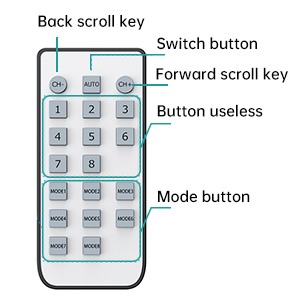
Image 6.1: Layout of the IR remote control for the MT-VIKI HD0112.
- Power Button: Turns the device on or off.
- CH- / CH+ (Back/Forward Scroll Key): Used to navigate through options or adjust settings.
- 720P/1080P Switch Button: Toggles between 720p and 1080p output resolutions.
- Mode Buttons (MODE1-MODE8): Directly select various pre-programmed video wall splicing modes.
- Number Buttons (1-8): These buttons are typically unused for this specific model's primary functions.
Splicing Modes:
The controller supports 35 display options. Use the 'Mode' button on the remote or front panel to cycle through available configurations until your desired layout is achieved.

Image 6.2: Diagram illustrating various splicing modes supported by the MT-VIKI HD0112, including 3x3, 3x4, 4x3, 2x2, 2x5, and 2x6.
Edge Blending:
The device incorporates an edge blending technique to minimize the appearance of bezels between displays, creating a more cohesive video wall. This feature is automatically applied or can be adjusted via specific mode settings.
Image 6.3: Illustration of the edge blending technique, showing the difference between thick and thin physical borders after adjustment.
7. Advanced Configurations
Using an HDMI Extender:
To extend the distance between your HDMI source and the video wall controller, an HDMI extender can be used. Connect the HDMI extender transmitter (TX) to your source, and the receiver (RX) to the HD0112's HDMI input. Use a CAT-5e/6/7 cable to connect the TX and RX units.

Image 7.1: Diagram showing how to connect the video wall controller with an HDMI extender to increase service distance.
Using an HDMI Switch:
To connect multiple HDMI source devices to the video wall controller, an HDMI switch can be utilized. Connect your various source devices (e.g., PC, laptop, TV box) to the inputs of the HDMI switch, and then connect the output of the HDMI switch to the HDMI input of the HD0112. This allows you to easily switch between different signal sources for your video wall display.
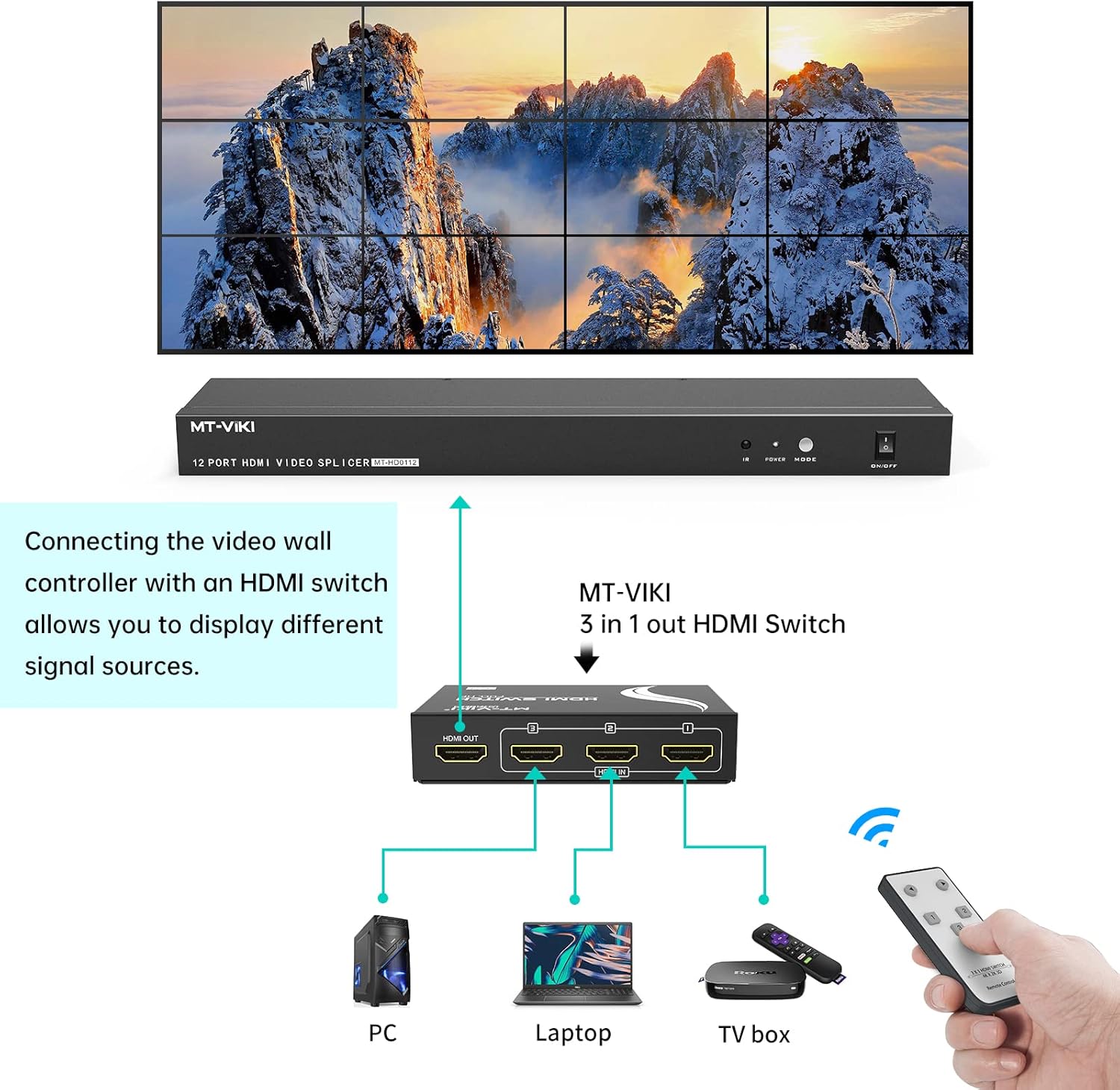
Image 7.2: Diagram illustrating how to connect the video wall controller with an HDMI switch to display different signal sources.
8. Troubleshooting
- No Picture/Signal:
- Ensure all HDMI cables are securely connected to both the source, controller, and displays.
- Verify the power adapter is correctly connected and the unit is powered on.
- Check if the input source is active and outputting a signal.
- Try a different HDMI cable or source device to rule out cable or source issues.
- Incorrect Splicing Mode:
- Use the 'Mode' button on the remote or front panel to cycle through all available modes until the correct configuration is displayed.
- Refer to the splicing modes diagram (Image 6.2) to identify the correct mode for your setup.
- Picture Quality Issues (Flickering, Distortion):
- Ensure all HDMI cables are high-quality and not excessively long.
- Check the resolution setting on your source device; ensure it is compatible with 1080p @ 60Hz.
- Verify power supply stability.
- Remote Control Not Working:
- Check and replace the batteries in the remote control.
- Ensure there are no obstructions between the remote and the IR receiver on the controller.
- Point the remote directly at the IR receiver.
9. Specifications
| Feature | Detail |
|---|---|
| Model Number | HD0112 |
| Input Ports | 1 x HDMI |
| Output Ports | 12 x HDMI |
| Max Resolution | 1080p @ 60Hz |
| Splicing Modes | 3x3, 3x4, 4x3, 2x2, 2x5, 2x6, and more (35 options) |
| Control Method | Front Panel Buttons, IR Remote Control |
| Power Supply | DC 12V |
| Color | Black |
| Item Weight | 2.89 pounds |
| Package Dimensions | 15.8 x 4 x 4 inches |
10. Maintenance
To ensure the longevity and optimal performance of your MT-VIKI HD0112 Video Wall Controller, follow these maintenance guidelines:
- Cleaning: Use a soft, dry cloth to clean the exterior of the device. Avoid using liquid cleaners or aerosols, as they may damage the unit.
- Ventilation: Ensure the device is placed in a well-ventilated area. Do not block any ventilation openings. Proper airflow prevents overheating.
- Power Supply: Use only the provided power adapter. Disconnect the power supply during electrical storms or when unused for long periods.
- Environment: Keep the device away from direct sunlight, heat sources, excessive humidity, and dust.
- Handling: Avoid dropping or subjecting the device to strong impacts.
11. Warranty and Support
MT-VIKI products are designed for reliability and performance. For warranty information, technical support, or service inquiries, please refer to the warranty card included in your package or visit the official MT-VIKI website. Please have your model number (HD0112) and purchase details ready when contacting support.
For additional support or to explore other MT-VIKI products, you may visit the MT-VIKI Store on Amazon.