

1. Introduction
This manual provides essential information for the safe and efficient use of your SDTYYP 36V 10.5Ah Lithium Battery for foldable electric bicycles. Please read this manual thoroughly before installation, operation, or maintenance to ensure optimal performance and longevity of your battery.
2. Product Overview
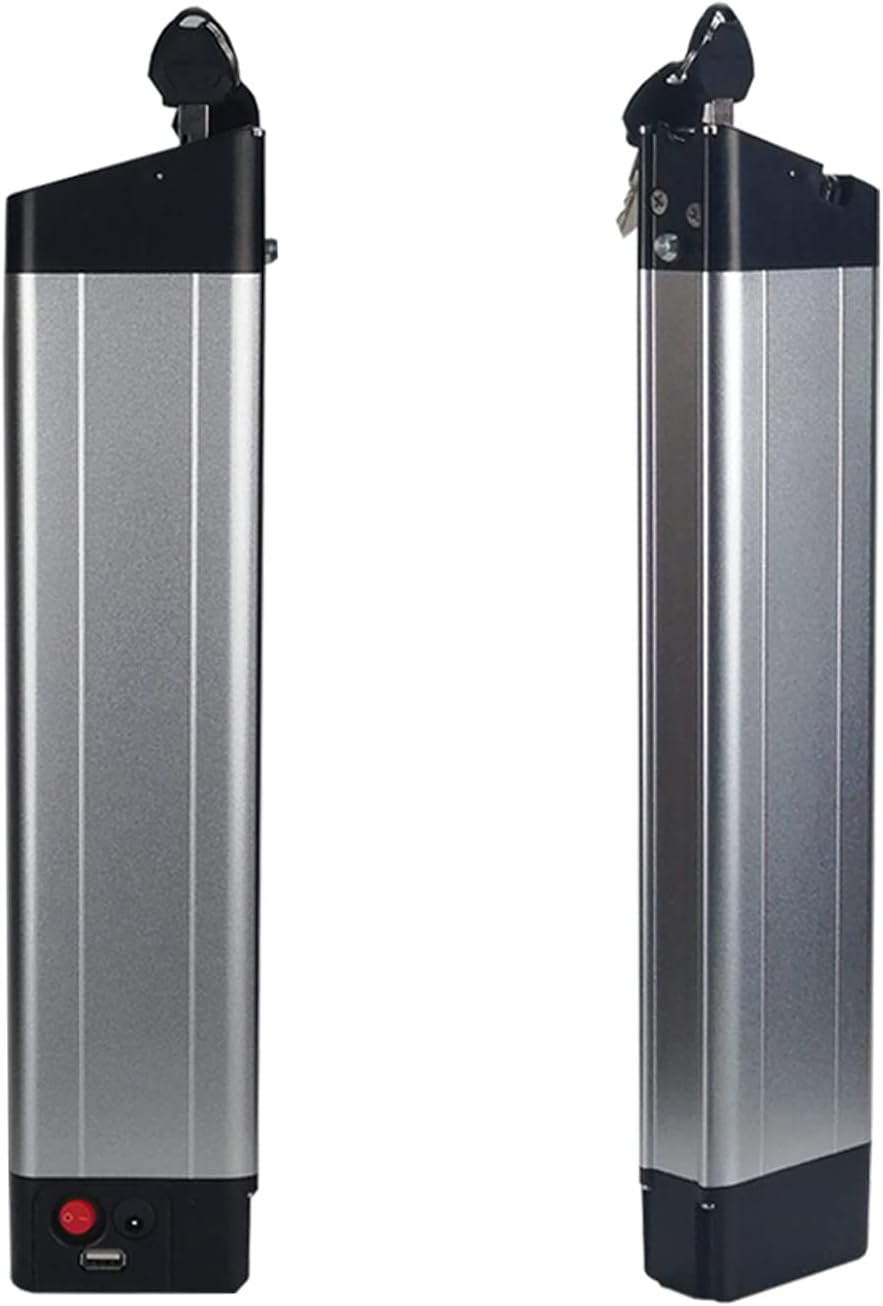
The SDTYYP 36V 10.5Ah lithium battery is designed for foldable electric bicycles, offering reliable power with advanced safety features. It is constructed with A+ grade automotive cells, ensuring high quality and durability. The integrated Battery Management System (BMS) provides comprehensive protection against common electrical issues.
Key Features:
- Premium Quality Cells: Utilizes A+ grade automotive cells for enhanced performance and lifespan.
- Integrated BMS: Protects against overcharge, short-circuits, and high temperatures, ensuring safe operation.
- Durable Casing: Features excellent insulation and wear resistance.
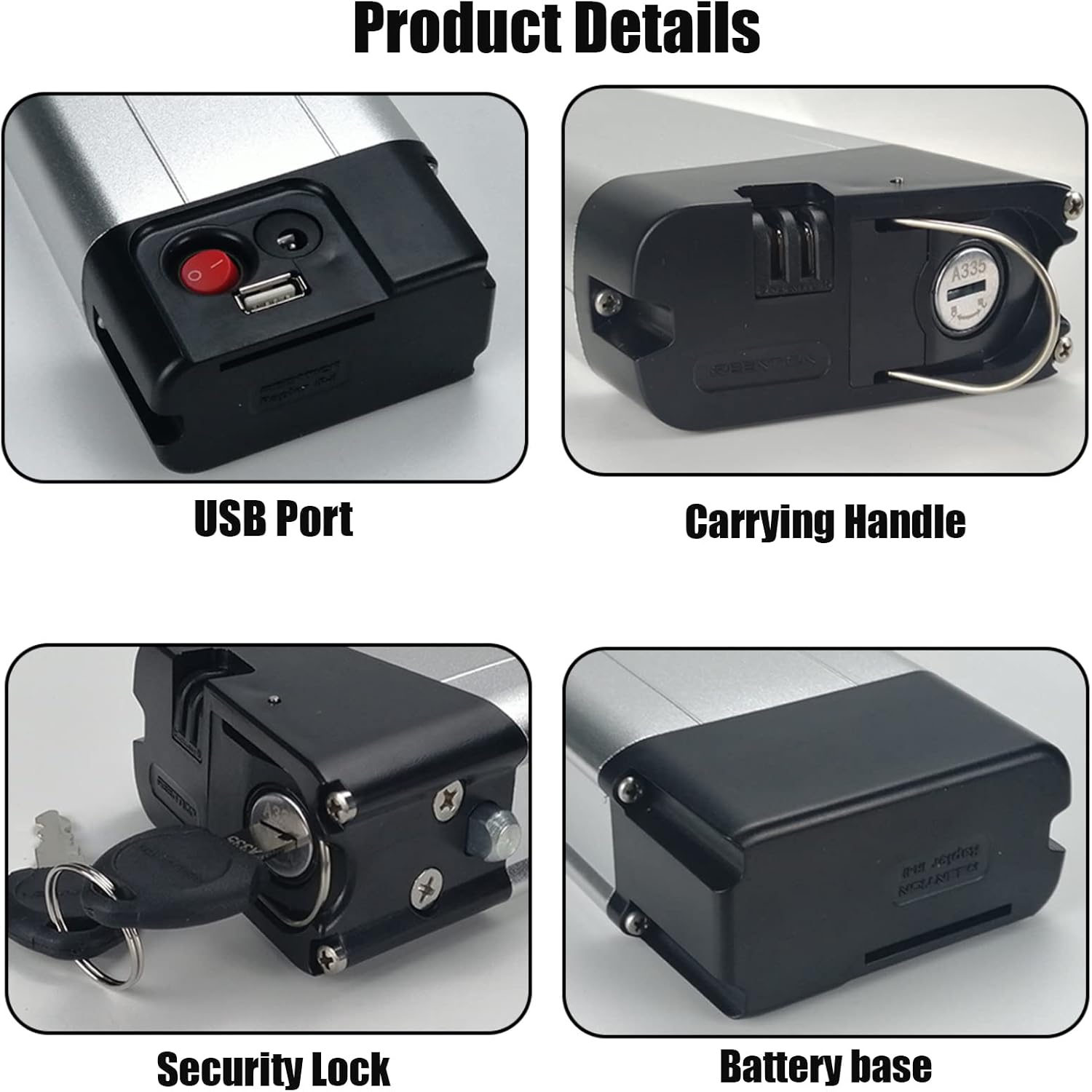
- Security Lock: Securely locks the battery to the bicycle frame to prevent theft.
- Portable Carrying Handle: Facilitates easy installation, removal, and transport.
- USB Charging Port: Allows charging of mobile phones and other devices while riding.
Components:

3. Setup and Installation
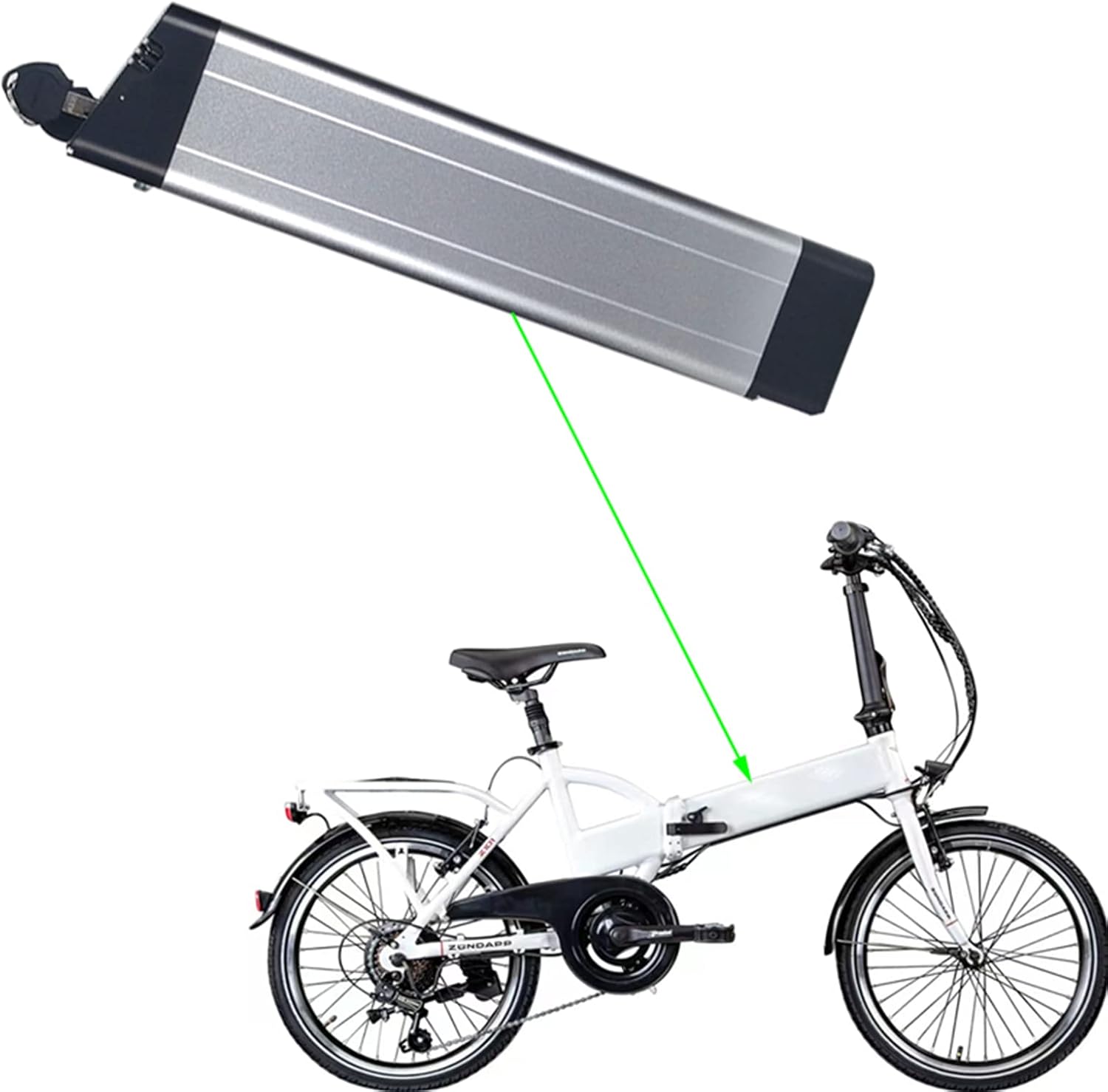
Proper installation is crucial for the battery's performance and safety. Ensure your electric bicycle is compatible with a 36V battery system and has the appropriate mounting points.
Compatibility Check:
Before purchase and installation, verify that your motor model (e.g., 36V) and battery specifications (capacity, power, size, 2-pin/5-pin connector) match. If your original battery is 24V, you must select a new 24V battery. Do not attempt to use a 36V battery. Batteries of different voltages are not compatible.
Installation Steps:
- Prepare the Bicycle: Ensure the electric bicycle is turned off and stable.
- Mount the Battery Base: Securely attach the battery base to the designated area on your bicycle frame using appropriate fasteners.
- Insert the Battery: Align the battery with the mounted base and slide it into place. Ensure it clicks securely.
- Secure with Lock: Use the provided key to lock the battery to the frame. This prevents accidental detachment and theft.
- Connect Cables: Connect the battery's power cable to the bicycle's motor system. Ensure a firm connection.
4. Operating Instructions
Once installed, operating the battery is straightforward.
Powering On/Off:
- Locate the red power switch on the battery.
- Press the switch to turn the battery ON. The bicycle's electrical system will now be active.
- Press the switch again to turn the battery OFF when not in use or for storage.
Using the USB Port:
- The integrated USB port allows you to charge compatible electronic devices (e.g., smartphones) while the battery is powered on.
- Connect your device's USB charging cable to the USB port on the battery.
5. Charging Instructions
Always use the provided 42V charger for your SDTYYP 36V 10.5Ah lithium battery. Using an incompatible charger can damage the battery and pose safety risks.
Charging Process:
- Connect Charger: Plug the charger into a standard wall outlet. The charger's indicator light may turn green.
- Connect to Battery: Connect the charger's output plug to the charging port on the battery. The charger's indicator light should turn red, indicating charging is in progress.
- Monitor Charging: Allow the battery to charge fully. The charger's indicator light will turn green when charging is complete.
- Disconnect: Once fully charged, disconnect the charger from the battery first, then from the wall outlet.
The built-in BMS prevents overcharging, but it is recommended to disconnect the charger once the battery is full to prolong its lifespan.
6. Safety Information
Your safety is paramount. Adhere to the following safety guidelines when handling and using the battery.
General Safety Precautions:
- Do not disassemble, puncture, or modify the battery.
- Avoid exposing the battery to extreme temperatures (hot or cold), direct sunlight, or fire.
- Keep the battery away from water and moisture.
- Do not short-circuit the battery terminals.
- Use only the specified charger provided with the battery.
- Keep out of reach of children and pets.
- If the battery shows signs of damage, swelling, or leakage, discontinue use immediately and contact support.
- Dispose of the battery according to local regulations for lithium-ion batteries.
BMS Protection:
The integrated BMS (Battery Management System) is designed to provide multiple layers of safety:
- Overcharge Protection: Prevents the battery from being charged beyond its safe voltage limit.
- Short-Circuit Protection: Automatically cuts off power in case of a short circuit.
- High-Temperature Protection: Monitors and regulates the battery's temperature to prevent overheating.
7. Maintenance
Regular maintenance helps extend the life and performance of your battery.
- Cleaning: Wipe the battery casing with a dry, soft cloth. Do not use water or harsh chemicals.
- Storage: If storing the battery for an extended period, charge it to approximately 50-60% capacity. Store in a cool, dry place, away from direct sunlight and extreme temperatures. Recharge every 2-3 months to prevent deep discharge.
- Connection Checks: Periodically inspect the battery terminals and connectors for any signs of corrosion or damage. Ensure all connections are secure.
8. Troubleshooting
If you encounter issues with your battery, refer to the following common problems and solutions.
| Problem | Possible Cause | Solution |
|---|---|---|
| Battery not powering on | Battery is off; low charge; loose connection; faulty power switch. | Ensure power switch is ON; charge the battery; check all connections; contact support if switch is faulty. |
| Battery not charging | Charger not plugged in; faulty charger; faulty charging port; battery too hot/cold. | Check charger connection to outlet and battery; try another compatible outlet; ensure battery is within operating temperature range; contact support if charger or port is faulty. |
| Reduced range/capacity | Battery aging; improper charging habits; extreme operating conditions. | Ensure full charges; avoid frequent deep discharges; operate within recommended temperature; consider battery replacement if significantly aged. |
| USB port not working | Battery not powered on; faulty USB cable/device; faulty USB port. | Ensure battery is ON; try a different USB cable and device; contact support if port is faulty. |
If the problem persists after attempting these solutions, please contact customer support.
9. Specifications
Detailed technical specifications for the SDTYYP 36V 10.5Ah Lithium Battery.
| Specification | Value |
|---|---|
| Model | EDGE |
| Maximum Cells | 18650 (30 cells) |
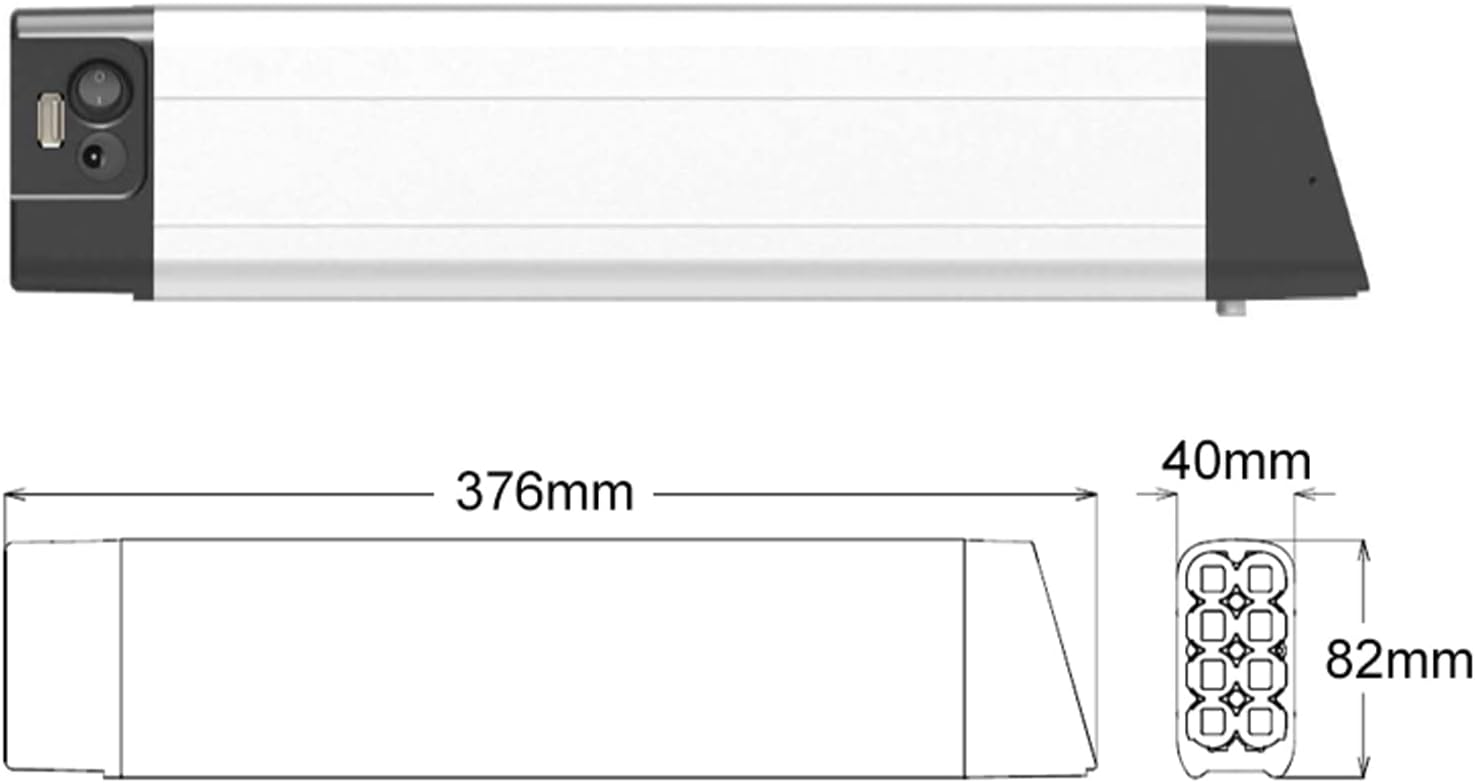
| Dimensions (L×W×H) | 376 × 82 × 40 mm |
| Voltage | 36 Volts |
| Max Capacity Options | 7 Ah / 9 Ah / 9.6 Ah / 10.5 Ah |
| Current Product Capacity | 10.5 Ah |
| Ampere Rating | 30 A |
| Charging Port | DC2.1 Opt. 3Pin high current |
| Discharge Port | 2Pin |
| LED Indicator | Without |
| USB Port | With |
| Power Switch | With |
| Recommended Use | Bicycle |
| Reusability | Rechargeable |
10. Warranty and Support
SDTYYP is committed to customer satisfaction. If you have any questions or require assistance with your battery, please do not hesitate to contact us as soon as possible. We are available to provide professional guidance and patiently answer all your inquiries.
For support, please refer to the contact information provided with your purchase or on the official SDTYYP website.