
OKAIDI OD8051
OKAIDI OD8051 Baby Monitor User Manual
Model: OD8051
Introduction
This user manual provides comprehensive instructions for the safe and effective operation of your OKAIDI OD8051 Baby Monitor. Please read this manual thoroughly before using the product and retain it for future reference. The OKAIDI OD8051 is designed to help you monitor your baby with features such as a 5.0-inch LCD screen, two-way audio, night vision, and temperature monitoring.
Package Contents
Ensure all items are present in the package:
- 1 x OKAIDI OD8051 Baby Monitor (Parent Unit with 5-inch screen)
- 1 x OKAIDI OD8051 Baby Camera (Baby Unit)
- 2 x AC Power Adapters
- 1 x Wall Mounting Kit
- 1 x User Manual
Product Overview
Familiarize yourself with the components of your baby monitor system.
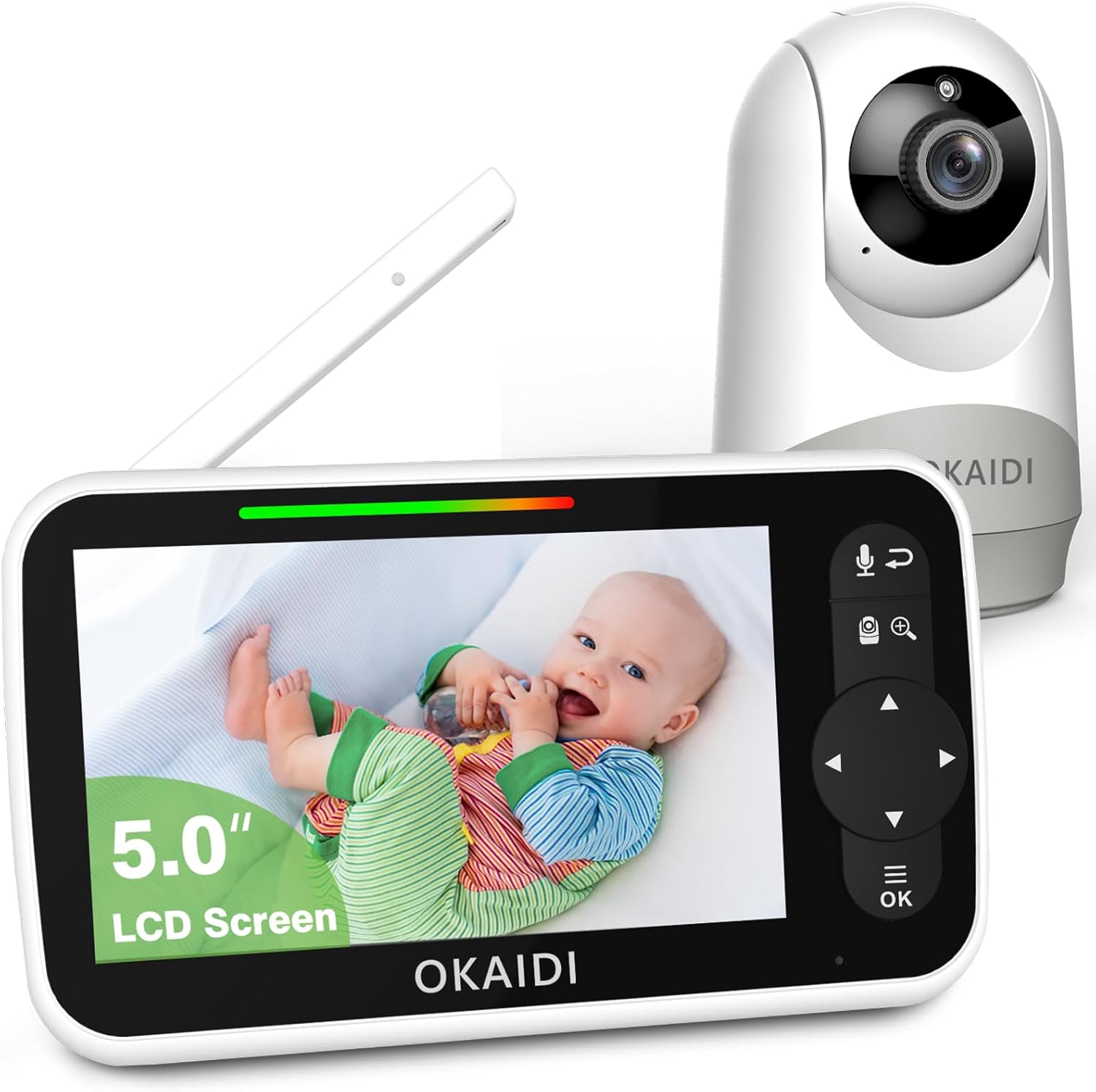
Figure 1: The OKAIDI OD8051 baby monitor, featuring a 5.0-inch LCD screen for viewing and a separate camera unit.
Parent Unit (Monitor) Features:
- 5.0-inch LCD Screen
- Volume Control
- Lullaby Playback
- Temperature Display
- Timer/Alarm Function
- Brightness Adjustment
- VOX Mode (Voice Operated eXchange)
- Language Settings
- Two-Way Talk Button
- Navigation and OK buttons
- Built-in rechargeable Lithium-ion battery (3500mAh)
Baby Unit (Camera) Features:
- Adjustable Camera Angle
- Infrared Night Vision LEDs
- Microphone and Speaker for Two-Way Talk
- Temperature Sensor
- Power Input
- Wall Mountable
Setup
1. Charging the Parent Unit
- Connect one AC power adapter to the Parent Unit and plug it into a power outlet.
- Charge the Parent Unit for at least 4 hours before initial use to ensure optimal battery performance. The battery indicator on the screen will show charging status.
- A fully charged battery provides approximately 16 hours of screen-on time or 30 hours in audio-only mode.

Figure 2: Battery performance details for the Parent Unit.
2. Powering the Baby Unit (Camera)
- Connect the second AC power adapter to the Baby Unit and plug it into a power outlet. The Baby Unit does not operate on battery and must remain plugged in.
- Place the Baby Unit in a location that provides a clear view of your baby, ensuring it is out of reach of children.
- For optimal signal, avoid placing the Baby Unit near other electronic devices that may cause interference. The system uses 2.4 GHz FHSS wireless transmission, which does not require Wi-Fi or a mobile app.

Figure 3: The monitor utilizes secure 2.4 GHz FHSS wireless transmission, offering a range of up to 1,000 feet without Wi-Fi.
3. Initial Pairing (Usually Automatic)
The Parent Unit and Baby Unit are pre-paired at the factory. If pairing is lost or you are adding an additional camera, refer to the "Adding/Pairing Camera" section in the Operating instructions.
Operating Instructions

Figure 4: Overview of the monitor's main functions and controls.
1. Power On/Off
- To turn on the Parent Unit, press and hold the Power button until the screen illuminates.
- To turn off, press and hold the Power button again until the screen shuts down.
- The Baby Unit powers on automatically when plugged into an outlet.
2. Adjusting Volume
Use the dedicated Volume buttons on the Parent Unit to increase or decrease the sound level from the Baby Unit.
3. Two-Way Talk
Press and hold the Two-Way Talk button on the Parent Unit to speak to your baby through the Baby Unit's speaker. Release the button to hear your baby again.

Figure 5: Demonstrating the clear two-way audio communication feature.
4. Pan, Tilt, and Zoom (PTZ)
Use the navigation buttons on the Parent Unit to remotely adjust the camera's viewing angle (pan and tilt). Press the Zoom button to digitally zoom in or out (up to 2X digital zoom).
5. Night Vision
The Baby Unit automatically activates infrared night vision in low-light conditions, providing a clear black-and-white image on the Parent Unit screen. This feature operates without harsh red light, ensuring your baby's comfort.

Figure 6: Automatic infrared night vision provides clear monitoring in the dark.
6. VOX Mode (Voice Operated eXchange)
VOX mode conserves battery by turning off the Parent Unit screen when no sound is detected from the Baby Unit. The screen will automatically activate when sound above a set threshold is detected.
- Access the menu on the Parent Unit to enable/disable VOX mode and adjust its sensitivity level.
- LED indicators on the Parent Unit also show sound levels.

Figure 7: VOX mode activates the screen upon sound detection and enters sleep mode when quiet.
7. Lullabies
The monitor includes eight pre-programmed lullabies. Access the Lullaby menu on the Parent Unit to select and play a lullaby to soothe your baby.
8. Temperature Monitoring
The Baby Unit has a built-in temperature sensor that displays the room temperature on the Parent Unit screen. This helps ensure your baby's environment is comfortable.
9. Alarm/Timer
Set alarms or timers through the Parent Unit's menu for reminders such as feeding times or diaper changes. There are eight levels of alarm settings available.
10. Language Settings
To change the display language on the Parent Unit, navigate to the Language menu. Eight languages are supported: English (US), English (UK), French, Spanish, Portuguese, German, Italian, and Dutch.

Figure 8: The language selection screen on the Parent Unit.
Maintenance
Cleaning
- Ensure both units are powered off and unplugged before cleaning.
- Wipe the surfaces of the Parent Unit and Baby Unit with a soft, dry, or slightly damp cloth.
- Do not use abrasive cleaners, solvents, or harsh chemicals.
- Avoid getting moisture into any openings.
Storage
- If storing the monitor for an extended period, fully charge the Parent Unit's battery before storage.
- Store in a cool, dry place, away from direct sunlight and extreme temperatures.
Troubleshooting
| Problem | Possible Cause | Solution |
|---|---|---|
| No picture/sound on Parent Unit |
|
|
| Poor picture/sound quality |
|
|
| Parent Unit not charging |
|
|
| VOX mode not working as expected |
|
|
Specifications
| Feature | Detail |
|---|---|
| Model Number | OD8051 |
| Brand | OKAIDI |
| Screen Size | 5.0 inches LCD |
| Transmission Type | 2.4 GHz FHSS (Secure, No Wi-Fi/App Required) |
| Operating Range | Up to 1000 feet (300 meters) in open space |
| Parent Unit Battery | 3500mAh Lithium-ion (Included) |
| Battery Life (Parent Unit) | Approx. 16 hours (screen on), 30 hours (audio only) |
| Power Input | 5 Volts, 5 Watts (AC Adapters Included) |
| Night Vision | Automatic Infrared |
| Special Features | Two-Way Talk, Remote Pan/Tilt/Zoom, VOX Mode, Temperature Monitoring, Lullabies, Alarm Function, Multilingual Support |
| Dimensions (L x W x H) | 17.27 x 11.18 x 13.46 cm (6.8 x 4.4 x 5.3 inches) |
| Weight | 498.95 grams (1.1 pounds) |
| Color | White |
| Mounting Type | Wall mount bracket (for camera) |
Warranty and Support
For warranty information or technical support, please refer to the documentation included with your purchase or contact OKAIDI customer service. Keep your purchase receipt as proof of purchase.
Manufacturer: OKAIDI
ASIN: B0BZ8BGV5W
Date First Available: September 24, 2023
Related Documents - OD8051
 |
Intelligence Artificielle : Impacts dans l'Industrie et le Secteur de l'Ameublement Analyse approfondie de l'impact de l'Intelligence Artificielle (IA) sur l'industrie en général et le secteur de l'ameublement en particulier, couvrant ses applications, ses limites et ses défis. |
 |
MultiMédia à la Une : Actualités TV, Jeux Vidéo, Audio et Tendances Tech Découvrez le dernier numéro de MultiMédia à la Une (Mai 2024, N°312), avec des analyses sur le marché de la TV, les nouveautés jeux vidéo, les innovations audio et les tendances technologiques. |