1. Introduction and Overview
This manual provides essential information for the use and maintenance of your new replacement remote control. Designed as an aftermarket alternative, this remote offers convenient control for various Sony AV Receiver models, including RM-U301, RM-U302, and RM-U303. It operates via Infrared (IR) communication and requires no complex programming or setup, functioning immediately upon battery installation.
Please note that as a replacement unit, some advanced or specific functions of your original remote may not be fully supported. This is a characteristic of replacement remotes and not an indication of a defect.
2. Product Features
- Direct Replacement: Functions as an immediate replacement for specified Sony AV Receiver remotes.
- No Programming Required: Ready to use out of the box after battery insertion.
- Durable Construction: Made from ABS material for comfortable handling and long-lasting use.
- Stable Performance: Offers reliable signal transmission over a good distance.
- Compact Design: Small and easy to operate.
- Infrared (IR) Communication: Standard wireless communication for remote controls.
3. Setup: Battery Installation
To begin using your remote control, you must first install the batteries. This remote requires two (2) AAA batteries (not included).
- Locate the battery compartment on the back of the remote control.
- Gently slide the battery compartment cover downwards or outwards to open it.
- Insert two AAA batteries, ensuring that the positive (+) and negative (-) terminals align correctly with the markings inside the compartment. Incorrect insertion can prevent the remote from functioning.
- Slide the battery compartment cover back into place until it clicks securely.
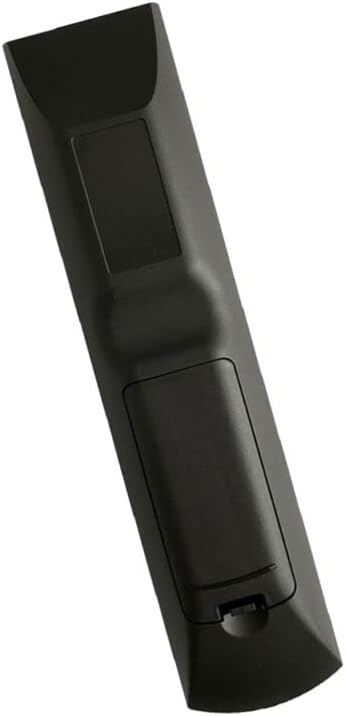
Figure 3.1: Rear view of the remote control with the battery compartment.
This image displays the back of the remote control, highlighting the area where the battery cover is located. The cover is designed to slide open for easy access to the battery slots.
4. Operating Instructions
Once batteries are installed, the remote control is ready for immediate use with compatible Sony AV Receivers (RM-U301, RM-U302, RM-U303). Point the remote directly at the infrared sensor on your AV receiver.

Figure 4.1: Front view of the remote control with button layout.
This image shows the front of the remote control, displaying all the buttons for various functions such as power, volume, channel selection, input switching, and navigation. The buttons are clearly labeled for ease of use.
Basic Functions:
- Power On/Off: Use the dedicated power button (often labeled with a circle and line symbol) to turn your device on or off.
- Volume Control: Adjust the audio level using the Volume Up (+) and Volume Down (-) buttons.
- Input Selection: Cycle through different audio/video inputs (e.g., TV, DVD, CD, Video) using the Input or Source buttons.
- Navigation: Use the directional arrow buttons (Up, Down, Left, Right) and the central OK/Enter button to navigate menus.
Important Compatibility Note:
As this is an aftermarket replacement remote, some specific or advanced functions present on your original Sony remote may not be replicated or may behave differently. This is not a defect. For optimal compatibility, it is recommended to verify the remote's functionality with your specific unit model or original remote part number.
5. Maintenance
- Battery Care: Always remove batteries from the remote control if it will not be used for an extended period (e.g., several weeks or months) to prevent battery leakage and potential damage to the remote.
- Battery Replacement: When replacing batteries, always use new batteries of the same type (AAA). Do not mix old and new batteries, or different types of batteries, as this can impair performance or cause leakage.
- Cleaning: To clean the remote, gently wipe its surface with a soft, dry cloth. For stubborn dirt, a slightly damp cloth can be used, but ensure no moisture enters the remote. Do not use harsh chemicals or abrasive cleaners.
- Storage: Store the remote in a cool, dry place away from direct sunlight and extreme temperatures.
6. Troubleshooting
Remote Not Responding:
- Check Batteries: Ensure batteries are inserted correctly with the correct polarity (+/-). Replace old or depleted batteries with fresh AAA batteries.
- Line of Sight: Make sure there are no obstructions between the remote control and the infrared sensor on your AV receiver.
- Distance: Ensure you are within the effective operating range of the remote.
Some Functions Do Not Work:
- This is a common characteristic of aftermarket replacement remotes. Not all functions of the original remote may be supported. This is not a product defect.
- Verify if the specific function is critical for your usage. If so, you may need to use the original remote or consider a universal remote with learning capabilities.
Intermittent Operation:
- Batteries may be low. Replace them with new ones.
- Ensure the remote's infrared emitter is clean and unobstructed.
7. Specifications
| Attribute | Detail |
|---|---|
| Product Type | Replacement Remote Control |
| Brand | Generic |
| Compatible Devices | Sony RM-U301, RM-U302, RM-U303 AV Receivers, Television, Stereo System, Set Top Box, DVD/Blu-ray Player, Home Theater |
| Connectivity Technology | Infrared (IR) |
| Power Source | 2 x AAA Batteries (not included) |
| Material | ABS/Plastic |
| Color | Black or White (color may vary) |
| Manufacturer | e-remotecontrol |
8. Warranty and Support
This product is an aftermarket replacement. For any specific issues or concerns regarding the remote control's functionality or compatibility, please contact the seller or manufacturer directly through your purchase platform. They can provide assistance and guidance for troubleshooting or potential replacements if necessary.
Please refer to your purchase documentation for details on return policies or any implied warranties provided by the seller.


