
Introduction
This manual provides instructions for the Generic Replacement Remote Control, designed to operate various functions of your Peaq PMS 400 Micro Compact Hi-fi Audio System, as well as compatible TV, Audio, and Projector devices. This remote is an aftermarket replacement and may not replicate all functions of an original remote control.
Setup
1. Battery Installation
The remote control requires two AAA batteries (not included). Follow these steps to install them:
- Locate the battery compartment cover on the back of the remote control.
- Press down on the tab and slide the cover off.
- Insert two AAA batteries, ensuring the positive (+) and negative (-) terminals align correctly with the markings inside the compartment.
- Slide the battery compartment cover back into place until it clicks securely.
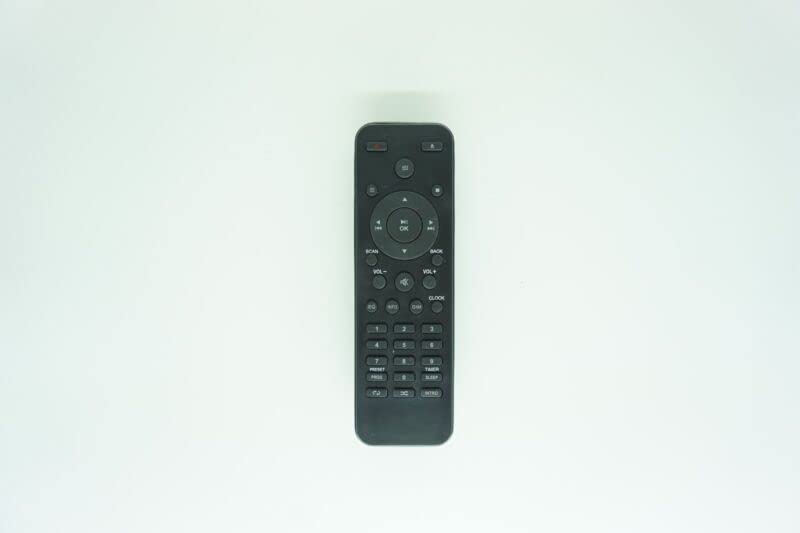
Figure 1: Generic Replacement Remote Control. This image displays the remote control, which is typically black or white, featuring various buttons for power, volume, channel, navigation, and numerical input. The battery compartment is located on the back.
2. Initial Use
No programming or setup is required for this replacement remote control. Once batteries are installed, it is ready for use with compatible devices. For optimal performance, ensure the remote is pointed directly at the device's infrared (IR) receiver.
Operating Instructions
This remote control utilizes infrared (IR) communication. Ensure a clear line of sight between the remote and the device you wish to control. The maximum effective range is approximately 5 meters (16 feet).
- Power Button: Press to turn the device on or off.
- Volume Up/Down: Adjusts the audio volume.
- Channel/Track Buttons: Navigates through channels or audio tracks.
- Navigation Pad: Use the directional arrows to move through menus and the central button to confirm selections.
- Numeric Keypad: For direct input of channel numbers or other numerical data.
- Playback Controls: Buttons for Play, Pause, Stop, Fast Forward, and Rewind for media playback.
Note: As a replacement remote, some advanced or specific functions of your original device's remote may not be supported. This is not indicative of a defect.
Maintenance
Battery Replacement
Replace batteries when the remote's performance degrades or it stops responding. Always replace both batteries at the same time. Do not mix old and new batteries, or different types of batteries (e.g., alkaline with rechargeable).
Cleaning
To clean the remote control, wipe it with a soft, dry cloth. Do not use liquid cleaners or abrasive materials, as these can damage the remote's surface or internal components.
Storage
If the remote control will not be used for an extended period, remove the batteries to prevent leakage and potential damage to the device.
Troubleshooting
- Remote not responding:
- Check if the batteries are installed correctly with the correct polarity.
- Replace old batteries with new ones.
- Ensure there is a clear line of sight between the remote and the device's IR receiver. Remove any obstructions.
- Make sure you are within the effective operating range (approximately 5 meters).
- Some functions do not work:
- This is a replacement remote control. It may not support all functions of the original remote. This is normal and not a defect.
- Verify that the function you are trying to use is supported by the replacement remote.
If issues persist after following these steps, please contact the seller for further assistance.
Specifications
| Brand | Generic |
| Model (ASIN) | B0BZ7MMGZG |
| Compatible Devices | Peaq PMS 400 Micro Compact Hi-fi Audio System, DVD/Blu-ray Player, Home Theater, Set Top Box, Stereo System, Television |
| Connectivity Technology | Infrared (IR) |
| Controller Type | Button Control |
| Maximum Range | 5 Meters |
| Number of Supported Devices | 1 |
| Batteries Required | 2 AAA batteries |
| Material | ABS/Plastic |
| Color | Black or white (color may vary) |
Warranty and Support
Warranty Information
For warranty details regarding this Generic Replacement Remote Control, please refer to the specific terms provided by the seller at the time of purchase. As a generic replacement product, warranty coverage may vary.
Customer Support
If you encounter any issues or have questions not covered in this manual, please contact the seller directly through your purchase platform. Providing your order number and the product's ASIN (B0BZ7MMGZG) will help expedite support.