
1. Introduction
This manual provides essential information for the proper setup, operation, and maintenance of your Generic Replacement Remote Control for Sony AV Amplifier RM-PR1. This remote is designed as an aftermarket replacement and may not replicate all functions of an original remote control. Please read these instructions carefully before use.
2. Setup
2.1 Battery Installation
The remote control requires two (2) AAA batteries for operation. No programming or complex setup is required; simply install the batteries to begin use.
- Locate the battery compartment on the back of the remote control.
- Slide the battery compartment cover downwards or in the direction indicated by an arrow to open it.
- Insert two (2) AAA batteries, ensuring the positive (+) and negative (-) terminals align correctly with the markings inside the compartment.
- Replace the battery compartment cover until it clicks securely into place.
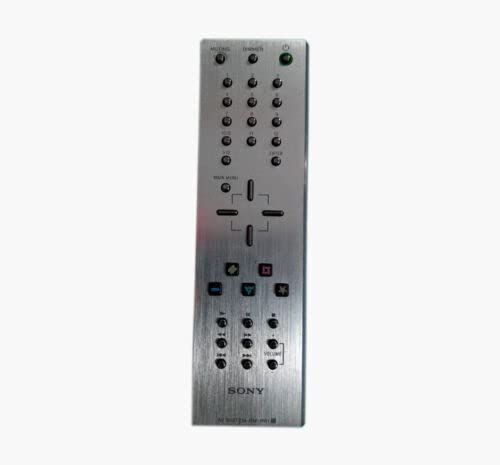
Figure 1: Generic Replacement Remote Control. This image shows the overall design of the remote control, which is typically black or white, and includes various buttons for controlling audio/video devices.
2.2 Initial Use
Once batteries are installed, the remote control is ready for use. Point the remote directly at your Sony AV Amplifier or other compatible device and press the desired function button.
3. Operating Instructions
This replacement remote control is designed to operate various functions on compatible devices. It is compatible with DVD/Blu-ray Players, Home Theater systems, Set Top Boxes, Stereo Systems, and Televisions, in addition to Sony AV Amplifiers.
- Power Button: Press to turn your device on or off.
- Volume Control: Use the volume up (+) and volume down (-) buttons to adjust audio levels.
- Channel/Track Selection: Use the channel up/down buttons or number pad for selection.
- Input/Source: Press the input or source button to cycle through available inputs on your device.
- Navigation Buttons: Use the directional arrows and 'OK' or 'Enter' button to navigate menus.
Important Note: As an aftermarket replacement, some advanced or specific functions of your original remote may not be supported by this replacement unit. This is not indicative of a defective product.
4. Maintenance
4.1 Cleaning
To clean the remote control, gently wipe its surface with a soft, dry cloth. Avoid using liquid cleaners, solvents, or abrasive materials, as these can damage the remote's finish or internal components.
4.2 Battery Care and Storage
- If the remote control will not be used for an extended period, remove the batteries to prevent leakage and potential damage.
- Do not mix old and new batteries, or different types of batteries (e.g., alkaline with rechargeable), as this can impair performance and potentially cause leakage.
- Dispose of used batteries according to local regulations.
5. Troubleshooting
- Remote not responding:
- Check if the batteries are inserted correctly with the correct polarity.
- Replace old batteries with new ones.
- Ensure there are no obstructions between the remote control and the device's infrared (IR) receiver.
- Confirm you are within the maximum operating range of approximately 5 meters (16 feet).
- Certain functions do not work:
- As a replacement remote, some specific or advanced functions of your original device's remote may not be supported. This is expected behavior for aftermarket remotes.
- Verify that your device is listed as compatible.
- Intermittent operation:
- Weak batteries can cause inconsistent performance. Replace them.
- Ensure a clear line of sight to the device.
6. Specifications
| Feature | Specification |
|---|---|
| Brand | Generic |
| Model | RM-PR1 (Replacement) |
| Color | Black or white (randomly sent) |
| Connectivity Technology | Infrared (IR) |
| Maximum Range | 5 Meters |
| Number of Supported Devices | 1 |
| Compatible Devices | DVD/Blu-ray Player, Home Theater, Set Top Box, Stereo System, Television, Sony AV Amplifier |
| Battery Type | 2 x AAA batteries (not included) |
| Material | ABS/Plastic |
7. Warranty and Support
This product is tested for functionality before delivery to ensure it is working correctly upon arrival. For any compatibility concerns or issues, it is recommended to provide your original remote's part number or your unit's model number to the seller for assistance.
Please refer to your purchase platform's return policy for information regarding returns or exchanges. Typically, a 30-day return window is available for refund or replacement.