
LE32F405
Replacement Remote Control User Manual
For PROCASTER LE32F405 Smart LCD LED HDTV TV
1. Introduction
This document provides comprehensive instructions for the use and maintenance of your new replacement remote control. This remote is designed to work with PROCASTER LE32F405 Smart LCD LED HDTV TVs, as well as various Audio/Video Players, Home Theater systems, Set Top Boxes, and Stereo Systems.
Please note that this is an aftermarket replacement remote control and not a genuine PROCASTER product. While it offers core functionality, some advanced or specific features of your original remote may not be supported. The remote is tested for functionality before shipping to ensure reliable performance.
2. Setup
2.1 Battery Installation
Your remote control requires two (2) AAA batteries for operation. Batteries are not included with the remote.
- Locate the battery compartment on the back of the remote control.
- Slide the battery cover downwards or in the direction indicated by an arrow to open it.
- Insert two AAA batteries, ensuring the positive (+) and negative (-) terminals align correctly with the markings inside the compartment.
- Replace the battery cover by sliding it back into position until it clicks securely.
Important: Do not mix old and new batteries, or different types of batteries. Remove batteries if the remote will not be used for an extended period.
2.2 Initial Pairing/Setup
This replacement remote control typically requires no programming or complex setup. Once the batteries are correctly installed, it should be ready for immediate use with compatible devices.
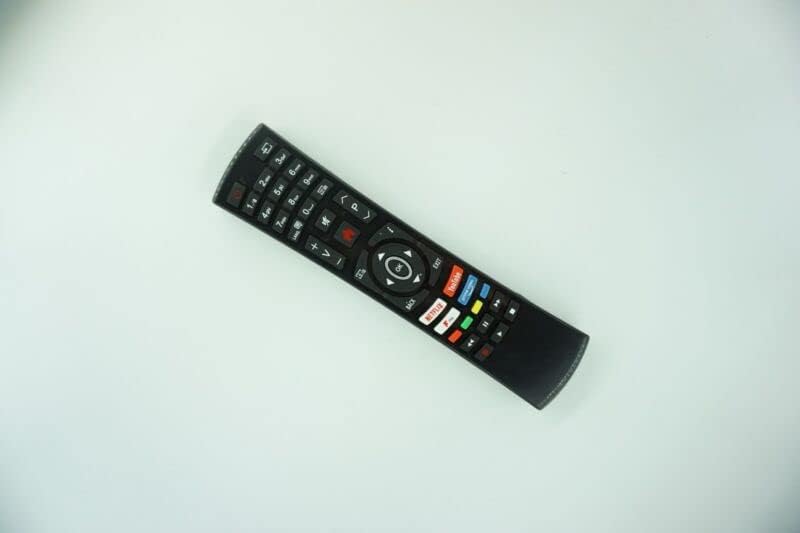
Image: Back view of the replacement remote control, highlighting the battery compartment area. This image illustrates where to insert the AAA batteries.
3. Operating Your Remote Control
The remote control utilizes Infrared (IR) communication. Ensure there is a clear line of sight between the remote's IR emitter (located at the front) and the IR receiver on your device (TV, Audio/Video Player, etc.).

Image: Front view of the replacement remote control, displaying the layout of all buttons. This image helps users identify various controls.
3.1 Basic Functions
- Power Button: Turns the connected device ON or OFF.
- Number Buttons (0-9): Used for direct channel input or numerical selections.
- Volume Up/Down (+/-): Adjusts the audio volume.
- Channel Up/Down (CH+/-): Changes the television channel.
- Mute Button: Toggles audio mute.
- Input/Source Button: Cycles through available input sources (HDMI, AV, etc.).
- Navigation Pad (Up/Down/Left/Right/OK): Used to navigate menus and confirm selections.
- Back/Exit Button: Returns to the previous screen or exits a menu.
For specific functions not listed, refer to your original device's user manual, as this replacement remote may not replicate all specialized buttons or features.
4. Maintenance
4.1 Cleaning the Remote Control
To maintain the remote's appearance and functionality, clean it periodically:
- Use a soft, dry cloth to wipe the surface of the remote.
- For stubborn dirt, slightly dampen the cloth with water or a mild, non-abrasive cleaner. Avoid excessive moisture.
- Do not use harsh chemicals, solvents, or abrasive cleaning agents, as these can damage the remote's finish or internal components.
4.2 Battery Care
Proper battery care ensures optimal performance and longevity of your remote:
- If the remote will not be used for an extended period (e.g., several weeks or months), remove the batteries to prevent leakage and potential damage to the remote.
- Always replace all batteries at the same time. Do not mix old and new batteries, or different types of batteries (e.g., alkaline with rechargeable).
- Dispose of used batteries responsibly according to local regulations.
5. Troubleshooting
If you encounter issues with your remote control, please refer to the following table for common problems and their solutions:
| Issue | Solution |
|---|---|
| Remote not responding to button presses. | Check battery installation. Ensure batteries are inserted correctly with correct polarity. Replace old or depleted batteries with fresh ones. Ensure there is a clear line of sight between the remote and the device's IR receiver. |
| Some functions or buttons do not work. | This is an aftermarket replacement remote. It may not support all advanced or specific functions of your original device's remote. This is not a defect. Refer to your device's original manual for unsupported functions. |
| Short transmission distance or intermittent response. | Replace batteries with fresh ones. Ensure no obstructions are blocking the IR signal path. Ensure the remote is pointed directly at the device. |
| Remote feels loose or makes rattling sound. | Ensure the battery cover is securely closed. If the issue persists, contact seller support. |
6. Specifications
| Brand | Generic |
| Model Compatibility | PROCASTER LE32F405, LE-32F405 Smart LCD LED HDTV TV |
| Wireless Communication | Infrared (IR) |
| Material | ABS/Plastic |
| Power Source | 2 x AAA Batteries (not included) |
| Color | Black or White (color may vary and is sent randomly) |
| Special Feature | Ergonomic design |
| Max Number of Supported Devices | 1 (dedicated replacement) |
| Compatible Devices (General) | TV/Audio/Projector, DVD/Blu-ray Player, Home Theater, Set Top Box, Stereo System, Television |
7. Warranty and Support
As an aftermarket replacement product, specific warranty terms may vary. The product is tested for functionality prior to delivery to ensure it is in working condition upon arrival.
For any questions, concerns, or support regarding this replacement remote control, please contact the seller directly through the platform where you made your purchase. Providing your original remote part number or unit model can assist in resolving any compatibility inquiries.
no relevant documents
Ask a question about this manual
Ask about setup, troubleshooting, compatibility, parts, safety, or missing instructions. Manuals+ will review the question and use this page’s manual context to help answer it.