1. Introduction
This manual provides essential instructions for the operation and maintenance of your new Generic replacement remote control. This remote is designed to work with Tesla 43V505BUS Smart LCD LED HDTV TVs, as well as other compatible Audio/Video Players and Projectors. Please read this manual carefully before use to ensure proper functionality and to understand its features.
2. Product Overview
The replacement remote control is an aftermarket product designed to offer basic functionality for your compatible devices. It features an ergonomic design made from durable ABS material for comfortable handling.
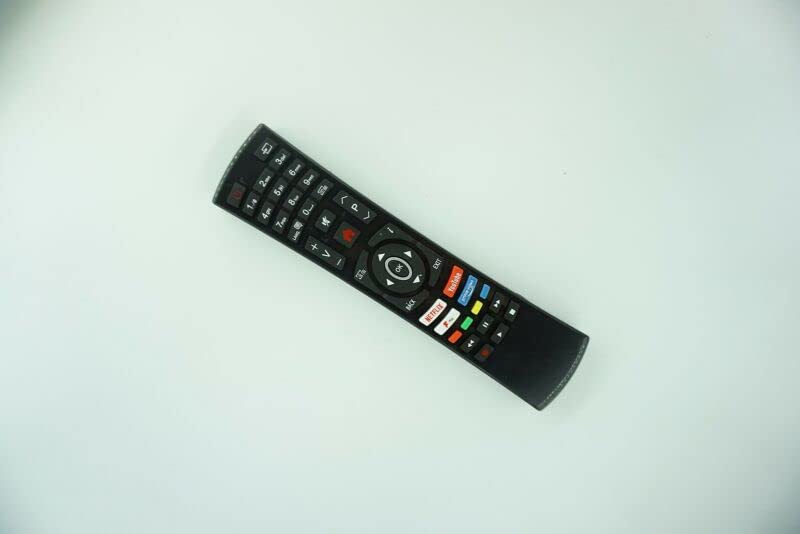
Figure 1: Front view of the Generic Replacement Remote Control. The remote is black with various buttons for numbers, volume, channel, navigation, and quick access to streaming services like Netflix and YouTube.
This remote utilizes Infrared (IR) wireless communication for reliable control of your devices.
3. Setup
3.1 Battery Installation
- Locate the battery compartment on the back of the remote control.
- Open the battery compartment cover.
- Insert two (2) AAA batteries, ensuring the positive (+) and negative (-) terminals align correctly with the markings inside the compartment.
- Close the battery compartment cover securely.
Note: Batteries are not included with the remote control.
3.2 Initial Pairing / Programming
This replacement remote control requires no programming or setup. Once batteries are installed, it is ready for immediate use with compatible devices.
4. Operating Instructions
Point the remote control directly at the infrared receiver on your device (e.g., TV, DVD player, projector) and press the desired button.
4.1 Basic Functions
- Power Button: Turns the device on or off.
- Number Buttons (0-9): For direct channel selection.
- Volume Up/Down (+V/-V): Adjusts the volume level.
- Channel Up/Down (+P/-P): Changes channels.
- Navigation Buttons (Up, Down, Left, Right, OK): Used for menu navigation and selection.
- Back/Exit Buttons: Returns to the previous screen or exits a menu.
- Quick Access Buttons: Dedicated buttons for popular streaming services like Netflix and YouTube (functionality depends on device compatibility).
Important Note: As this is an aftermarket replacement remote control, some advanced functions or specific features of your original remote may not be supported or may operate differently. This is not indicative of a product defect.
4.2 Compatible Devices
This remote is compatible with a variety of devices, including:
- Television (HDTV, Smart LCD LED TV)
- Audio/Video Players
- DVD/Blu-ray Players
- Home Theater Systems
- Set Top Boxes
- Stereo Systems
- Projectors
5. Maintenance
5.1 Battery Care
- Remove batteries from the remote control if it will not be used for an extended period to prevent leakage.
- Do not mix old and new batteries.
- Do not mix different types of batteries (e.g., alkaline and rechargeable).
- Dispose of used batteries responsibly according to local regulations.
5.2 Cleaning
Wipe the remote control with a soft, dry cloth. Avoid using liquid cleaners or abrasive materials, as these can damage the surface or internal components.
6. Troubleshooting
- Remote not responding:
- Ensure the remote is pointed directly at the device's IR receiver.
- Check if the batteries are correctly installed with the correct polarity.
- Replace old batteries with new ones.
- Ensure there are no obstructions between the remote and the device.
- Some functions do not work:
- This is a replacement remote control, and some functions may not be identical to the original remote. This is considered normal operation for a universal or replacement remote.
- Verify that your device model is listed as compatible.
- Short transmission distance:
- Replace batteries with new ones.
- Ensure there are no strong light sources or other IR devices interfering with the signal.
7. Specifications
| Feature | Detail |
|---|---|
| Brand | Generic |
| Model Number (ASIN) | B0BZ7M8XCT |
| Connectivity Technology | Infrared (IR) |
| Power Source | 2 x AAA Batteries (not included) |
| Material | ABS/Plastic |
| Max Number of Supported Devices | 1 |
| Compatible Devices | DVD/Blu-ray Player, Home Theater, Set Top Box, Stereo System, Television |
| Color | Black or white (color sent randomly) |
8. Warranty and Support
Warranty information for this Generic replacement remote control is not provided in this manual. For specific warranty details or technical support, please contact the seller or retailer from whom you purchased the product. It is recommended to retain your proof of purchase for any warranty claims.