
Product Overview
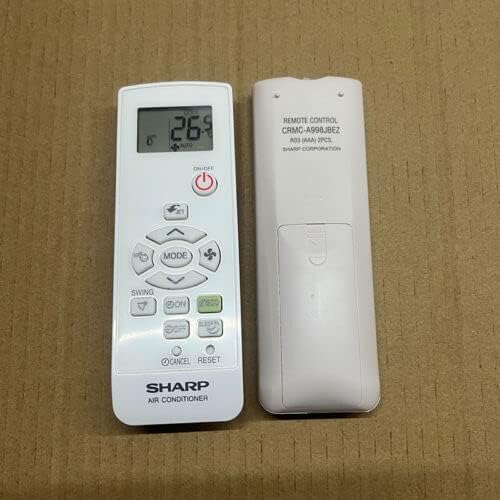
This image displays the front and back of the replacement remote control. The front features a digital display showing '26°C AUTO' and buttons for power, mode selection, fan speed, swing, timer, and reset. The back of the remote indicates 'REMOTE CONTROL CRMC-A998JBEZ R03 (AAA) 2PCS SHARP CORPORATION', detailing the model number and battery type.
This manual provides instructions for the Replacement Remote Control, model CRMC-A998JBEZ, designed for Sharp Air Conditioners. This remote serves as a dedicated replacement and may not replicate all functions of an original remote control. It operates using infrared (IR) communication.
Setup
Battery Installation
The remote control requires 2 AAA batteries (R03). Batteries are not included with the remote control.
- Locate the battery compartment on the back of the remote control.
- Slide the battery compartment cover downwards to open.
- Insert two AAA batteries, ensuring correct polarity (+ and -) as indicated inside the compartment.
- Slide the battery compartment cover back into place until it clicks securely.
Important: Do not mix old and new batteries or different types of batteries. Remove batteries if the remote control will not be used for an extended period.
Initial Setup
No programming or setup is required for this replacement remote control. Once batteries are installed, it is ready for use with compatible Sharp Air Conditioners.
Operating Instructions
Point the remote control directly towards the infrared receiver on your Sharp Air Conditioner unit.
- Power On/Off: Press the ON/OFF button to turn the air conditioner on or off.
- Mode Selection: Press the MODE button to cycle through available operating modes (e.g., Cool, Heat, Fan, Dry, Auto). The current mode will be displayed on the remote's screen.
- Temperature Adjustment: Use the ▲ (Up) and ▼ (Down) arrow buttons to increase or decrease the desired temperature.
- Fan Speed: Use the fan icon button to adjust the fan speed.
- Swing Function: Press the SWING button to activate or deactivate the louver swing function.
- Timer Functions: Use the ON and OFF buttons (below SWING) to set timer for automatic power on/off. Refer to your air conditioner's original manual for specific timer programming details if needed.
- Cancel/Reset: The CANCEL and RESET buttons are typically used for clearing timer settings or resetting the remote to default.
Note: As this is a replacement remote, some advanced functions present on the original remote may not be supported. The primary functions for temperature, mode, and power control are fully operational.
Maintenance
- Cleaning: Wipe the remote control with a soft, dry cloth. Do not use abrasive cleaners or solvents.
- Battery Replacement: Replace batteries when the remote's performance degrades or the display becomes dim. Always replace both batteries simultaneously.
- Storage: Store the remote control in a cool, dry place away from direct sunlight and extreme temperatures.
Troubleshooting
| Problem | Possible Cause | Solution |
|---|---|---|
| Remote not responding. | Dead or incorrectly installed batteries. Obstruction between remote and AC unit. Remote out of range. | Replace batteries, ensuring correct polarity. Remove any obstructions. Move closer to the AC unit. |
| Some functions do not work. | This is a replacement remote; not all original functions are supported. | Verify if the function is a basic operation (power, mode, temp). If it's an advanced feature, it may not be compatible. |
| Display is dim or blank. | Low battery power. | Replace batteries. |
| Remote works intermittently. | Weak batteries. Interference. | Replace batteries. Ensure no strong light sources (like direct sunlight) are interfering with the IR signal. |
| Remote sends random commands. | Stuck button or internal malfunction. | Remove batteries for a few minutes and reinsert. If problem persists, consider replacement. |
Specifications
- Model: CRMC-A998JBEZ
- Compatibility: Designed for Sharp Air Conditioners (specific models may vary, refer to original AC manual for compatibility).
- Wireless Communication: Infrared (IR)
- Power Source: 2 x AAA Batteries (R03)
- Material: ABS/Plastic
- Color: Black or White (color may vary upon delivery)
- Dimensions: (Approximate, based on typical remote size) Length: 14 cm, Width: 5 cm, Thickness: 2 cm
- Operating Distance: Up to 8 meters (26 feet) under optimal conditions.
Warranty Information
This product is a replacement remote control. Warranty terms are typically provided by the seller at the time of purchase. Please retain your purchase receipt for any warranty claims. For specific warranty details, contact the seller directly.
Support
For further assistance or inquiries regarding this replacement remote control, please contact the seller or manufacturer. Providing your original remote's part number or your air conditioner unit's model number can help in resolving specific compatibility questions.
Manufacturer: e-remotecontrol
Brand: Generic


