1. Introduction
This manual provides instructions for the setup, operation, and maintenance of your Generic replacement remote control, model 0010402886AJ, designed for Haier Air Conditioners. This remote control uses infrared (IR) communication.
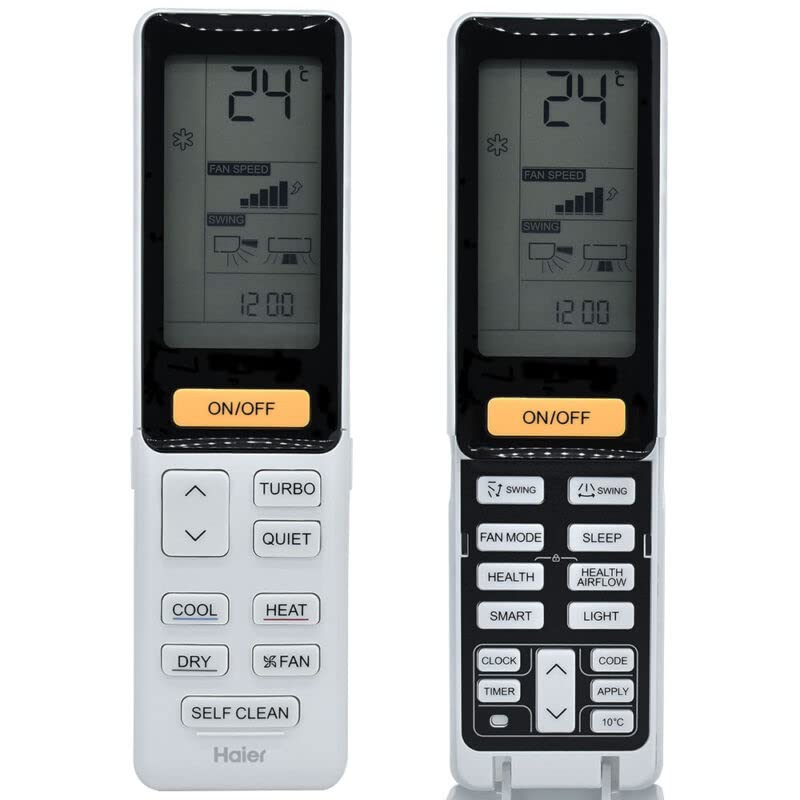
Figure 1: Front and back view of the remote control. The front features a digital display showing temperature and mode settings, along with various function buttons such as ON/OFF, COOL, HEAT, FAN, DRY, TURBO, QUIET, SELF CLEAN, and temperature adjustment arrows. The back shows the battery compartment cover.
2. Setup
2.1 Battery Installation
- Locate the battery compartment on the back of the remote control.
- Slide the battery compartment cover downwards and remove it.
- Insert two (2) AAA batteries, ensuring the positive (+) and negative (-) terminals match the diagrams inside the compartment.
- Replace the battery compartment cover by sliding it back into place until it clicks securely.
Note:
- Do not mix old and new batteries or different types of batteries.
- Remove batteries if the remote control will not be used for an extended period.
2.2 Initial Use
This replacement remote control requires no programming or setup. Once batteries are installed, it is ready for use with compatible Haier Air Conditioner units.
3. Operating Instructions
Point the remote control directly at the infrared receiver on your Haier Air Conditioner unit. Ensure there are no obstructions between the remote and the unit.
3.1 Button Functions
- ON/OFF: Powers the air conditioner on or off.
- Temperature Adjustment Arrows (▲ / ▼): Adjusts the desired temperature setting.
- COOL: Activates cooling mode.
- HEAT: Activates heating mode.
- DRY: Activates dehumidification mode.
- FAN: Activates fan-only mode and cycles through fan speeds.
- TURBO: Engages maximum cooling or heating power for rapid temperature change.
- QUIET: Sets the fan speed to a lower setting for quieter operation.
- SELF CLEAN: Initiates the self-cleaning function of the air conditioner (if supported by the unit).
- FAN SPEED: Adjusts the fan speed (indicated on the display).
- SWING: Controls the louver swing function for air direction.
3.2 Display Information
The remote control's LCD display shows current settings such as:
- Set Temperature (e.g., 24°C)
- Operating Mode (Cool, Heat, Dry, Fan)
- Fan Speed
- Swing Mode
- Current Time (e.g., 12:00)
4. Maintenance
4.1 Cleaning
Wipe the remote control with a soft, dry cloth. Do not use liquid cleaners or abrasive materials, as these can damage the surface or internal components.
4.2 Battery Replacement
Replace batteries when the remote control's range decreases or if the display becomes dim or unresponsive. Follow the battery installation steps in Section 2.1.
4.3 Storage
If the remote control will not be used for an extended period, remove the batteries to prevent leakage and potential damage.
5. Troubleshooting
- Remote not responding:
- Check if the batteries are correctly installed and have sufficient charge. Replace if necessary.
- Ensure there is a clear line of sight between the remote control and the air conditioner's receiver.
- Verify that the air conditioner unit is powered on.
- Some functions do not work:
- As a replacement remote control, some advanced or specific functions of the original remote may not be supported. This is not indicative of a defective product.
- Ensure your air conditioner unit supports the specific function you are trying to use (e.g., SELF CLEAN).
- Short transmission distance:
- Replace the batteries with fresh ones.
- Ensure no objects are blocking the IR signal.
6. Specifications
- Model: 0010402886AJ
- Brand: Generic
- Manufacturer: e-remotecontrol
- Compatible Devices: Haier Air Conditioners
- Power Source: 2 x AAA Batteries (not included)
- Communication: Infrared (IR)
- Material: ABS/Plastic
- Color: Black or white (may vary)
- ASIN: B0BZ7M4T1G