
1. Introduction
This manual provides instructions for the Generic Universal Replacement Remote Control, Model 815-00025. This remote is designed to operate various devices including televisions, audio systems, and projectors. It serves as an aftermarket replacement and may not replicate all functions of an original remote control. No programming or setup is required for basic operation; simply install batteries.
2. Safety Information
- Do not mix old and new batteries, or different types of batteries.
- Ensure correct battery polarity (+/-) when inserting.
- Remove batteries if the remote control will not be used for an extended period to prevent leakage.
- Keep batteries out of reach of children.
- Avoid exposing the remote control to direct sunlight, heat sources, or moisture.
3. Package Contents
- 1 x Generic Universal Replacement Remote Control (Model 815-00025)
Note: AAA batteries are not included and must be purchased separately.
4. Setup
4.1 Battery Installation
The remote control requires two AAA batteries for operation.
- Locate the battery compartment on the back of the remote control.
- If present, use a small screwdriver to loosen the screw securing the battery compartment cover.
- Slide the battery compartment cover downwards or outwards to open.
- Insert two AAA batteries, ensuring that the positive (+) and negative (-) terminals align correctly with the markings inside the compartment.
- Replace the battery compartment cover and secure it with the screw if applicable.
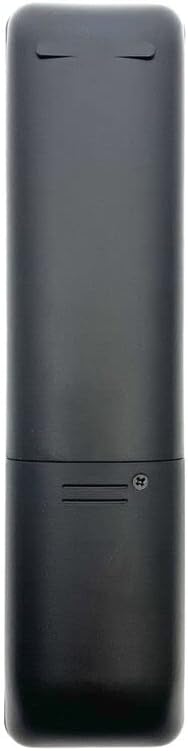
Image: Rear view of the remote control, highlighting the battery compartment cover and securing screw. This is where two AAA batteries are inserted.
5. Operation
Once batteries are installed, the remote control is ready for use. Point the remote directly at the device you wish to control.
5.1 Basic Functions
- POWER: Turns the connected device (TV, audio system, projector) on or off.
- VOLUME +/-: Increases or decreases the audio volume.
- CHANNEL +/-: Changes the television channel up or down.
- MUTE: Silences the audio output.
- INPUT/SOURCE: Cycles through available input sources (e.g., HDMI 1, HDMI 2, AV).
- NUMBER BUTTONS (0-9): Directly selects channels or inputs.
- NAVIGATION BUTTONS (Up, Down, Left, Right, OK/Enter): Used for menu navigation and selection.
5.2 Advanced Functions
- NETFLIX: Provides direct access to the Netflix application on compatible smart TVs or streaming devices.
Note: As a replacement remote, some specific functions or buttons present on your original remote may not be available or fully functional on this universal replacement. This is not indicative of a defect.
6. Compatibility
This universal replacement remote control is designed to work with a range of devices. It is compatible with:
- DVD/Blu-ray Players
- Home Theater Systems
- Set Top Boxes
- Stereo Systems
- Televisions
- Projectors
For optimal compatibility, it is recommended to verify your device's model number or original remote part number if you encounter issues.
7. Maintenance
- Clean the remote control regularly with a soft, dry cloth. Do not use liquid cleaners or abrasive materials.
- Avoid dropping the remote control or subjecting it to strong impacts.
- Store the remote control in a cool, dry place when not in use.
8. Troubleshooting
| Problem | Solution |
|---|---|
| Remote control is not working. |
|
| Remote control has limited range. |
|
| Some functions do not work. |
|
9. Specifications
| Feature | Value |
|---|---|
| Brand | Generic |
| Model | 815-00025 |
| Special Feature | Universal |
| Color | Black or white (color may vary) |
| Max Number of Supported Devices | 1 |
| Compatible Devices | DVD/Blu-ray Player, Home Theater, Set Top Box, Stereo System, Television, Projector |
| Connectivity Technology | Infrared (IR) |
| Controller Type | Button Control |
| Maximum Range | 5 Meters |
| Number of Batteries Required | 2 |
| Battery Type | AAA |
| Material | ABS/Plastic |
10. Warranty and Support
This product is an aftermarket replacement remote control. For specific warranty information or technical support, please refer to the retailer or manufacturer from whom the product was purchased. Keep your purchase receipt as proof of purchase.