
0010402886R
Replacement Remote Control User Manual
Brand: Generic | Model: 0010402886R
1. Introduction
This manual provides instructions for the Generic Replacement Remote Control, model 0010402886R, designed for use with Haier AC Air Conditioners (model 0010402886) and compatible TV/Audio/Projector units. This is an aftermarket replacement remote control and may not replicate all functions of the original device's remote. It is engineered for ease of use, requiring no complex programming or setup.
For optimal performance, it is recommended to verify compatibility with your specific unit model or original remote part number.
2. Setup
2.1 Battery Installation
The remote control requires two (2) AAA batteries for operation. Batteries are not included with the remote.
- Locate the battery compartment cover on the back of the remote control.
- Slide the cover downwards or press the latch (if present) to open the compartment.
- Insert two AAA batteries, ensuring the positive (+) and negative (-) terminals align correctly with the markings inside the compartment.
- Close the battery compartment cover by sliding it back into place until it clicks securely.
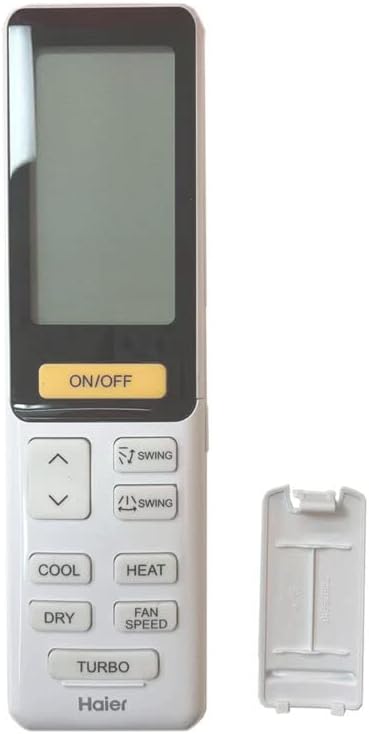
Image: Rear view of the remote control with the battery cover removed, illustrating the battery insertion process.
2.2 Initial Use
This replacement remote control is designed for immediate use. No programming or complex setup procedures are required. Once batteries are correctly installed, the remote is ready to operate compatible devices.
3. Operating Instructions
The remote control features an ergonomic design with clearly labeled buttons for various functions. Point the remote directly at the infrared receiver of your device (e.g., AC unit, TV) for optimal signal transmission.

Image: Front view of the remote control, displaying the LCD screen and all functional buttons.
3.1 Common Functions
- ON/OFF: Powers the device on or off.
- COOL: Activates the cooling mode for air conditioners.
- HEAT: Activates the heating mode for air conditioners.
- DRY: Activates the dehumidification mode.
- FAN SPEED: Adjusts the fan speed (e.g., low, medium, high, auto).
- SWING: Controls the louver swing function for air distribution.
- TURBO: Activates a rapid cooling or heating function.
- Arrow Buttons (Up/Down): Used for temperature adjustment or menu navigation.
Important Note: As this is a replacement remote control, some advanced or specific functions of your original device's remote may not be supported or may operate differently. This is not indicative of a defective product.
4. Maintenance
- Cleaning: Wipe the remote control with a soft, dry cloth. Do not use abrasive cleaners or solvents.
- Battery Care: If the remote will not be used for an extended period, remove the batteries to prevent leakage and potential damage to the remote.
- Battery Replacement: Do not mix old and new batteries, or different types of batteries (e.g., alkaline and rechargeable). Always replace all batteries with new ones of the same type.
- Storage: Store the remote in a cool, dry place away from direct sunlight and extreme temperatures.
5. Troubleshooting
- Remote Not Responding:
- Check if the batteries are inserted correctly with the correct polarity.
- Replace old batteries with new ones.
- Ensure there are no obstructions between the remote and the device's infrared receiver.
- Confirm the remote is pointed directly at the device.
- Some Functions Not Working:
- This is a replacement remote. It may not support all functions present on the original remote control for your specific device. This is normal for aftermarket replacement units.
- Verify that the function you are trying to use is supported by this specific replacement model.
- Short Transmission Distance:
- Replace the batteries. Low battery power can reduce the effective range.
- Ensure there are no strong light sources (like direct sunlight) interfering with the infrared signal.
6. Specifications
| Feature | Detail |
|---|---|
| Brand | Generic |
| Manufacturer | e-remotecontrol |
| Wireless Communication | IR (Infrared) |
| Power Source | 2 AAA batteries (not included) |
| Material | ABS/Plastic |
| Color | Black or white (sent randomly) |
| Special Feature | Ergonomic |
| Max Number of Supported Devices | 1 |
| Compatible Devices | Television, Set Top Box, Stereo System, DVD/Blu-ray Player, Home Theater, AC |
7. Warranty and Support
This product is an aftermarket replacement remote control. For any issues not covered in this manual, or for specific warranty information, please contact the seller directly through your purchase platform. It is recommended to provide your remote part number or the model of your unit when seeking support to ensure accurate assistance.
Ask a question about this manual
Ask about setup, troubleshooting, compatibility, parts, safety, or missing instructions. Manuals+ will review the question and use this page’s manual context to help answer it.