Introduction
This manual provides essential information for the setup, operation, maintenance, and troubleshooting of your new Generic replacement remote control. This remote is designed to function with various devices, including the Nakamichi NA135 Car CD DVD Audio System Player Receiver, as well as other compatible TV, audio, and projector systems. Please read these instructions carefully to ensure proper use and longevity of your remote control.
Setup
Battery Installation
Your remote control requires two AAA batteries for operation. Follow these steps to install them:
- Locate the battery compartment cover on the back of the remote control.
- Slide the cover downwards or press the latch to open it.
- Insert two AAA batteries, ensuring the positive (+) and negative (-) terminals align correctly with the markings inside the compartment.
- Replace the battery compartment cover, sliding it back into place until it clicks securely.
Note: Do not mix old and new batteries, or different types of batteries. Remove batteries if the remote will not be used for an extended period.
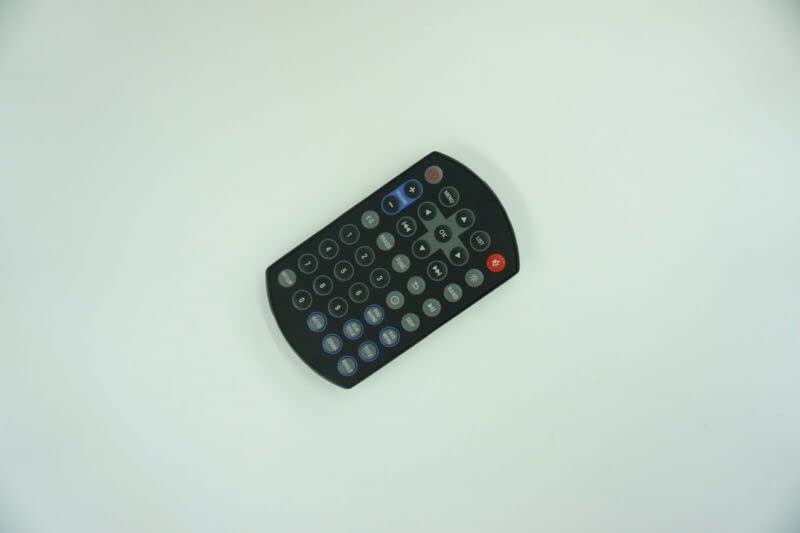
Image: The Generic replacement remote control, showing its button layout. The battery compartment is located on the reverse side.
Initial Use and Compatibility
This is a dedicated replacement remote control. No programming or setup is typically required; simply install the batteries, and it should be ready for use with compatible devices. However, as an aftermarket replacement, some functions may not operate identically to your original remote control. It is designed to work with the Nakamichi NA135 Car CD DVD Audio System Player Receiver and other devices such as DVD/Blu-ray Players, Home Theater systems, Set Top Boxes, Stereo Systems, and Televisions.
Operating Instructions
The remote control features standard buttons for common functions. Point the remote directly at the device you wish to control.
- Power Button: Turns the device on or off.
- Numeric Keypad (0-9): For direct channel input or menu navigation.
- Volume Up/Down: Adjusts the audio volume.
- Channel Up/Down: Changes TV channels or tracks on audio players.
- Mute Button: Silences the audio output.
- Playback Controls (Play, Pause, Stop, Fast Forward, Rewind, Skip): For controlling media playback on DVD/CD players.
- Menu/OK/Navigation Buttons: For navigating on-screen menus and confirming selections.
Important: Due to variations between original equipment and replacement remotes, some advanced or device-specific functions may not be supported. This is not indicative of a defective product.
Maintenance
Battery Care
- Remove batteries if the remote control will not be used for an extended period to prevent leakage.
- Replace all batteries at the same time; do not mix old and new batteries.
- Dispose of used batteries responsibly according to local regulations.
Cleaning
To clean your remote control, gently wipe it with a soft, dry cloth. For stubborn dirt, a slightly damp cloth can be used, followed by a dry cloth. Avoid using harsh chemicals or abrasive cleaners, as these can damage the remote's surface or internal components.
Troubleshooting
Remote Not Responding
- Check Batteries: Ensure batteries are correctly installed with the correct polarity and are not depleted. Replace with fresh AAA batteries if necessary.
- Line of Sight: Make sure there is a clear line of sight between the remote control and the device's infrared (IR) receiver. Obstructions can block the signal.
- Distance: Ensure you are within the effective operating range of the remote control.
- Device Power: Confirm that the device you are trying to control is powered on and functioning correctly.
Some Functions Not Working
As a replacement remote control, it may not support all functions of your original remote. This is a common characteristic of aftermarket replacement units. If a specific function does not work, it is likely due to compatibility limitations rather than a defect in the remote itself.
Specifications
| ASIN | B0BZ7LZ1KF |
| Batteries Required | 2 AAA batteries |
| Manufacturer | e-remotecontrol |
| Brand | Generic |
| Color | Black or white (randomly sent) |
| Max Number of Supported Devices | 1 (controls one device at a time) |
| Compatible Devices | DVD/Blu-ray Player, Home Theater, Set Top Box, Stereo System, Television, Nakamichi NA135 Car CD DVD Audio System Player Receiver |
| Connectivity Technology | Infrared (IR) |
Warranty and Support
This replacement remote control is tested before delivery to ensure it is in perfect working condition. As an aftermarket product, specific warranty details may vary. For optimal compatibility and support, it is recommended to provide your original remote control's part number or your unit's model number to the seller if you encounter any issues or have specific questions regarding its functionality.