1. Product Overview
This replacement remote control is designed to operate various devices including TV, audio players, video players, and projectors, specifically compatible with the Motorola 4K Android TV Stick DVM4KA01 and similar Android TV Boxes. It functions via infrared (IR) communication.
Key Features
- Dedicated replacement remote control.
- No programming or setup required; simply install new batteries.
- Constructed from durable ABS material for comfortable handling.
- Tested for functionality prior to delivery.
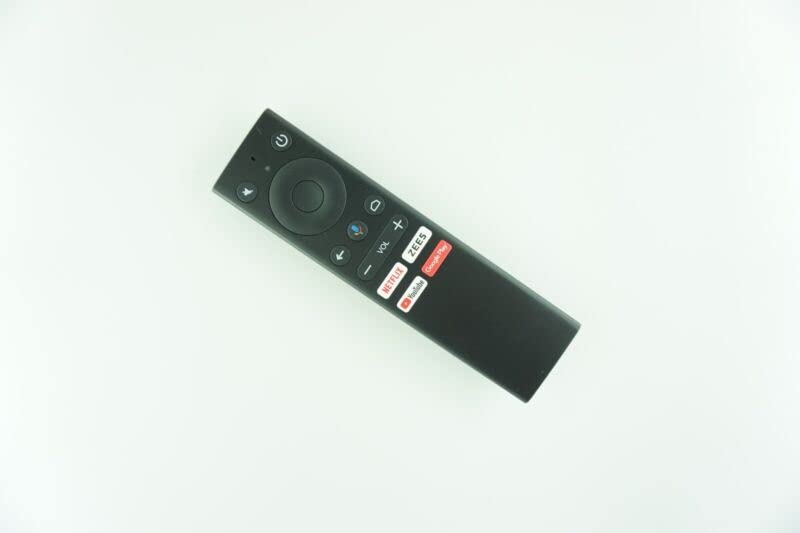
Image of the black replacement remote control. It features a power button, mute button, navigation pad, back button, home button, voice control button, volume up/down buttons, and dedicated buttons for Netflix, ZEES, YouTube, and Google Play.
2. Setup
Battery Installation
The remote control requires 2 AAA batteries (not included). Follow these steps to install them:
- Locate the battery compartment on the back of the remote control.
- Slide open the battery compartment cover.
- Insert two AAA batteries, ensuring the positive (+) and negative (-) terminals align correctly with the indicators inside the compartment.
- Close the battery compartment cover securely.
Important Battery Information:
- Do not mix old and new batteries.
- Do not mix different types of batteries.
- Remove batteries if the remote control will not be used for an extended period.
Initial Setup
This replacement remote control typically requires no programming or complex setup. Once batteries are installed, it should be ready for immediate use with compatible devices.
3. Operating Instructions
Basic Operation
Point the remote control directly at the device you wish to operate. Ensure there are no obstructions between the remote and the device's IR receiver.
Button Functions
- Power Button: Turns the connected device on or off.
- Mute Button: Mutes or unmutes the audio.
- Navigation Pad (Circular): Use the directional buttons (Up, Down, Left, Right) to navigate menus and select items. The center button acts as an 'OK' or 'Enter' button.
- Back Button: Returns to the previous screen or menu.
- Home Button: Returns to the main home screen of the device.
- Voice Control Button: Activates voice commands (if supported by your device and configured).
- Volume Buttons (VOL +/-): Increases or decreases the audio volume.
- Dedicated App Buttons (Netflix, ZEES, YouTube, Google Play): Provides direct access to these streaming applications.
Note: As this is a replacement remote, some advanced functions of your original remote may not be supported. This is not indicative of a defective product.
4. Maintenance
Cleaning
To clean the remote control, gently wipe it with a soft, dry cloth. Do not use liquid cleaners or abrasive materials, as these can damage the remote's surface or internal components.
Battery Replacement
Replace batteries when the remote's performance degrades or it stops responding. Follow the battery installation steps outlined in the 'Setup' section.
5. Troubleshooting
Common Issues and Solutions
| Problem | Possible Cause | Solution |
|---|---|---|
| Remote not responding | Dead or incorrectly installed batteries. | Check battery orientation and replace with fresh AAA batteries. |
| Remote not controlling device | Obstruction between remote and device; remote out of range; device not compatible. | Ensure clear line of sight to device's IR receiver. Move closer to the device. Verify device compatibility (e.g., Motorola 4K Android TV Stick DVM4KA01). |
| Some functions not working | This is a replacement remote, and some specific functions of the original remote may not be replicated. | This is expected behavior for a replacement remote. Focus on core functions. |
If issues persist after troubleshooting, please contact the seller for further assistance.
6. Specifications
Product Specifications
- Model Compatibility: Motorola 4K Android TV Stick DVM4KA01, various TV/Audio/Projector devices.
- Connectivity Technology: Infrared (IR)
- Power Source: 2 x AAA Batteries (not included)
- Material: ABS Plastic
- Color: Black or white (color may vary)
- Max Number of Supported Devices: 1
- Manufacturer: e-remotecontrol
Note: Specifications are subject to change without prior notice.
7. Warranty and Support
Return Policy
This product is subject to a 30-day return policy for refund or replacement. Please refer to your purchase details for specific terms.
Customer Support
For technical assistance or inquiries regarding this product, please contact the seller directly through your purchase platform. Providing your original remote part number or unit model may help in resolving specific compatibility questions.
