
1. Introduction
This user manual provides comprehensive instructions for the operation and maintenance of your new replacement remote control. This remote is designed to work with Pioneer AVH-X5650BT and AVH-X8550BT Car DVD RDS Radio Stereo systems. While it functions as a dedicated replacement, some advanced features of the original remote may not be supported. Please read this manual carefully to ensure proper use and to maximize the lifespan of your remote control.
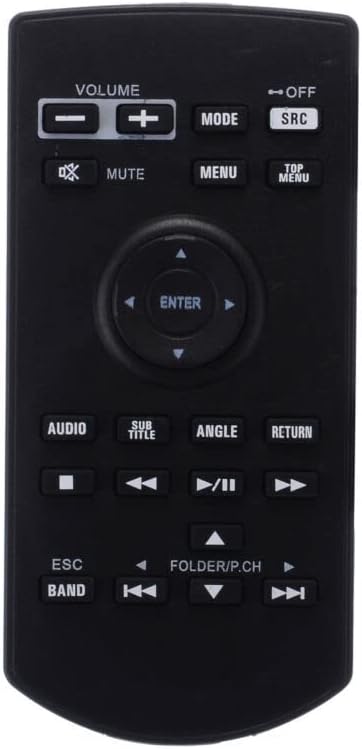
Figure 1: Front view of the Replacement Remote Control, showing all buttons clearly labeled.
2. Setup Guide
2.1 Battery Installation
The remote control requires two (2) AAA batteries (not included) for operation. Follow these steps to install the batteries:
- Locate the battery compartment on the back of the remote control.
- Slide the battery compartment cover downwards or in the direction indicated by an arrow to open it.
- Insert two AAA batteries, ensuring that the positive (+) and negative (-) terminals align correctly with the markings inside the compartment.
- Slide the battery compartment cover back into place until it clicks securely.
Note: Do not mix old and new batteries, or different types of batteries. Remove batteries if the remote will not be used for an extended period.
2.2 Initial Pairing / No Setup Required
This replacement remote control is designed to work out of the box with compatible Pioneer AVH-X5650BT and AVH-X8550BT units. No programming or setup is required. Simply install the batteries, point the remote towards your device, and begin operation.
3. Operating Instructions
The remote control features an intuitive layout for easy navigation and control of your compatible Pioneer car audio system. Below is an overview of the main buttons and their functions.

Figure 2: Angled view of the Replacement Remote Control, showcasing its compact design.
3.1 Button Functions Overview
| Button | Function |
|---|---|
| VOLUME +/- | Adjusts the audio output volume. |
| MUTE | Mutes or unmutes the audio output. |
| MODE | Cycles through different audio modes or sources. |
| SRC (Source) | Selects the input source (e.g., Radio, CD, USB, Bluetooth). |
| MENU | Accesses the main menu of the device. |
| TOP MENU | Navigates to the top level of a disc menu. |
| Navigation Arrows (Up, Down, Left, Right) | Navigates through menus and options. |
| ENTER | Confirms a selection or enters a submenu. |
| AUDIO | Cycles through available audio tracks or languages. |
| SUB TITLE | Toggles or selects subtitle options. |
| ANGLE | Changes the viewing angle for compatible discs. |
| RETURN | Goes back to the previous menu or screen. |
| Playback Controls (Play/Pause, Stop, Fast Forward, Rewind, Skip Forward, Skip Back) | Standard controls for media playback. |
| ESC (Escape) | Exits current function or menu. |
| BAND | Switches between radio bands (e.g., FM1, FM2, AM). |
| FOLDER/P.CH | Navigates through folders or preset channels. |
4. Maintenance
Proper care and maintenance will ensure the longevity and optimal performance of your remote control.
4.1 Cleaning
To clean the remote control, use a soft, dry cloth. For stubborn dirt, slightly dampen the cloth with water or a mild, non-abrasive cleaner. Do not use harsh chemicals, solvents, or abrasive cleaning pads, as these can damage the remote's surface or internal components.
4.2 Battery Care
- Always use fresh, high-quality AAA batteries.
- If the remote control will not be used for an extended period (e.g., several weeks or months), remove the batteries to prevent leakage and potential damage to the remote.
- Dispose of used batteries responsibly according to local regulations.
5. Troubleshooting
If you experience issues with your remote control, please refer to the following common problems and solutions:
- Remote is not responding:
- Check if the batteries are installed correctly with the correct polarity (+/-).
- Replace the batteries with new ones.
- Ensure there are no obstructions between the remote control and the infrared receiver on your Pioneer unit.
- Make sure you are within the effective operating range of the remote.
- Some functions do not work:
- As a replacement remote, some specific functions present on the original manufacturer's remote may not be supported. This is not a defect of the product.
- Refer to your Pioneer unit's original manual for specific functions that may require the original remote or direct unit controls.
- Remote works intermittently:
- This often indicates low battery power. Replace the batteries.
- Ensure the remote's infrared emitter is clean and free from debris.
6. Specifications
- Brand: Generic
- Manufacturer: e-remotecontrol
- Compatible Devices: Pioneer AVH-X5650BT, AVH-X8550BT Car DVD RDS Radio Stereo Systems, TV/Audio/Projector (general compatibility)
- Connectivity Technology: Infrared (IR)
- Power Source: 2 x AAA Batteries (not included)
- Color: Black or white (color may vary)
- Max Number of Supported Devices: 1 (dedicated to the specified Pioneer models)
7. Warranty and Support
This product is an aftermarket replacement remote control. For specific warranty information, please refer to the terms and conditions provided by your retailer or the seller at the time of purchase. Typically, replacement parts may come with a limited warranty against manufacturing defects.
For technical support or further assistance, please contact the seller or retailer from whom you purchased this remote control. They will be able to provide guidance specific to your purchase and address any product-related inquiries.


