
1. Introduction
This document provides instructions for the Generic Replacement Remote Control, designed to operate various devices including TV, Audio/Video Players, Projectors, and specifically compatible with D-link DCS-5211L/5222L IP HD Cameras. This is an aftermarket replacement remote control and is not a genuine original equipment manufacturer (OEM) product. While it offers core functionalities, some advanced features of your original remote may not be supported.
The remote is designed for ease of use, requiring no complex programming or setup. It features stable performance, a long transmission distance, and sensitive operation. Each unit is tested for functionality before shipment.
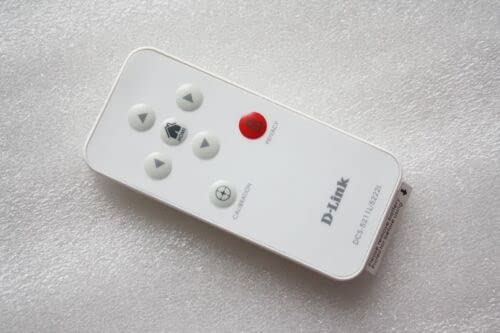
Figure 1: Generic Replacement Remote Control. The remote is available in black or white and features standard buttons for device control.
2. Setup
This replacement remote control requires no programming or complex setup. Simply install the batteries to begin operation.
2.1 Battery Installation
- Locate the battery compartment on the back of the remote control.
- Slide open the battery compartment cover.
- Insert two (2) AAA batteries, ensuring correct polarity (+ and -) as indicated inside the compartment.
- Close the battery compartment cover securely.
Important: Do not mix old and new batteries, or different types of batteries. Remove batteries if the remote control will not be used for an extended period to prevent leakage.
3. Operating the Remote Control
This remote control uses Infrared (IR) communication. Ensure a clear line of sight between the remote control and the device you wish to operate.
3.1 Basic Functions
- Power Button: Press to turn your device ON or OFF.
- Number Buttons (0-9): Use to directly select channels or input numerical values.
- Volume Up/Down: Adjust the audio volume.
- Channel Up/Down: Change channels sequentially.
- Mute Button: Mute or unmute the audio.
- Navigation Buttons (Up, Down, Left, Right, OK/Enter): Used for menu navigation and selection on compatible devices.
For specific functions related to your D-link DCS-5211L/5222L IP HD Camera, refer to your camera's original user manual for button mapping, as this replacement remote aims to replicate common functions.
4. Maintenance
Proper care will ensure the longevity of your remote control.
- Cleaning: Wipe the remote control with a soft, dry cloth. Do not use liquid cleaners or abrasive materials.
- Storage: Store the remote in a cool, dry place away from direct sunlight and extreme temperatures.
- Battery Replacement: Replace batteries promptly when the remote's performance degrades. Always replace both batteries at the same time.
5. Troubleshooting
If you experience issues with your remote control, try the following steps:
- Remote Not Responding:
- Check if the batteries are inserted correctly with the correct polarity.
- Replace old batteries with new AAA batteries.
- Ensure there is a clear line of sight between the remote's IR emitter and the device's IR receiver.
- Move closer to the device.
- Some Functions Not Working:
- As an aftermarket replacement, some specific or advanced functions of your original remote may not be supported. This is not a defect.
- Verify if the function you are trying to use is a standard function typically found on universal remotes.
6. Specifications
| Brand | Generic |
| Manufacturer | e-remotecontrol |
| Compatible Devices | DVD/Blu-ray Player, Home Theater, Set Top Box, Stereo System, Television, D-link DCS-5211L/5222L IP HD Camera |
| Connectivity Technology | Infrared (IR) |
| Power Source | 2 x AAA Batteries (not included) |
| Max Number of Supported Devices | 1 (Direct control of one device at a time) |
| Material | ABS/Plastic |
| Color | Black or White (color shipped randomly) |
7. Support
For further assistance or inquiries regarding this replacement remote control, please contact the manufacturer, e-remotecontrol, or your retailer.
When contacting support, it is helpful to provide your original remote's part number or the model number of the unit you intend to control (e.g., D-link DCS-5211L/5222L).