
1. Introduction
This manual provides comprehensive instructions for the setup, operation, and maintenance of your Windtrace Automatic Pill Dispenser. This electronic device is designed to assist in organizing, monitoring, and dispensing various medications, vitamins, and supplements, ensuring timely intake with audio and visual alerts.

2. Package Contents
Please ensure all items are present in your package:
- 1x Windtrace Automatic Pill Dispenser
- 6x Dosage Rings (for various medication schedules)
- 3x Black Keys (for battery compartment)
- 1x Instruction Manual
- 4x AA Batteries
3. Setup Instructions
3.1. Installing Batteries
- Locate the battery compartment on the underside of the dispenser.
- Use one of the provided black keys to unlock and open the battery cover.
- Insert the 4 AA batteries, ensuring correct polarity (+/-).
- Replace the battery cover and lock it with the key.
3.2. Selecting and Installing Dosage Rings
The dispenser comes with 6 different dosage rings to accommodate various medication schedules:
| No. | Times a day | Programmable Time Period |
|---|---|---|
| 1 | 1X per day | 28 days |
| 2 | 2X per day | 14 days |
| 3 | 3X per day | 9 days |
| 4 | 4X per day | 7 days |
| 5 | 5X per day | 5 days |
| 6 | 6X per day | 4 days |
Choose the appropriate dosage ring for your medication schedule and place it onto the central mechanism, aligning it correctly.

3.3. Loading Medications
- Open the transparent lid of the dispenser.
- Place your pills into the designated compartments according to your chosen dosage ring and schedule. The 28 large compartments can accommodate multiple pills.
- Close the transparent lid securely.
3.4. App Setup (Optional for advanced features)
For enhanced features like medication tracking and remote reminders, download the 'Smart Life' app:
- Scan the QR code on the back of the dispenser or search for 'Smart Life' in your mobile app store (Google Play for Android, App Store for iOS).
- Install and open the app.
- Register or log in to your account.
- Allow necessary permissions (Bluetooth, Location).
- Click 'Add Device' and follow the in-app instructions to connect your dispenser.
4. Operating Instructions
4.1. LCD Display Overview

4.2. Setting the Current Time
- Press "Menu" once.
- Press "Setup", then "-" or "+" to adjust the hour. (Hold "-" or "+" to accelerate adjustment).
- Press "Next", then "-" or "+" to adjust the minute.
- Press "Menu" to return to the home page.
4.3. Setting Alarms
You can set up to 6 daily alarms:
- Press "Menu" twice.
- Press "Setup".
- Press "Next", then "-" or "+" to adjust the hour.
- Press "Next", then "-" or "+" to adjust the minute.
- Press "Next" to save the 1st alarm. Return to step 1 to set up additional alarms.
- Hold "-" or "+" to return to the home page.
4.4. Adjusting Alarm Volume
- Press "Menu" three times.
- Press "Setup", then "-" or "+" to adjust the volume level.
- Press "Next", then "-" or "+" to adjust the alarm tone.
- Press "Menu" to return to the home page.
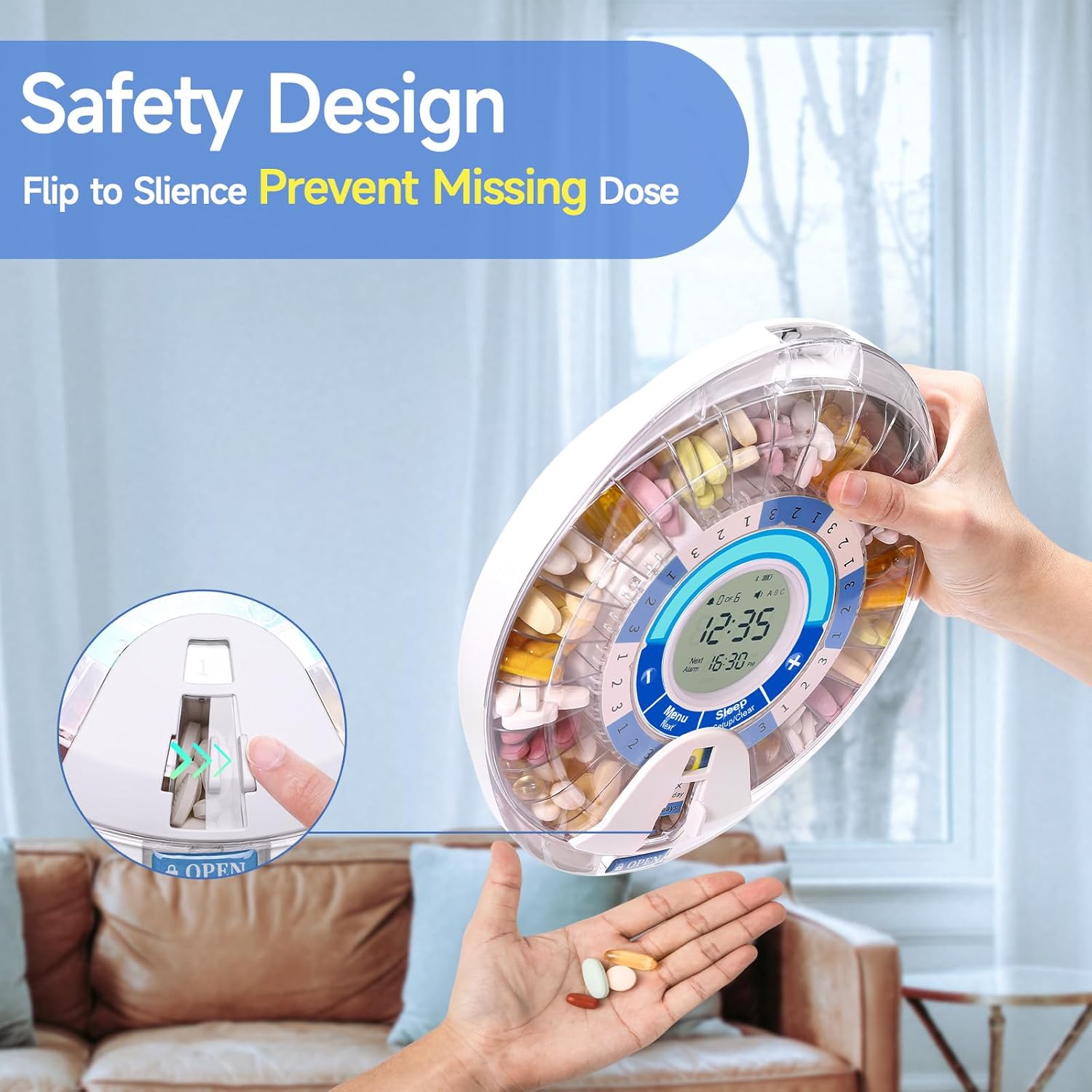
4.5. Dispensing Pills
When an alarm sounds and the light flashes:
- Locate the dispensing window.
- Flip the dispenser over to dispense the pills into your hand or a small cup. This action will also silence the alarm.
4.6. Cancelling Alarms
- Press "Menu" twice.
- Press "Setup".
- Press "Clear" to cancel the current alarm. The time will display "--:--".
- Press "+" to move to the next alarm, then "Clear" to cancel it.
- Hold "-" or "+" to return to the home page.
5. Maintenance
5.1. Cleaning the Pill Tray
The removable tray is made of food-grade materials and can be cleaned for hygiene. To clean:
- Remove the transparent lid and the dosage ring.
- Carefully lift out the pill tray.
- Wash the tray with mild soap and water. Ensure it is completely dry before reassembling.
- Wipe the main unit with a soft, damp cloth. Do not immerse the main unit in water.

6. Troubleshooting
Common Issues and Solutions:
- Dispenser not turning on: Check if batteries are installed correctly and are not depleted. Replace if necessary.
- Alarm not sounding: Ensure the volume is not set to mute. Check alarm settings for correct times.
- Pills not dispensing: Verify that the dispensing window is clear and not obstructed. Ensure the device is flipped completely when dispensing.
- Difficulty setting time/alarms: Refer to the specific sections in this manual or watch the instructional videos for step-by-step guidance.
- App connectivity issues: Ensure Bluetooth is enabled on your device and the dispenser is within range. Restart both the app and the dispenser if issues persist.
7. Specifications
- Brand: Windtrace
- Model: B0BZ4KJFFV
- Material: Plastic
- Color: Blue (variant)
- Power Source: 4x AA Batteries
- Special Features: Automatic, Easy Open, Lockable, Alarm, Flashing Light, Removable Tray, 6 Dosage Rings
- Compartments: 28
- Dimensions: 10.43 x 9.41 x 3.58 inches
- Weight: 2.09 Pounds
8. Important Safety Information
Statements regarding dietary supplements have not been evaluated by the FDA and are not intended to diagnose, treat, cure, or prevent any disease or health condition. Always consult with a healthcare professional before making any changes to your medication regimen.
9. Support
For additional assistance, support, or questions, please refer to the following resources:
- Consult this instruction manual.
- Watch the step-by-step instructional videos provided by Windtrace.
- Contact Windtrace customer service for further assistance.
