
1. Introduction
This manual provides essential information for the safe and efficient operation, installation, and maintenance of your TFCFL 110V Oil-Free Silent Air Compressor Motor. Please read these instructions thoroughly before using the product to ensure proper function and to prevent damage or injury. Keep this manual for future reference.

Image 1.1: Front view of the TFCFL Oil-Free Air Compressor Motor, showing the main unit and power cord.
2. Safety Information
Always observe the following safety precautions to reduce the risk of electric shock, fire, or serious injury.
- Electrical Safety: Ensure the power supply matches the specified voltage (110V). Do not operate with damaged cords or plugs. Avoid using in wet conditions.
- Operating Environment: Use the compressor in a well-ventilated area. Maintain ambient temperatures between 0-40°C.
- Personal Protective Equipment: Wear appropriate safety glasses and hearing protection during operation.
- Maintenance: Disconnect power before performing any maintenance or repairs.
- Overheating Protection: The unit is equipped with overheating protection. If the motor stops unexpectedly, allow it to cool down before restarting.

Image 2.1: The air compressor motor highlighting its safety features, including overheating protection and Insulation Grade B.
3. Package Contents
Verify that all components are present upon unpacking:
- 1x Oil-Free Air Compressor Motor
- 1x Capacitor
- 1x Silencer
- 4x Floor Mats

Image 3.1: Detailed view of the air compressor motor, showing its fan, exhaust port, and overall construction.
4. Specifications
Key technical specifications for the TFCFL Oil-Free Air Compressor Motor:
| Feature | Specification |
|---|---|
| Brand | TFCFL |
| Model Name | Portable Air Compressors |
| Voltage | 110 Volts |
| Maximum Power | 1100 Watts |
| Maximum Current | 5 Amps |
| Maximum Operating Pressure | 8 Bar (116 PSI) |
| Flow Rate | 200 L/min (7 CFM) |
| Vacuum | 680 mmHg / -90.6 kPa |
| Motor Horsepower | 1.47 HP |
| Operating Temperature Range | 0-40°C |
| Material | Aluminum, Stainless Steel |
| Product Dimensions (L x W x H) | 12.6" x 6.69" x 11.42" |
| Special Features | Oil-free, Silent Operation |

Image 4.1: Visual representation of the air compressor motor's performance metrics.
5. Setup
Follow these steps for initial setup:
- Unpacking: Carefully remove all components from the packaging. Inspect for any shipping damage.
- Placement: Place the compressor motor on a stable, level surface. Ensure adequate clearance for ventilation around the unit.
- Install Floor Mats: Attach the four provided floor mats to the bottom of the unit. These mats help reduce vibration and protect the surface.
- Install Silencer: Securely attach the silencer to the designated exhaust port on the compressor head. This component helps dampen operational noise.
- Connect Capacitor: Ensure the capacitor is correctly connected as per the wiring diagram (if applicable, refer to product labeling for specific wiring instructions).
- Power Connection: Connect the power cord to a grounded 110V electrical outlet.
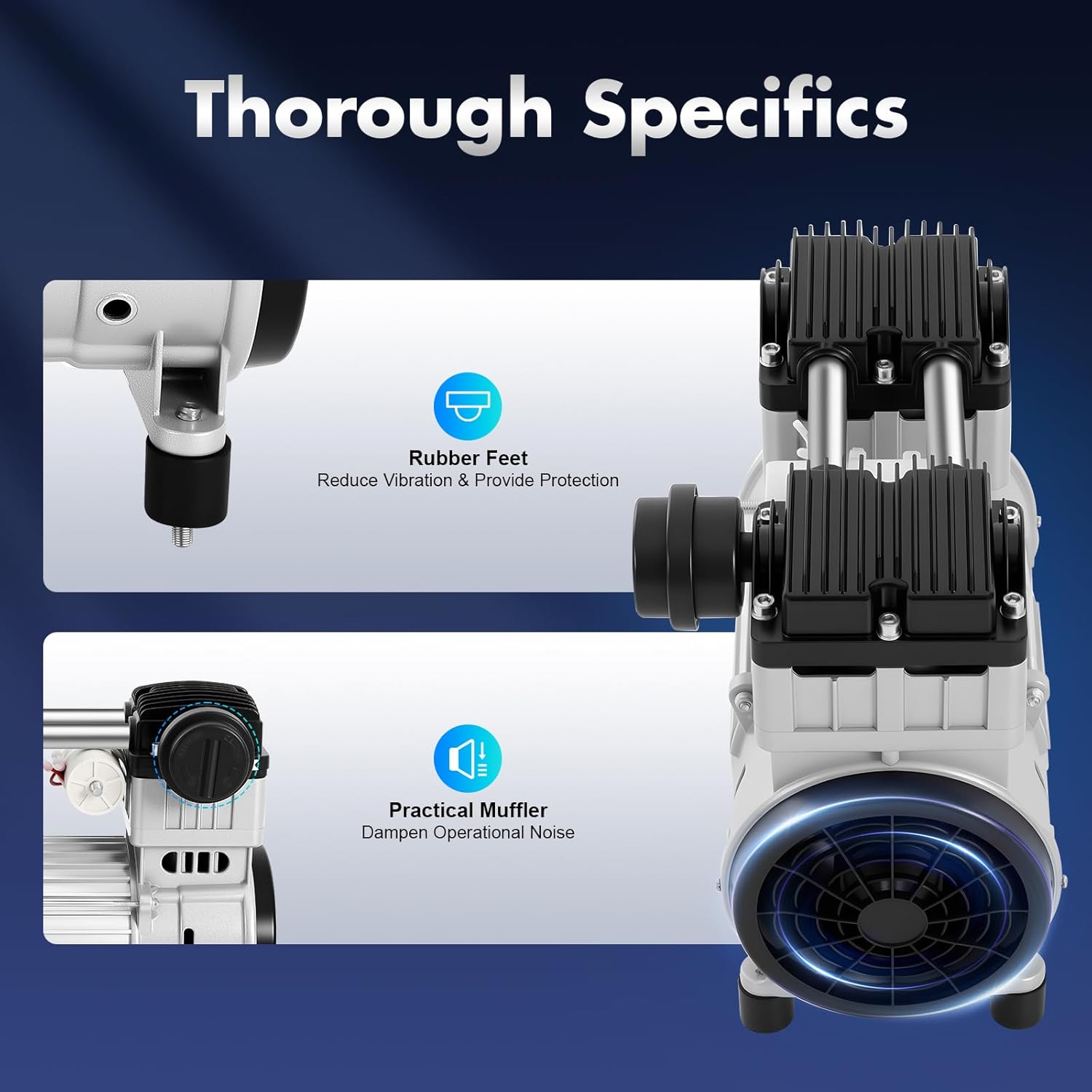
Image 5.1: Close-up view illustrating the rubber feet for vibration reduction and the practical muffler for noise dampening.

Image 5.2: Side view of the compressor motor, showing the power cord connection and the exhaust port where the silencer is installed.
6. Operating Instructions
The TFCFL Oil-Free Air Compressor Motor is designed for silent and efficient operation.
- Power On: Once properly set up and connected to power, turn on the unit using the designated power switch (if present) or by plugging it in. The motor will begin to operate.
- Oil-Free Operation: This compressor motor is oil-free, meaning it does not require lubrication for operation. This simplifies maintenance and ensures cleaner air output.
- Air Purification: The integrated filter device effectively removes impurities from the air, providing clean air for your applications.
- Monitoring: Observe the unit during initial operation to ensure stable performance and no unusual noises.
- Power Off: To stop operation, turn off the power switch or disconnect the unit from the power supply.

Image 6.1: Illustration demonstrating the quiet operation of the compressor motor, typically below 75dB, significantly quieter than an electric drill.
Versatile Applications: This motor is suitable for various applications, including fully automatic laminating machines, semiconductor LED measuring machines, dental medical tables, and other industrial or laboratory uses requiring clean, compressed air.

Image 6.2: Examples of diverse applications for the TFCFL air compressor motor, including electronics, food processing, medical, and packaging industries.
7. Maintenance
Regular maintenance ensures the longevity and optimal performance of your air compressor motor.
- Cleaning: Periodically clean the exterior of the unit with a dry cloth. Ensure cooling vents are free from dust and debris to maintain efficient thermal dissipation.
- Filter Inspection: Regularly inspect the air filter for cleanliness. Replace or clean the filter as needed to ensure optimal air purification and prevent reduced performance.
- Connections: Check all electrical and air connections periodically to ensure they are secure.
- Oil-Free Design: As this is an oil-free unit, there is no oil to check or change, simplifying maintenance.
- Storage: When not in use for extended periods, store the unit in a clean, dry environment within the recommended temperature range.

Image 7.1: The compressor motor's design features, including enlarged cooling vents and dual built-in fans, which contribute to efficient thermal dissipation.
8. Troubleshooting
Refer to the following table for common issues and their solutions:
| Problem | Possible Cause | Solution |
|---|---|---|
| Motor does not start | No power supply Damaged power cord/plug Overheating protection activated | Check power connection and outlet Inspect cord/plug for damage; replace if necessary Allow unit to cool down; check for obstructions around cooling vents |
| Low air pressure/flow | Clogged air filter Air leaks in connections | Clean or replace air filter Check and tighten all air connections |
| Unusual noise during operation | Loose components Unit not on a stable surface | Inspect for loose screws or parts and tighten Ensure unit is on a flat, stable surface; verify floor mats are installed |
| Motor stops unexpectedly | Overheating protection activated Power interruption | Allow unit to cool down; ensure proper ventilation Check power supply |
9. Warranty and Support
For warranty information or technical support, please contact the seller or manufacturer directly. Keep your purchase receipt as proof of purchase.
Manufacturer: Arraige
For further assistance, you may visit the TFCFL Store on Amazon.