
Sanpyl Sanpyl79qpr2otsh
Sanpyl Helmet Sport Camera
User Manual
Model: Sanpyl79qpr2otsh
Product Overview
The Sanpyl Helmet Sport Camera is a compact and durable device designed for capturing high-quality video during various outdoor activities. Its robust construction and advanced features make it ideal for sports enthusiasts.

Image: The Sanpyl Helmet Sport Camera mounted on a bracket, showcasing its compact design and the 170° wide-angle lens.
- Wide Angle Lens: Equipped with a 170° wide-angle lens, allowing for a broader field of view and comprehensive video capture.
- High Resolution: Supports video recording up to 1920x1080 (Full HD) and 1280x720 (HD) at 30 frames per second.
- Vibration Reminder: Features a built-in motor that provides vibration feedback to indicate the camera's working status, ensuring you are aware of recording activity.
- Durable and Waterproof: The camera body is constructed from alloy, providing full body waterproofing suitable for use in harsh weather conditions, including rain.
- Portable Design: Designed in a compact, flashlight-like shape, making it easy to carry for mountaineering, cycling, and other outdoor sports.
- Rechargeable Battery: Includes a built-in lithium battery for environmental friendliness and convenient recharging.

Image: A visual representation highlighting the camera's key features: waterproof design, built-in lithium battery, low illumination capability, ultra-small size, HD resolution, and 120-degree super wide angle lens.
Setup Guide
1. Charging the Battery
Before first use, fully charge the camera's built-in lithium battery. Connect the camera to a USB power source using the provided USB cable. The camera will indicate charging status (e.g., LED indicator). A full charge ensures maximum recording time.

Image: An illustration depicting the camera being charged, with a battery icon indicating the charging process.
2. Inserting a Memory Card
The camera supports SD flash memory cards (not included). Locate the memory card slot, typically under a protective cover. Insert the SD card gently until it clicks into place. Ensure the card is formatted correctly (FAT32 recommended) for optimal performance.
3. Mounting the Camera
The camera comes with various mounting accessories suitable for helmets, bicycles, and other sports equipment. Attach the appropriate mount to your desired surface, then secure the camera to the mount. Ensure the camera is firmly attached to prevent accidental detachment during activity.
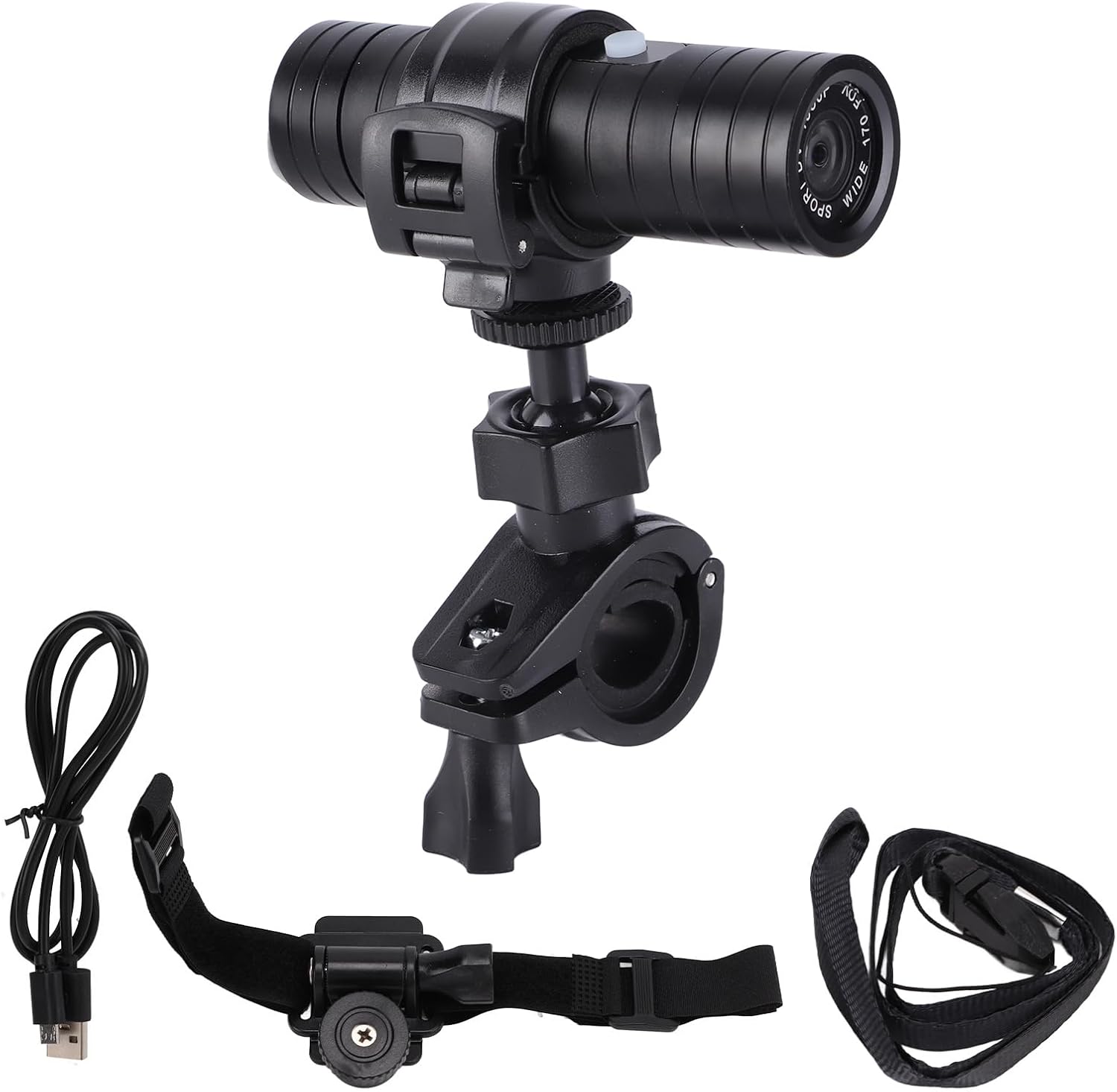
Image: The Sanpyl Helmet Sport Camera displayed alongside its accessories, including a USB charging cable, a head strap mount, and a handlebar/helmet mount.
Operating Instructions
1. Powering On/Off
To power on the camera, press and hold the power button (usually located on the top or side) for a few seconds until you feel a vibration or see an indicator light. To power off, repeat the process.
2. Recording Video
Once powered on, the camera is typically ready to record. Press the record button (often the same as the power button, or a dedicated button) to start recording. The camera will vibrate to confirm recording has started. Press the button again to stop recording. The camera supports continuous recording and can record while charging.

Image: A detailed diagram illustrating the camera's operational features, including the vibration reminder for recording status, support for Full HD 1080P video, 720P recording at 30 frames per second, and the ability to customize shooting time.
3. Understanding Vibration Reminders
The built-in motor provides haptic feedback to inform you of the camera's status without needing to look at it. For example, a short vibration might indicate recording start/stop, while a longer vibration could signal low battery or an error.
4. Adjusting Settings (if applicable)
While the camera is designed for simplicity, some models may allow for minor adjustments like setting the current time or modifying shooting duration. Refer to the specific instructions provided with your camera for advanced settings.
Maintenance
Proper maintenance ensures the longevity and optimal performance of your Sanpyl Helmet Sport Camera.
- Cleaning: Wipe the camera body with a soft, damp cloth. For the lens, use a specialized lens cleaning cloth and solution to avoid scratches. Ensure all ports and covers are sealed before exposing the camera to water.
- Waterproof Care: Although the camera is waterproof, avoid prolonged submersion beyond its specified depth rating. After use in saltwater, rinse with fresh water and dry thoroughly.
- Battery Care: To preserve battery life, avoid fully discharging the battery frequently. Store the camera with a partial charge (around 50%) if not used for extended periods.
- Storage: Store the camera in a cool, dry place away from direct sunlight and extreme temperatures.

Image: A composite image highlighting the camera's metal aluminum waterproof construction and its 170-degree wide-angle lens, emphasizing its suitability for extreme weather.
Troubleshooting
If you encounter issues with your camera, refer to the following common solutions:
| Problem | Possible Cause | Solution |
|---|---|---|
| Camera does not power on. | Low or depleted battery. | Charge the battery fully. |
| Camera not recording. | No memory card, full memory card, or card error. | Insert a compatible SD card, delete old files, or format the card. |
| Poor video quality. | Dirty lens, low light conditions, or incorrect resolution setting. | Clean the lens, ensure adequate lighting, or check resolution settings. |
| Vibration reminder not working. | Internal malfunction. | Contact customer support. |
If the problem persists after trying these solutions, please contact Sanpyl customer support.
Specifications
| Feature | Detail |
|---|---|
| Brand | Sanpyl |
| Model Name | Sanpyl79qpr2otsh |
| Video Capture Resolution | 1080p (1920x1080), 720p (1280x720) |
| Lens Angle | 170° Wide Angle |
| Waterproof Feature | Yes, full body waterproof (alloy construction) |
| Battery Type | Built-in Lithium Battery |
| Flash Memory Type | SD Card (external) |
| Connectivity Technology | USB2.0 |
| Color | Black |
| Item Weight | 11.3 ounces |
| Dimensions (Approx.) | 100mm (3.9in) length, 28.5mm (1.1in) diameter |

Image: A diagram illustrating the compact dimensions of the camera, measuring approximately 100mm in length and 28.5mm in diameter.
Warranty and Support
For warranty information and technical support, please refer to the documentation included with your purchase or visit the official Sanpyl website. Keep your proof of purchase for warranty claims.
For further assistance, you may contact the seller directly through the platform where the product was purchased.
Ask a question about this manual
Ask about setup, troubleshooting, compatibility, parts, safety, or missing instructions. Manuals+ will review the question and use this page’s manual context to help answer it.