
1. Introduction
This manual provides detailed instructions for the setup, operation, maintenance, and troubleshooting of your KEROLFFU RGB 4-Fan Laptop Cooling Pad. Please read this manual thoroughly before using the product to ensure proper function and to maximize its lifespan.
2. Product Features
- Balanced 4-Fan Airflow: Equipped with four fans to provide comprehensive and balanced cooling across your laptop, effectively dissipating heat from critical areas.
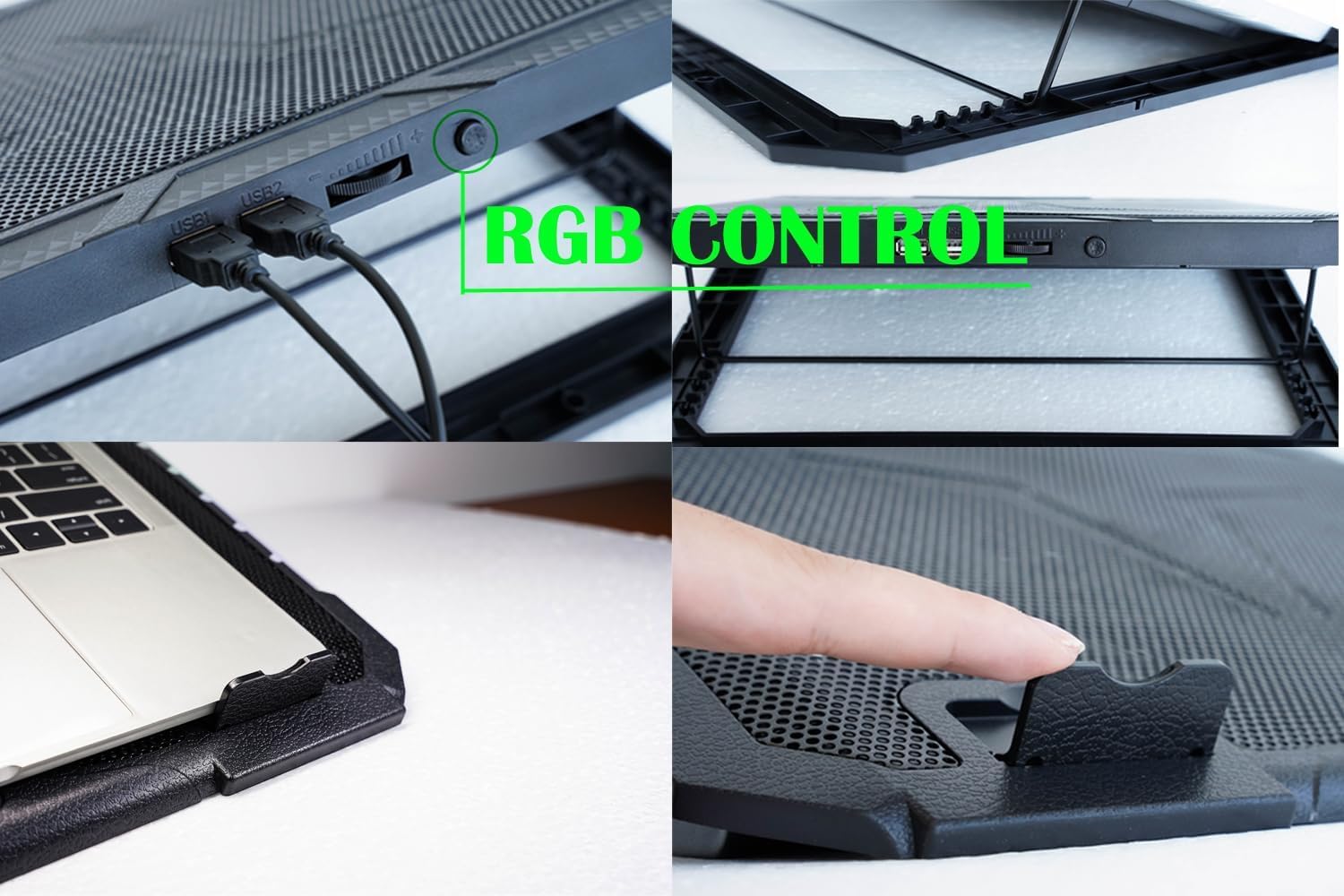
- Customizable RGB Sidelights: Features 10 distinct RGB lighting modes, controllable via a dedicated button. Long-press to turn lights on/off, short-press to cycle through modes.
- Durable Construction: Constructed with improved materials for enhanced durability and resistance to breakage.
- 5-Level Height Adjustment: Offers five adjustable height settings, allowing for optimal viewing and typing angles to reduce neck and back strain.
- Integrated Phone Holder: Includes a convenient phone holder for easy access to your mobile device while using your laptop.
- Dual USB Ports: Provides two USB ports, ensuring you do not lose a USB port when connecting the cooling pad to your laptop.
3. Setup Guide
- Unpack the Cooling Pad: Carefully remove the cooling pad from its packaging.
- Connect Power: Connect the cooling pad to your laptop using the provided USB cable. Insert one end into the cooling pad's USB input and the other into an available USB port on your laptop.
- Place Your Laptop: Position your laptop securely on the cooling pad. Ensure the laptop is centered and rests on the anti-slip stoppers at the front.
- Adjust Height: Lift the cooling pad to your desired height level using the adjustable stand mechanism at the rear. There are 5 height settings available.
- Utilize Phone Holder: Extend the integrated phone holder from the side of the cooling pad if desired, and place your smartphone in it.

4. Operating Instructions
4.1 Fan Control
- The fans will automatically start operating once the cooling pad is connected to a powered USB port.
- Use the fan speed adjustment wheel, typically located on the side of the cooling pad, to increase or decrease the fan speed. Rotate the wheel towards '+' for higher speed and towards '-' for lower speed.
4.2 RGB Lighting Control
- Locate the RGB button on the back or side of the cooling pad.
- To change RGB modes: Short-press the RGB button to cycle through the 10 available lighting modes.
- To turn RGB lights on/off: Long-press the RGB button for approximately 3 seconds.

4.3 Product Overview Video
5. Maintenance
- Cleaning: Regularly clean the mesh surface and fan blades to prevent dust buildup, which can impede airflow and reduce cooling efficiency. Use a soft, dry cloth or compressed air.
- Storage: When not in use, store the cooling pad in a cool, dry place away from direct sunlight and extreme temperatures.
- Avoid Liquids: Do not expose the cooling pad to liquids. If liquid spills occur, disconnect power immediately and allow it to dry completely before reuse.
6. Troubleshooting
| Problem | Possible Cause | Solution |
|---|---|---|
| Fans not spinning | Not connected to power; USB cable faulty; Fan speed set to minimum. | Ensure USB cable is securely connected to a working USB port. Try a different USB port or cable. Adjust fan speed dial. |
| RGB lights not working | Lights turned off; Power issue. | Long-press the RGB button to turn lights on. Ensure the cooling pad is receiving power. |
| Insufficient cooling | Fan speed too low; Dust buildup; Laptop vents blocked. | Increase fan speed. Clean the cooling pad and laptop vents. Ensure laptop is positioned correctly. |
| Cooling pad unstable | Height adjustment not locked; Laptop not placed correctly. | Ensure the adjustable stand is securely locked into a height setting. Reposition the laptop to sit firmly on the stoppers. |
7. Specifications
| Feature | Detail |
|---|---|
| Model | RGB 4Fan 12-17inch |
| Brand | KEROLFFU |
| Material | Metal |
| Item Weight | 1.8 Pounds |
| Product Dimensions (L x W x H) | 15.8" x 11.5" x 1.1" |
| Cooling Method | Air (4 Fans) |
| RGB Lighting Modes | 10 modes |
| Height Adjustment | 5 levels |
| USB Ports | 2 (USB1, USB2) |
8. Warranty and Support
This KEROLFFU product is covered by a 30-day Amazon warranty. For any product-related inquiries, technical support, or warranty claims, please contact the seller directly through your Amazon order page. Please have your order number and product model readily available for faster assistance.