
Introduction
Thank you for choosing the KEEPEEZ MBF-011A 2.2LB Large Bread Maker Machine. This appliance is designed to simplify your bread-making process with its advanced features and versatile programs. Please read this manual thoroughly before use to ensure safe and optimal operation.
Safety Instructions
Always follow basic safety precautions when using electrical appliances to reduce the risk of fire, electric shock, and injury to persons.
- Do not touch hot surfaces. Use handles or knobs.
- To protect against electric shock, do not immerse cord, plugs, or appliance in water or other liquid.
- Close supervision is necessary when any appliance is used by or near children.
- Unplug from outlet when not in use and before cleaning. Allow to cool before putting on or taking off parts.
- Do not operate any appliance with a damaged cord or plug or after the appliance malfunctions or has been damaged in any manner.
- Do not use outdoors.
- Do not let cord hang over edge of table or counter or touch hot surfaces.
- Do not place on or near a hot gas or electric burner, or in a heated oven.
- Extreme caution must be used when moving an appliance containing hot oil or other hot liquids.
- Do not use appliance for other than intended use.
What's Included
Your KEEPEEZ Bread Maker comes with the following accessories:
- Recipe Book (x1)
- Heat Resistant Glove (x1)
- Fruit Nut Dispenser (x1)
- Nonstick Ceramic Pan (x1)
- Measuring Cup (x1)
- Hook (x1)
- Measuring Spoon (x1)
- Stirring Rod (x2)
Product Overview
The KEEPEEZ MBF-011A bread maker features a sleek design with advanced technology for perfect homemade bread.
- 710W Upgraded Dual Heaters: Ensures even baking and browning with 360° dual heaters.
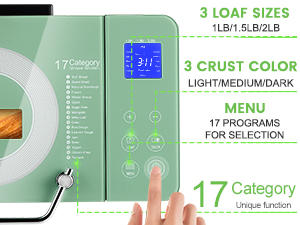
- 17 Preset Programs: Includes Soft Bread, Sweet Bread, Natural Sourdough, French, Whole Wheat, Quick, Sugar-Free, Multigrain, Milky Loaf, Cake, Raw Dough, Leaven Dough, Jam, Bake, Yogurt, Gluten-Free, and Ferment.
- 2.2 LB Large Capacity: Bake generous-sized loaves in the non-stick ceramic pan.
- Auto Nut Dispenser: Automatically releases ingredients like nuts or fruits at the optimal time.
- 3 Loaf Sizes & 3 Crust Colors: Customize your bread to 1LB, 1.5LB, or 2.2LB, and choose light, medium, or dark crust.
- 15-Hour Delay Timer & 1-Hour Keep Warm: Enjoy fresh bread anytime.
- 15-Minute Power Failure Backup: Protects your baking process during short power outages.
- 100% Copper Quiet Motor: Operates with low noise for a peaceful kitchen environment.
- Ceramic Kneading Blade: Designed to replicate artisan kneading.
- Precise 360° Baking Technology: Ensures soft, bouncy bread with consistent textures.
- Sleek Stainless Steel Design: Durable, rust-proof, and adds an elegant touch to your kitchen.
- 2 Custom Modes: Allows setting personalized kneading and baking times.

Setup
- Unpack: Carefully remove all packaging materials and accessories.
- Clean: Wash the bread pan, kneading blade, measuring cup, and measuring spoon with warm, soapy water. Rinse thoroughly and dry. Wipe the exterior of the appliance with a damp cloth.
- Install Kneading Blade: Insert the kneading blade onto the shaft at the bottom of the bread pan. Ensure it is securely in place.
- Place Bread Pan: Insert the bread pan into the baking chamber. Press down firmly and twist clockwise until it clicks into position.
- Position: Place the bread maker on a stable, flat, heat-resistant surface, away from direct sunlight and heat sources. Ensure adequate ventilation around the appliance.
- Connect Power: Plug the power cord into a grounded electrical outlet. The display will light up, indicating the machine is ready.
Operating Instructions
Follow these steps to bake your desired bread:
- Add Ingredients: Add liquid ingredients first, followed by dry ingredients. Make sure the yeast is placed in a separate corner, away from liquids and salt.
- Select Program: Press the 'MENU' button to cycle through the 17 preset programs until your desired program is selected. The program number and name will be displayed on the LCD screen.
- Select Loaf Size: Press the 'LOAF' button to choose your desired loaf size (1LB, 1.5LB, or 2.2LB).
- Select Crust Color: Press the 'COLOR' button to select your preferred crust color (Light, Medium, or Dark).
- Set Delay Timer (Optional): If you wish to delay the start of the baking process, use the '+' and '-' buttons to set the desired delay time. The delay time includes the baking time.
- Start Baking: Press the 'START/STOP/PAUSE' button to begin the selected program. The machine will start kneading.
- Monitor Progress: You can observe the baking process through the large viewing window. The LCD display will show the current stage (Preheat, Stir, Rest, Ferment, Bake, Warm, End).
- End of Program: Once the program is complete, the machine will beep and automatically enter the 1-hour 'KEEP WARM' function.
- Remove Bread: Use heat-resistant gloves to carefully remove the bread pan from the machine. Invert the pan to release the bread onto a wire rack to cool.


Using the Automatic Nut Dispenser
The automatic nut dispenser allows you to add ingredients like nuts, seeds, or dried fruits at the perfect moment during the kneading cycle, ensuring they are evenly distributed without being crushed.
- Open Dispenser: Open the lid of the bread maker and locate the automatic nut dispenser on the inside of the lid.
- Add Ingredients: Place your desired nuts, seeds, or dried fruits into the dispenser. Do not overfill.
- Close Lid: Close the bread maker lid. The dispenser will automatically open and release the ingredients into the bread pan at the appropriate time during the selected program.

Recipes
Your KEEPEEZ Bread Maker comes with a professional recipe book containing 40 recipes to help you get started. These recipes are optimized for the machine's programs and features, ensuring delicious results every time. Experiment with different ingredients and settings using the custom modes to create your unique bread creations.

Maintenance and Cleaning
Proper maintenance ensures the longevity and performance of your bread maker.
- Bread Pan: The non-stick ceramic pan is BPA-Teflon-PTFE free and dishwasher safe for easy cleaning. For best results, hand wash with warm, soapy water and a soft sponge.
- Kneading Blade: Remove the kneading blade from the bread pan after each use. Clean it with warm, soapy water. If it's difficult to remove, soak the pan in warm water for a few minutes.
- Exterior: Wipe the exterior of the bread maker with a soft, damp cloth. Do not use abrasive cleaners or immerse the appliance in water.
- Lid and Viewing Window: Clean the lid and viewing window with a damp cloth. For stubborn stains, use a mild detergent.
- Storage: Ensure the appliance is completely cool and dry before storing. Store in a cool, dry place.

Troubleshooting
If you encounter issues with your bread maker, refer to the following common solutions:
- Bread Not Rising: Ensure yeast is fresh and active. Check water temperature (too hot or cold can kill yeast). Verify correct ingredient measurements.
- Dense Bread: Too much flour or not enough liquid can result in dense bread. Adjust measurements according to the recipe.
- Bread Sticks to Pan: Ensure the non-stick coating is intact. A light coating of oil or butter on the pan before adding ingredients can help. Allow bread to cool slightly before removing.
- Machine Not Starting: Check if the power cord is securely plugged in. Ensure the bread pan is correctly installed and locked into place.
- Uneven Baking: Ensure the machine is placed on a level surface. Verify that the heating elements are clean and unobstructed.
For persistent issues, please contact customer support.
Specifications
| Brand | KEEPEEZ |
| Model Number | MBF-011A |
| Color | Green |
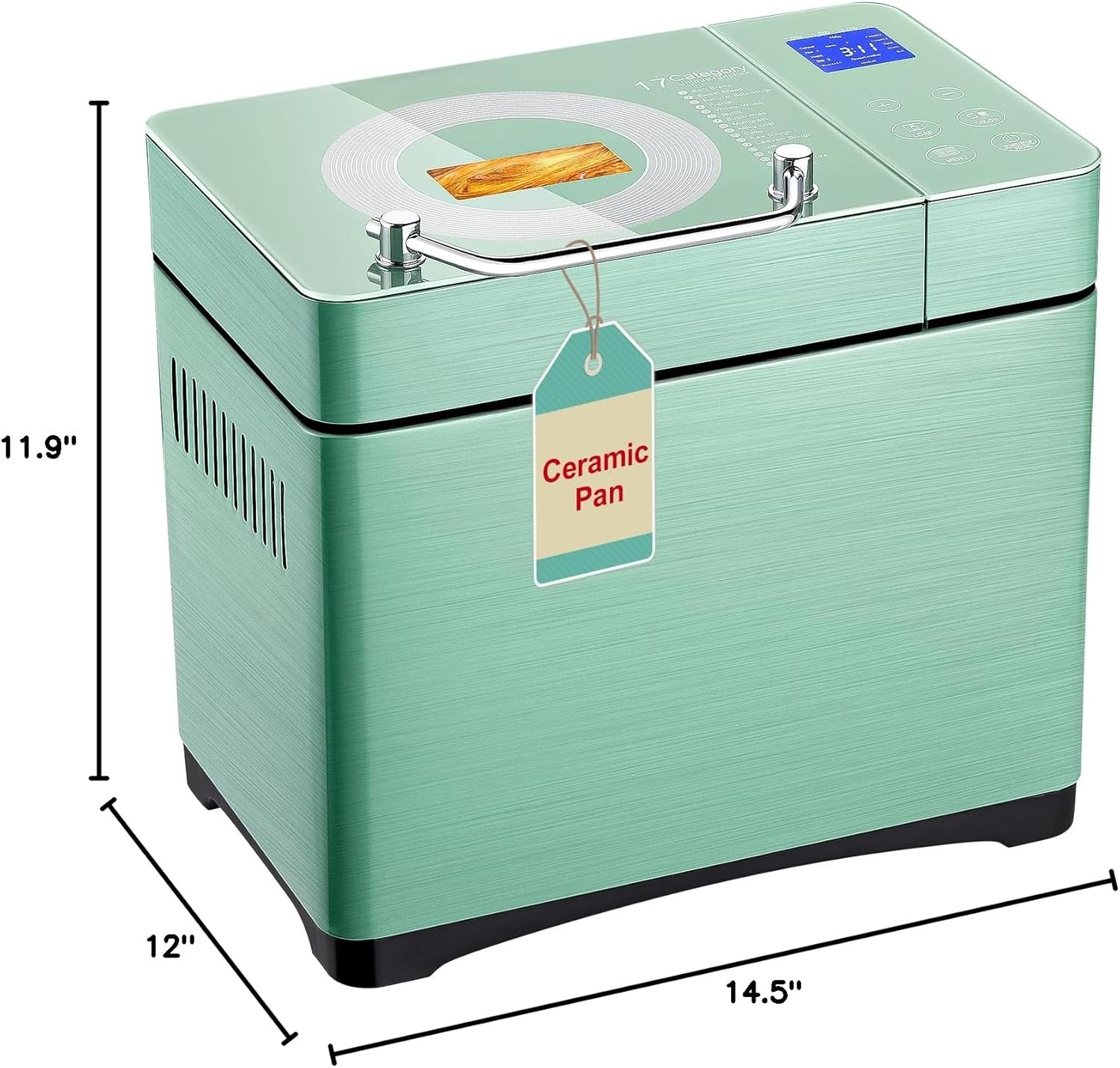
| Product Dimensions | 12"D x 14.5"W x 11.9"H |
| Item Weight | 16.71 pounds |
| Wattage | 710 watts |
| Voltage | 120 Volts |
| Number of Programs | 17 |
| Material | Fully Stainless Steel Body, Non-stick Ceramic Pan, Tempered Glass Touch Panel, Low Noise Pure Copper DC Motor, Dual Quartz Heaters |
| Product Care Instructions | Dishwasher Safe (for ceramic pan) |
Warranty and Support
KEEPEEZ offers a 2-year warranty on this bread maker. For any product inquiries, technical assistance, or warranty claims, please contact our customer service team. We provide 7*24 hour service to ensure your satisfaction.
For further assistance, please visit the KEEPEEZ Store on Amazon.