
1. Introduction
The Leaptrend 2000W Pure Sine Wave Power Inverter converts 12V DC battery power into standard 110V/120V AC household power at 60Hz. It provides a continuous output of 2000 watts and a peak surge power of 4000 watts, making it suitable for a wide range of applications.
This inverter is designed for use in various environments, including RVs, cars, trucks, vans, yachts, trailers, outdoor camping, and off-grid solar systems, providing reliable power for your electronic devices and appliances.
2. Safety Instructions
For safe operation and to prevent damage to the inverter or connected devices, please observe the following safety guidelines:
- Ensure proper ventilation around the inverter to prevent overheating.
- Do not expose the inverter to water, rain, or excessive moisture.
- Connect the inverter only to a 12V DC power source. Connecting to a different voltage may cause damage.
- Always connect the inverter to the battery before connecting any AC appliances.
- Ensure the total wattage of connected AC appliances does not exceed the inverter's continuous power rating of 2000W.
- The inverter is equipped with multiple protection features, including under-voltage, over-voltage, over-temperature, over-load, short circuit, and Ground Fault Circuit Interrupter (GFCI) protection.
- This product is ETL Listed to UL 458, FCC Part 15 Class B, and CE EN61000-3-2 certified.
3. Package Contents
Verify that all items are present in the package:
- Leaptrend 2000W Pure Sine Wave Power Inverter
- 3ft 6AWG Battery Cables (2 red, 2 black)
- 19.8ft Wired Remote Control

Figure 3.1: Leaptrend 2000W Pure Sine Wave Power Inverter and accessories.
4. Product Features
- Pure Sine Wave Output: Provides stable and clean AC power, suitable for sensitive electronics, protecting and extending their lifespan.
- High Efficiency: Converts 12V DC to AC with an efficiency of over 92%.
- LCD Digital Display: Shows real-time operational status, including input voltage, output voltage, wattage, frequency, and various protection indicators (under-voltage, over-voltage, over-temperature, over-load, short circuit).
- Multiple AC Outlets: Features 3 standard AC plugs for connecting various electronic appliances.
- USB Charging Port: Includes a 2.4A USB port for charging mobile devices.
- Remote Control: Comes with a 19.8ft wired remote controller for convenient operation from a distance.
- Cooling Fans: Integrated cooling fans help maintain optimal operating temperature and ensure stable performance.
- Wide Battery Compatibility: Compatible with various battery types including Lithium (Li), Sealed Lead-Acid (SLD), Gel, Flooded (FLD), and Absorbed Glass Mat (AGM) batteries.
- Operating Temperature Range: Designed for reliable operation in temperatures from -20°C to 50°C.

Figure 4.1: Pure Sine Wave output comparison and efficiency.

Figure 4.2: Battery compatibility.
5. Product Diagram

Figure 5.1: Front and Rear Panel Components.
- Front Panel: LCD Screen, AC Outlets, High Output AC Terminal, GFCI LED, USB Port, Remote Switch Connection, ON/OFF Switch.
- Rear Panel: Positive (+) Terminal, Negative (-) Terminal, Cooling Fans.
6. Setup and Installation
- Placement: Choose a dry, well-ventilated area for the inverter. Ensure there is sufficient space around the unit for airflow to the cooling fans.
- Battery Connection: Connect the supplied 6AWG red cable to the inverter's positive (+) terminal and the battery's positive (+) terminal. Connect the supplied 6AWG black cable to the inverter's negative (-) terminal and the battery's negative (-) terminal. Ensure connections are tight and secure.
- Grounding: Properly ground the inverter according to local electrical codes.
- Remote Control Connection: Plug the remote control cable into the "REMOTE" port on the inverter's front panel.
- Initial Power On: After all connections are secure, switch the inverter's ON/OFF switch to the "ON" position. The LCD display should illuminate, indicating the inverter is operational.
7. Operation
- Turning On/Off: Use the ON/OFF switch on the inverter or the remote control to power the unit on or off.
- Connecting AC Appliances: Plug your AC appliances into the AC outlets on the inverter's front panel. Ensure the total power consumption does not exceed 2000W.
- Using the USB Port: Connect your USB-powered devices to the 2.4A USB port for charging.
- Monitoring: The LCD display provides real-time information about the inverter's status. Monitor input voltage, output voltage, wattage, and frequency. Pay attention to any error indicators.

Figure 7.1: LCD Digital Display showing operational data.
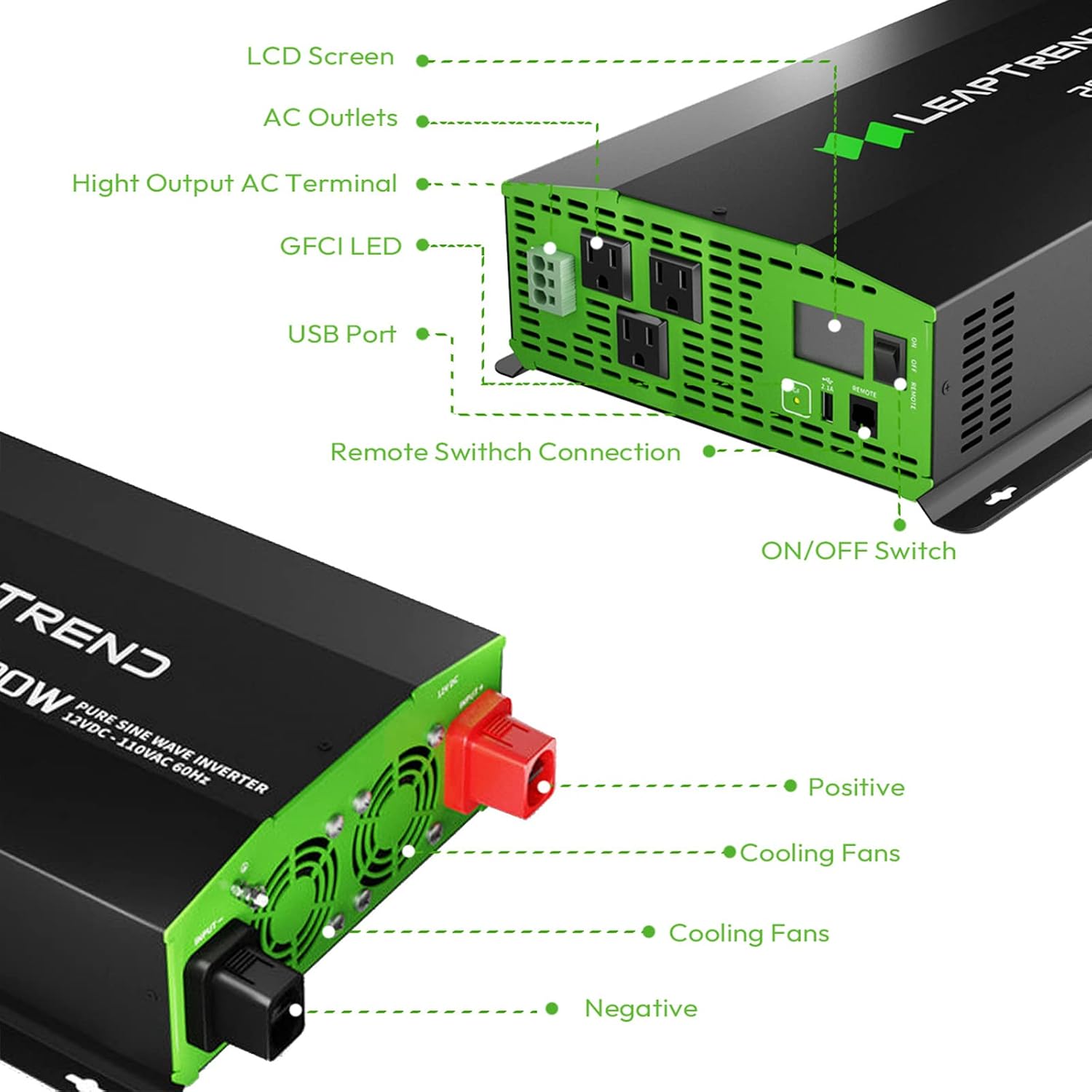
Figure 7.2: Examples of compatible appliances.
8. Maintenance
- Cleaning: Keep the inverter clean and free from dust and debris. Use a dry cloth for cleaning.
- Ventilation: Regularly check that the cooling fans are not obstructed and are functioning correctly.
- Connections: Periodically inspect all electrical connections to ensure they remain tight and free from corrosion.
- Storage: When not in use for extended periods, store the inverter in a cool, dry place.
9. Troubleshooting
The LCD display provides error indications to help diagnose issues. Refer to the display for specific alerts:
- Under-Voltage Alarm: Indicates the input DC voltage is too low. Recharge or replace the battery.
- Over-Voltage Alarm: Indicates the input DC voltage is too high. Check the battery and charging system.
- Over-Temperature Alarm: Indicates the inverter is overheating. Ensure proper ventilation and reduce load.
- Over-Load Protection: Occurs when the connected load exceeds the inverter's capacity. Reduce the load by unplugging some appliances.
- Short Circuit Indication: Indicates a short circuit in the output. Disconnect all loads and check for faults.
- GFCI Protection: Ground Fault Circuit Interrupter protection activates if a ground fault is detected. Check for faulty wiring or appliances.

Figure 9.1: Inverter protection features.
10. Specifications
| Feature | Specification |
|---|---|
| Model Number | 05c51de3-b0f1-468b-b2f9-6ca0c4d9fab2 |
| Continuous Power | 2000W |
| Surge Power | 4000W |
| Input DC Voltage | 12V DC |
| Output AC Voltage | 110V/120V AC |
| Output Frequency | 60Hz |
| Efficiency | >92% |
| Product Dimensions | 17.1 x 9.3 x 4 inches (43 x 24 x 10 cm) |
| Item Weight | 15.97 pounds (7.24 kg) |
| Power Source | 110v, Battery Powered, Corded Electric |

Figure 10.1: Inverter dimensions.
11. Warranty and Support
The Leaptrend 2000W Pure Sine Wave Power Inverter comes with a 12-month warranty from the date of purchase. Leaptrend is committed to 100% customer satisfaction.
For technical support, warranty claims, or any questions regarding your product, please contact Leaptrend customer service through the retailer's platform or the official Leaptrend website.