1. Introduction
Thank you for choosing the eMylo Smart Watt Meter & Energy Protector. This device is designed to provide accurate energy monitoring, remote control capabilities, and essential circuit protection for your home or factory. Please read this manual thoroughly before installation and operation to ensure safe and efficient use of the product.
2. Safety Information
WARNING: Electrical installation and wiring should only be performed by qualified personnel. Incorrect installation can lead to electric shock, fire, or damage to the device and connected appliances.
- Always disconnect power before installing or servicing the device.
- Ensure the device is installed in a dry, well-ventilated area, away from direct sunlight and extreme temperatures.
- Verify that the voltage and current ratings of your electrical system are compatible with the device's specifications (AC 80-400V, 63A).
- Do not attempt to disassemble or modify the device.
- Ensure all wire connections are secure and properly insulated.
3. Product Overview
The eMylo Smart Watt Meter & Energy Protector is a single-phase AC device that combines energy monitoring with circuit breaker and leakage protection functionalities. It features a clear digital display and intuitive control buttons, along with smart connectivity for remote management via a smartphone application.

Figure 3.1: Front view of the eMylo Smart Watt Meter & Energy Protector.
3.1. Device Components

Figure 3.2: Labeled components of the eMylo Smart Watt Meter.
- IN (Input Terminals): Connect incoming power lines (Neutral and Live).
- OUT (Output Terminals): Connect outgoing power lines to your load (Neutral and Live).
- Digital Display: Shows real-time voltage, current, electricity consumption (kWh), and leakage current.
- SET Button: Used to enter settings mode or confirm selections.
- Increase Button (Up Arrow): Navigates up or increases values in settings.
- Decrease Button (Down Arrow): Navigates down or decreases values in settings.
- Switch Button (Power Icon): Manually turns the circuit on or off.
- Indicator Lights: Display status for WiFi connection, voltage, current, and leakage.
4. Features
This smart watt meter offers a range of advanced features for comprehensive energy management and protection:

Figure 4.1: Key features of the eMylo Smart Watt Meter.
- Highest Accuracy: Utilizes a high-quality core, large-scale integrated circuit, and SMT technology for direct and accurate measurement of active energy consumption (error controlled within 1%).
- Remote Control and Voice Control: Control connected devices from anywhere via the smartphone app. Compatible with Alexa and Google Home for voice commands.
- Timer & Schedule Feature: Automate device operation by setting daily schedules, timers, or countdowns.
- Circuit Breaker & Leakage Protection: Supports setting thresholds for current, voltage, or leakage. The switch automatically trips if thresholds are exceeded. Extended disconnection time can be preset.
- More Safe and Durable: Constructed from high-quality, eco-friendly flame-resistant ABS material, ensuring good anti-electromagnetic interference, low power consumption, high precision, high overload capacity, high stability, and anti-stealing properties.
- 2.4GHz WiFi Support: Connects to your home network for smart functionalities. (Note: Only supports 2.4GHz WiFi, not 5GHz).
4.1. Smart Control Capabilities

Figure 4.2: App Remote Control in action.
The device allows you to control your home appliances remotely using the Tuya Smart/Smart Life App. This includes turning devices on/off from anywhere with an internet connection.

Figure 4.3: Electricity consumption statistics displayed in the app.
Monitor your energy usage directly and accurately, with consumption data available in the app. The error margin for measurement is controlled within 1%.
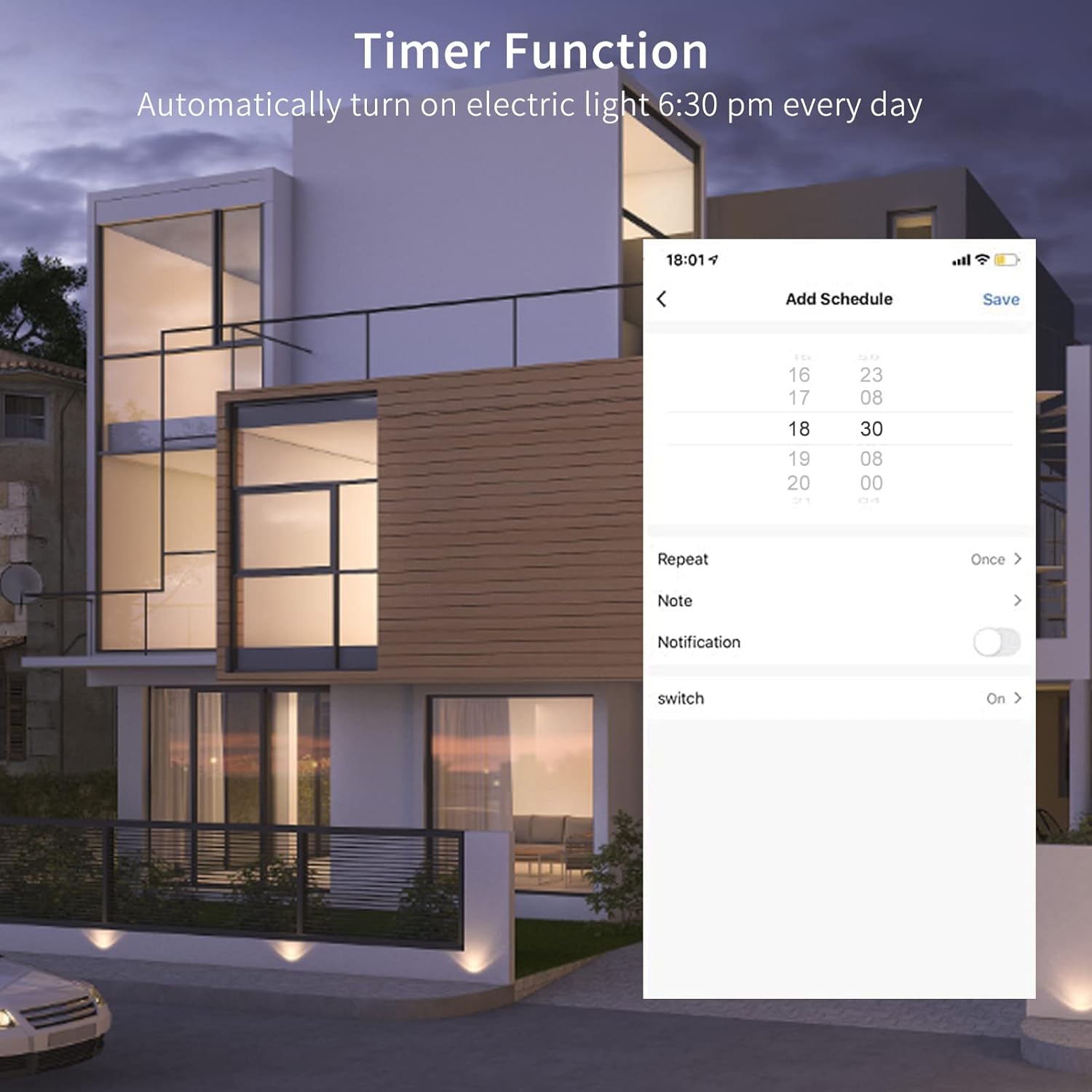
Figure 4.4: Setting up the Timer Function in the app.
Automate your devices with the timer function, for example, setting lights to turn on automatically at a specific time each day.

Figure 4.5: Voice control compatibility with Alexa and Google Home.
Integrate the device with Amazon Alexa or Google Home for convenient voice control of your connected appliances.
5. Setup
5.1. Electrical Installation
IMPORTANT: Electrical installation should be carried out by a certified electrician to ensure safety and compliance with local electrical codes. Ensure power is OFF before beginning installation.
- Mount the eMylo Smart Watt Meter & Energy Protector securely in your electrical distribution box or desired location.
- Connect the incoming live (L) and neutral (N) wires to the 'IN' terminals of the device.
- Connect the outgoing live (L) and neutral (N) wires to the 'OUT' terminals of the device, leading to your load.
- Double-check all connections for tightness and correct polarity.
- Restore power to the circuit. The device display should light up.
5.2. App Connection and Pairing
To utilize the smart features, you need to connect the device to the Tuya Smart or Smart Life app.

Figure 5.1: App connection and pairing process.
- Download the App: Turn on your mobile phone's Bluetooth. Download the "Smart Life" or "Tuya Smart" app from the App Store (iOS) or Google Play Store (Android). Register and log in to your account.
- Enter Pairing Mode: On the device, long press the button with the link symbol (usually the 'Decrease' button) for about 5 seconds until the indicator light starts blinking rapidly. If it's not blinking rapidly by default, this step will initiate the rapid blink.
- Add Device in App: Open the app. Choose the "+" icon in the upper right corner to add a device. A page will pop up indicating a device is to be added.
- Confirm Indicator: In the app, confirm that the indicator is blinking rapidly. Enter your 2.4GHz WiFi network password. (Note: Your phone should also be connected to the 2.4GHz WiFi network during pairing).
- Connect: Wait a few seconds for the device to connect. Once connected, you can remotely control and monitor your appliance freely.
6. Operating Instructions
6.1. Manual Operation
- Power On/Off: Press the 'Switch Button' (power icon) on the device to manually turn the connected circuit on or off.
- View Display Data: The digital display cycles through real-time voltage (V), current (A), electricity consumption (kWh), and leakage current (mA).
- Adjust Settings (Advanced): Use the 'SET', 'Increase', and 'Decrease' buttons to navigate and adjust advanced settings directly on the device, such as protection thresholds. Refer to the on-screen prompts for specific adjustments.
6.2. App Operation
Once connected to the Smart Life/Tuya Smart app, you can access a wide range of functionalities:

Figure 6.1: App interface for monitoring and protection settings.
- Remote Control: Tap the power icon within the app to remotely turn the connected circuit on or off.
- Real-time Monitoring: View live data for voltage, current, active power, and total energy consumption (kWh).
- Leakage Protection: Monitor leakage current and receive alerts. Set leakage protection thresholds in the app's settings.
- Timer and Schedule: Set one-time timers, recurring schedules, or countdowns for automatic control of connected devices.
- Protection Thresholds: Configure over-current, over-voltage, under-voltage, and leakage protection thresholds. The device will automatically trip if these limits are exceeded.
- Cost Management: The app may include a cost management function. If not required, it is recommended to turn this function off to avoid insufficient alarm power.
7. Maintenance
The eMylo Smart Watt Meter & Energy Protector requires minimal maintenance.
- Cleaning: Gently wipe the device with a soft, dry cloth. Do not use abrasive cleaners, solvents, or immerse the device in water.
- Inspection: Periodically check the wiring connections to ensure they remain secure.
- Firmware Updates: Keep the Smart Life/Tuya Smart app updated to ensure the best performance and access to new features. Firmware updates for the device may be pushed through the app.
8. Troubleshooting
If you encounter issues with your eMylo Smart Watt Meter & Energy Protector, refer to the following common problems and solutions:
| Problem | Possible Cause | Solution |
|---|---|---|
| Device does not power on. | No power supply; incorrect wiring. | Check main power supply. Verify wiring connections (IN/OUT, Live/Neutral) are correct and secure. Consult a qualified electrician if unsure. |
| Cannot connect to WiFi / App pairing fails. | Incorrect WiFi band (5GHz); weak WiFi signal; incorrect password; device not in pairing mode. | Ensure your WiFi network is 2.4GHz. Move the device closer to your WiFi router. Verify WiFi password. Ensure the device indicator light is blinking rapidly (long press the 'Decrease' button if not). Your phone should also be on the 2.4GHz network during pairing. |
| Device trips frequently. | Overload; short circuit; leakage current; protection thresholds set too low. | Check connected appliances for faults or excessive load. Verify there is no leakage in the circuit. Adjust protection thresholds in the app if they are set too sensitively for your application. |
| Inaccurate readings. | Improper installation; device malfunction. | Ensure wiring is correct and secure. If the issue persists, contact customer support. |
| Device shows voltage on 'N' terminal when off (for 220V 2-pole setup). | This device is designed for single-phase N and L connections. It may not fully isolate both hot lines in a 2-pole 220V application if wired incorrectly. | For 220V applications, ensure proper wiring by a qualified electrician. This device is primarily designed for single-phase (Live and Neutral) systems. If used in a 2-pole setup, ensure both hot lines are properly interrupted by external means if full isolation is required. |
9. Specifications
| Attribute | Value |
|---|---|
| Manufacturer | eMylo |
| Part Number | CHAC953 |
| Item Model Number | CHAC953 |
| Style | Circuit breaker |
| Color | White |
| Product Dimensions | 2.56 x 1.22 x 3.27 inches |
| Item Weight | 5.9 ounces |
| Item Package Quantity | 1 |
| Batteries Included? | No |
| Batteries Required? | No |
| Date First Available | March 20, 2023 |
10. Warranty and Support
10.1. Warranty Information
Specific warranty details may vary. Please refer to the product packaging or contact the manufacturer directly for information regarding the warranty period and terms of service for your eMylo Smart Watt Meter & Energy Protector.
10.2. Customer Support
For technical assistance, troubleshooting, or any inquiries regarding your eMylo product, please contact the manufacturer, eMylo, or the seller, Chatthen, through their official support channels. You can often find contact information on their official websites or through the platform where you purchased the product.

