
1. Introduction
This manual provides detailed instructions for the safe and effective use of the Senzooe XY-LUP DC USB Voltage Regulator Module. This versatile module is designed to convert a 5V USB input into various DC output voltages, including 3.3V, 9V, 12V, and 24V, making it suitable for a wide range of desktop power supply applications.
Please read this manual thoroughly before operating the device and retain it for future reference.
2. Product Features
- Input Voltage: 5V DC via USB (Type-A or Micro USB).
- Adjustable Output Voltage: Supports 3.3V, 9V, 12V, and 24V DC outputs.
- Compact Design: Approximately 77mm x 28mm, ideal for desktop and portable applications.
- Integrated Display: Features a display for real-time voltage and current monitoring.
- Multiple Output Terminals: Screw terminals for secure output connections.

Figure 2.1: Front view of the XY-LUP module, showing the USB input, display, and output terminals.
3. Setup Instructions
- Connect Input Power: Insert the USB-A connector into a standard 5V USB power source (e.g., computer USB port, USB wall adapter, power bank). Alternatively, use the Micro USB port for input.
- Identify Output Terminals: Locate the screw terminals labeled "OUT+ (V)" for positive voltage output and "OUT- (A)" for negative/ground. The "COM" terminal is typically common ground.
- Connect Load: Connect your device or circuit requiring power to the appropriate output terminals. Ensure correct polarity (+ to + and - to -) to prevent damage to your device or the module.
- Adjust Output Voltage: Use the onboard potentiometer (the small blue component with a brass screw) to adjust the desired output voltage. Turn clockwise to increase voltage and counter-clockwise to decrease. Observe the integrated display for the current output voltage reading.

Figure 3.1: Close-up view of the module, highlighting the USB input and the voltage adjustment potentiometer.
4. Operating the Module
Once connected and powered, the module's display will illuminate, showing the current output voltage and current. The module is designed for continuous operation within its specified limits.
- Voltage Adjustment: Fine-tune the output voltage using the potentiometer. It is recommended to adjust the voltage before connecting sensitive loads.
- Monitoring: The integrated display provides real-time feedback on the output voltage (V) and current (A). This helps in ensuring your connected device receives the correct power.
- Safety Precautions:
- Do not exceed the maximum rated output current for the selected voltage.
- Ensure proper ventilation around the module during operation.
- Avoid short-circuiting the output terminals.
- Keep the module away from moisture and extreme temperatures.

Figure 4.1: View of the module's output screw terminals for connecting external devices.
5. Maintenance
The XY-LUP module is designed for low maintenance. Follow these guidelines to ensure its longevity:
- Cleaning: Gently wipe the module with a dry, soft cloth to remove dust. Do not use liquid cleaners or solvents.
- Storage: When not in use, store the module in a dry, cool place, away from direct sunlight and corrosive materials.
- Inspection: Periodically inspect the connections and the module for any signs of damage or wear.
6. Troubleshooting
| Problem | Possible Cause | Solution |
|---|---|---|
| No display/No output | No input power or faulty USB cable. | Check USB power source and cable. Try a different USB port or adapter. |
| Incorrect output voltage | Potentiometer not adjusted correctly. | Adjust the potentiometer slowly while observing the display. |
| Output voltage fluctuates | Unstable input power or overloaded output. | Ensure stable 5V input. Reduce load or check if load exceeds module's current capacity. |
| Module gets hot | Excessive load or insufficient ventilation. | Reduce load. Ensure adequate airflow around the module. |
7. Specifications
- Model: XY-LUP
- Input Voltage: 5V DC (via USB-A or Micro USB)
- Output Voltage: Adjustable (3.3V, 9V, 12V, 24V DC)
- Approximate Dimensions: 77mm x 28mm
- Manufacturer: Senzooe
- ASIN: B0BYX6JCMF
- First Available Date: March 19, 2023
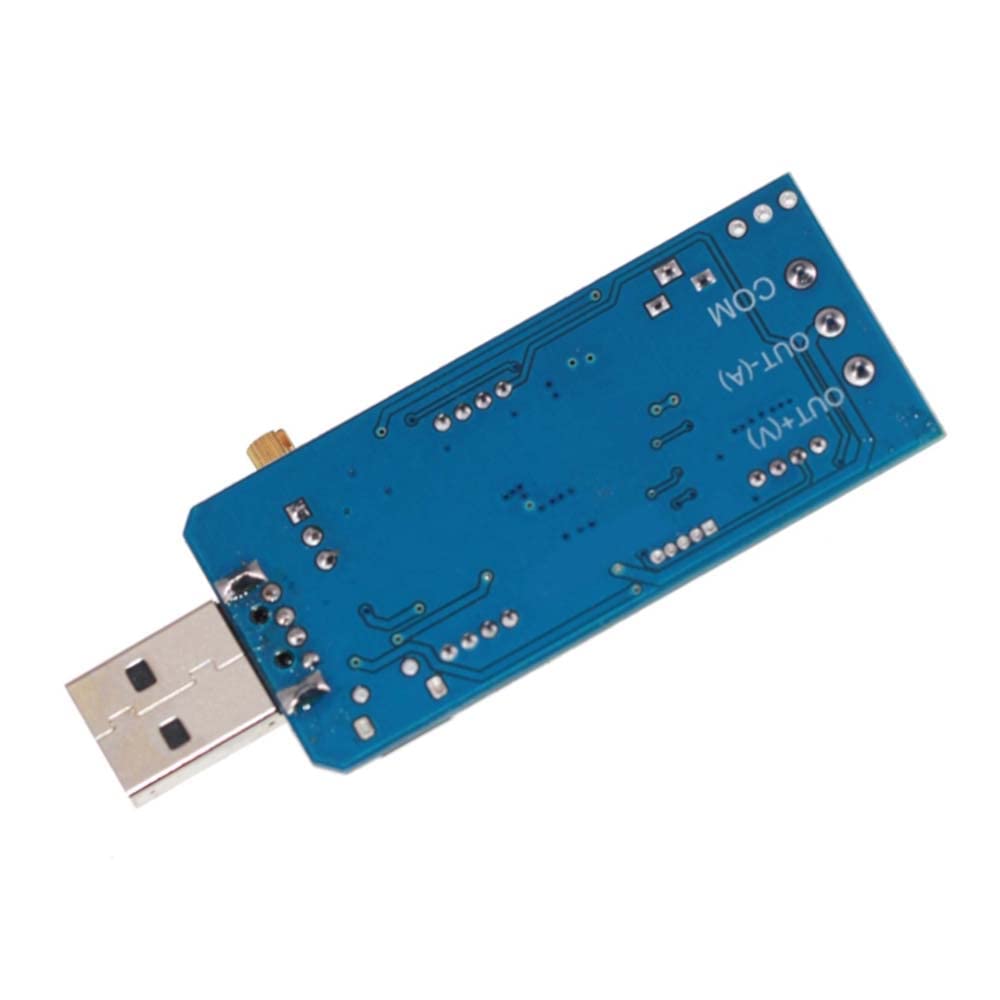
Figure 7.1: Rear view of the XY-LUP module, showing the circuit board layout.
8. Warranty and Support
Information regarding specific warranty terms and customer support for the Senzooe XY-LUP module is not provided in the product details. For warranty claims or technical assistance, please refer to the seller's information on the purchase platform or contact Senzooe directly through their official channels if available.