1. Introduction
Thank you for choosing the wonlex CF12 Smartwatch. This device is designed to enhance your daily life with smart features, health monitoring, and communication capabilities. This manual provides essential instructions for setup, operation, and maintenance to ensure optimal performance and longevity of your smartwatch.

Image 1.1: The wonlex CF12 Smartwatch, showcasing both the elegant mesh band and the comfortable pink silicone strap.
2. Setup Guide
2.1 Package Contents
- wonlex CF12 Smartwatch (with 1 stainless steel band)
- 1 Silicone Strap
- Charging Cable
- User Manual
2.2 Initial Charging
Before first use, fully charge your smartwatch. Connect the magnetic charging cable to the charging points on the back of the watch and plug the USB end into a power adapter (not included) or a computer USB port. A full charge typically takes 2-3 hours.
2.3 App Installation and Device Pairing
To unlock the full functionality of your wonlex CF12 Smartwatch, you need to install the companion application on your smartphone.
- Download the App: Scan the QR code in the manual or search for the designated app (e.g., 'FitCloudPro' or similar, check packaging for exact name) in your smartphone's app store (Apple App Store for iOS, Google Play Store for Android).
- Install and Open: Install the app and grant necessary permissions (Bluetooth, notifications, location, etc.).
- Enable Bluetooth: Ensure Bluetooth is enabled on your smartphone.
- Pair Device: Open the app, navigate to the 'Device' or 'Add Device' section. The app will search for available devices. Select 'CF12' or the corresponding device name to pair.
- Confirm Pairing: Follow any on-screen prompts on both your phone and watch to confirm the pairing.
The smartwatch is compatible with Android 4.4+ and iOS 9.0+ devices, utilizing Bluetooth 5.2 for stable connectivity.
3. Operating Instructions
3.1 Basic Navigation
- Touch Screen: Swipe left/right, up/down to navigate through menus and features. Tap to select.
- Side Button: Press to wake the screen, return to the home screen, or access the main menu.
3.2 Customize Watch Faces
Personalize your smartwatch display with various watch faces.
- Built-in Dials: On the watch, long-press the home screen to cycle through pre-installed watch faces.
- Custom Faces: Use the companion app to upload your favorite photos as watch backgrounds or choose from an expanded library of designs.

Image 3.1: The smartwatch displaying various customizable watch faces, including options to use personal photos.
3.3 Call Management and Notifications
With Bluetooth connectivity, your smartwatch allows for convenient call handling and message alerts.
- Answer/Dial Calls: The built-in high-quality speakers enable you to answer incoming calls directly from your wrist or dial numbers via the watch interface.
- Message Reminders: Receive intelligent notifications for incoming calls, text messages, and alerts from social media applications such as Facebook, Twitter, WhatsApp, WeChat, and Instagram. Ensure notification permissions are enabled in the companion app.

Image 3.2: The smartwatch displaying an incoming call and various social media notification icons, illustrating its Bluetooth call and message reminder capabilities.
3.4 Health Tracking
The wonlex CF12 Smartwatch provides comprehensive health monitoring features:
- Heart Rate Monitor: Continuously tracks your heart rate.
- Blood Pressure Monitor: Provides estimates of blood pressure levels.
- Blood Oxygen (SpO2) Monitor: Measures blood oxygen saturation.
- Sleep Tracker: Monitors sleep patterns, including deep sleep, light sleep, and awake times.
- Menstrual Management: Helps track menstrual cycles.
- Pregnancy Tracking: Supports tracking for pregnancy-related data.
Note: Health data provided by this device is for reference only and should not be used for medical diagnosis or treatment. Consult a medical professional for health concerns.

Image 3.3: Visual representation of the smartwatch's health monitoring capabilities, including 24-hour heart rate, blood pressure, SpO2, steps, and sleep tracking data.
3.5 Sports Modes
The smartwatch supports 122 sports modes to track your physical activity:
- Activity Tracking: Automatically records daily steps, distance covered, calories burned, and active minutes.
- Specific Modes: Includes modes for walking, running, cycling, yoga, and many others. Select the appropriate mode before starting your workout for accurate tracking.
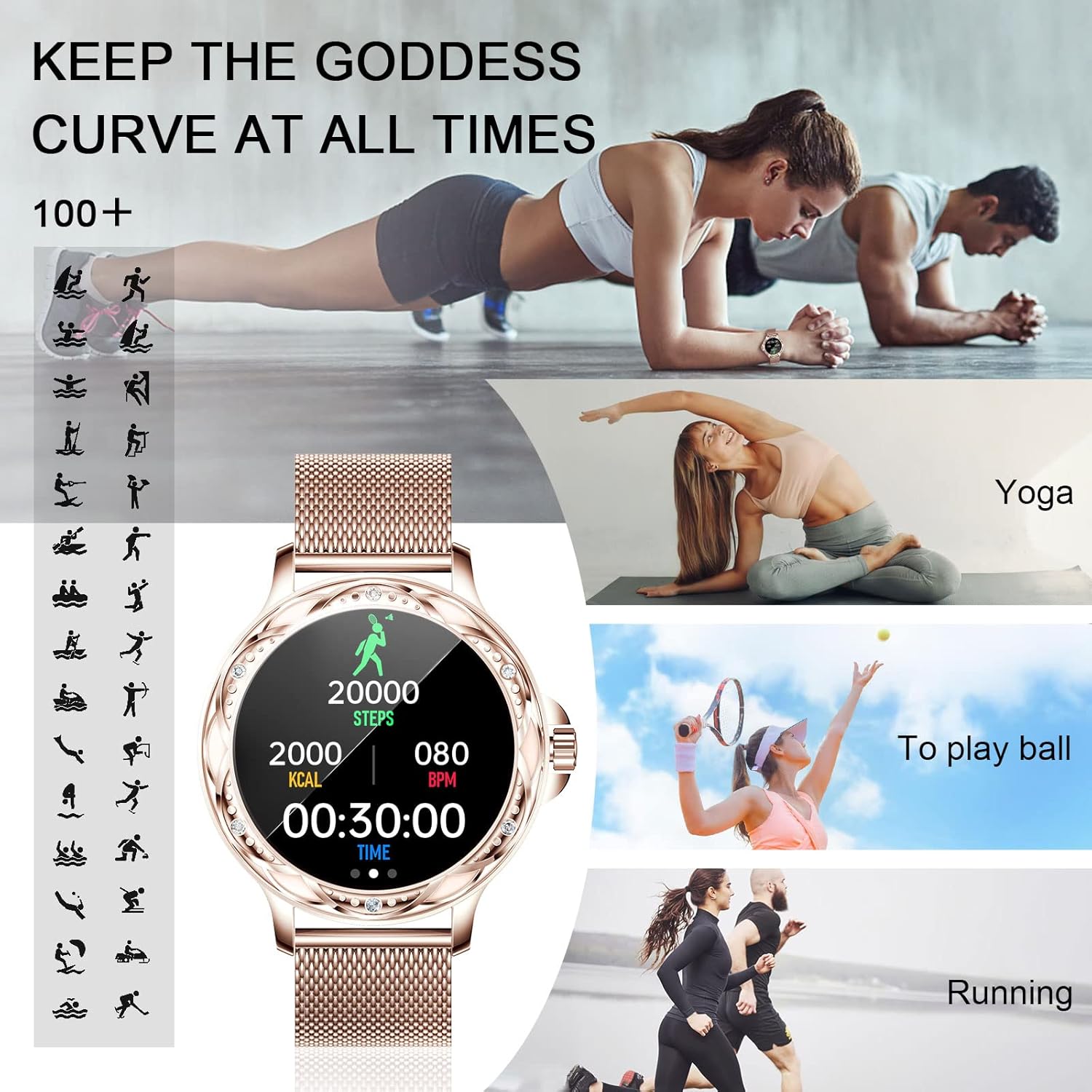
Image 3.4: The smartwatch interface showing steps, calories, and heart rate during a workout, alongside various sports activity icons.
3.6 Additional Features
Your wonlex CF12 Smartwatch includes several other useful functions:
- Timer: For various timing needs.
- Alarm Clock: Set alarms directly from the watch or app.
- Remote Camera Control: Use the 'Shake to take photos' feature to remotely trigger your phone's camera.
- Sedentary Reminder: Alerts you to move after periods of inactivity.
- Drink Water Reminder: Prompts you to stay hydrated.
- Find Watch: Locate your watch if misplaced (within Bluetooth range).
- Weather Forecast: Provides current weather information.
- Music Control: Play, pause, skip tracks on your paired smartphone.
- AI Voice Assistant: Access your phone's voice assistant directly from the watch.

Image 3.5: An overview of the smartwatch's 'Personal Assistant' features, including icons for life helper, personality dial, music mode, making calls, timer, SMS reminder, alarm clock, photograph (remote camera), sedentary reminder, remind to drink water, find a watch, weather, steps, and sleep mode.
4. Maintenance and Care
4.1 Water Resistance
The wonlex CF12 Smartwatch features an IP67 waterproof rating. This means it can withstand daily life scenarios such as hand washing, rain, and splashes. However, it is not recommended to soak the smartwatch in water, wear it while swimming or showering, or expose it to hot water or steam environments, as this may compromise its water resistance.
4.2 Cleaning
Regularly clean your smartwatch and bands with a soft, dry cloth. If necessary, use a slightly damp cloth and then dry thoroughly. Avoid using harsh chemicals or abrasive materials.
4.3 Battery Life
The smartwatch is equipped with a 200 mAh battery. A full charge provides approximately 3-5 days of typical usage and up to 20 days of standby time. Actual battery life may vary based on usage patterns and enabled features.
5. Troubleshooting
- Device not turning on: Ensure the watch is fully charged. Connect it to the charger for at least 30 minutes.
- Cannot pair with smartphone:
- Ensure Bluetooth is enabled on your phone and the watch.
- Make sure the watch is within Bluetooth range of your phone.
- Restart both your phone and the smartwatch.
- Try uninstalling and reinstalling the companion app.
- Notifications not received:
- Check app permissions on your phone to ensure the companion app has access to notifications.
- Verify that notification settings are enabled within the companion app for specific applications.
- Ensure the watch is connected via Bluetooth.
- Inaccurate weather data: If weather data is incorrect, try closing and reopening the companion app. Ensure location services are enabled for the app and that you have entered your correct location or zip code in the app settings.
- Health data appears inconsistent: Ensure the watch is worn snugly on your wrist, not too tight or too loose. Clean the sensor on the back of the watch.
6. Specifications
| Feature | Detail |
|---|---|
| Model Number | CF12 |
| Brand | wonlex |
| Connectivity | Bluetooth 5.2 |
| Compatibility | Android 4.4+, iOS 9.0+ |
| Water Resistance | IP67 |
| Battery Capacity | 200 mAh |
| Typical Usage Battery Life | 3-5 days |
| Standby Battery Life | Approx. 20 days |
| Health Monitoring | Heart Rate, Blood Pressure, Blood Oxygen, Sleep, Menstrual Management, Pregnancy Tracking |
| Sports Modes | 122+ modes (e.g., walking, running, cycling, yoga) |

Image 6.1: Diagram illustrating the physical dimensions of the wonlex CF12 Smartwatch and its bands.
7. Warranty and Support
7.1 Warranty Information
Your wonlex CF12 Smartwatch is covered by a one-year after-sales service when purchased from an official authorized store. Please retain your proof of purchase for warranty claims.
7.2 Customer Support
For any questions, technical assistance, or warranty inquiries, please contact wonlex customer support through the contact information provided on your product packaging or the official wonlex website.


