
Introduction

Image Description: A top-down view of the Senzooe XY-T04 remote digital temperature controller board, connected to a K-type thermocouple. The display shows "OUT 302°C H355".
This manual provides instructions for the installation, operation, and maintenance of the Senzooe XY-T04 remote digital temperature controller. This device is designed for precise temperature control using a K-type thermocouple, suitable for various industrial and scientific applications.
Safety Information
- Ensure the power supply voltage matches the device's requirements (DC 6.0-30V).
- Do not expose the device to moisture, corrosive substances, or extreme temperatures.
- All wiring should be performed by qualified personnel to prevent electric shock or damage to the device.
- Disconnect power before performing any maintenance, wiring, or troubleshooting.
- Keep the device out of reach of children and unauthorized personnel.
Product Overview
The Senzooe XY-T04 is a digital temperature controller featuring a clear LCD display and intuitive controls. It utilizes a K-type thermocouple for accurate temperature sensing and provides a relay output for controlling external heating or cooling devices.
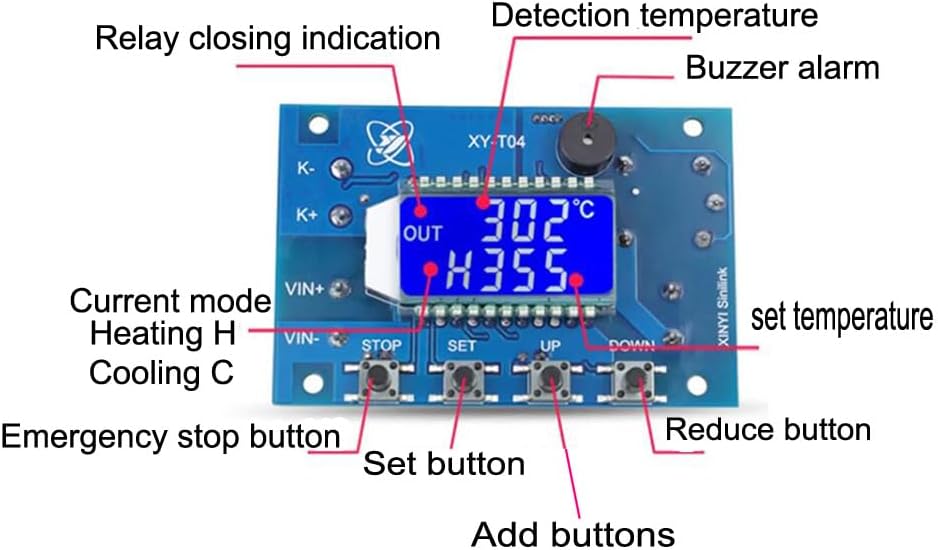
Image Description: This image shows the Senzooe XY-T04 temperature controller with its various components labeled. Key labels include "Relay closing indication", "Detection temperature", "Buzzer alarm", "Current mode Heating H Cooling C", "Emergency stop button", "Set button", "Add buttons", and "Reduce button". The display shows "OUT 302°C H355".
- Digital Display: Shows current temperature, set temperature, and operating mode (Heating/Cooling).
- Control Buttons: STOP, SET, UP, DOWN for configuration and operation.
- K-type Thermocouple Input: Dedicated terminals for connecting the K-type thermocouple.
- Relay Output: Provides a switch contact for controlling external loads.
- Buzzer: Emits audible alerts for alarms or operational feedback.
Setup and Installation
Follow these steps to properly install and connect your XY-T04 temperature controller.

Image Description: This image illustrates the wiring connections for the Senzooe XY-T04 temperature controller. It shows terminals for "DC 6.0-30V power supply" (VIN+ and VIN-), "K-type thermocouple" (K+ and K-), and "Relay switch" outputs. A small module is also shown connected to the main board.
- Power Supply Connection: Connect a DC 6.0-30V power supply to the VIN+ and VIN- terminals. Ensure correct polarity to prevent damage to the device.
- Thermocouple Connection: Connect the K-type thermocouple to the K+ and K- terminals. Observe the polarity of the thermocouple (typically red wire for positive, blue or white for negative). Incorrect polarity may result in inaccurate readings.
- Relay Output Connection: Connect the device to be controlled (e.g., heater, cooler, fan) to the Relay switch terminals. This is a dry contact relay, meaning it acts as a switch. Ensure the external device has its own power supply and is wired correctly through the relay contacts.
- Module Connection (if applicable): If your setup includes an additional module, connect it to the designated port on the main board as indicated in the wiring diagram.
Operating Instructions
Once powered on, the controller will display the current temperature. Use the buttons to configure and operate the device.
- Power On/Off: The device powers on automatically when connected to a suitable power supply. There is no dedicated power button. Disconnect the power supply to turn off the device.
- Setting Temperature:
- Press the SET button briefly. The currently set temperature will flash on the display.
- Use the UP and DOWN buttons to adjust the desired temperature value.
- Press SET again to confirm and save the setting, or wait a few seconds for the display to stop flashing, and the setting will be saved automatically.
- Changing Operating Mode (Heating/Cooling):
- Long press the SET button (typically for 3-5 seconds) to enter the parameter setting menu.
- Use UP and DOWN buttons to navigate through the available parameters until you find the mode setting (often indicated by 'H' for Heating or 'C' for Cooling).
- Press SET to select the parameter, then use UP or DOWN to change the mode between Heating (H) and Cooling (C).
- Press SET to confirm the mode selection, then long press SET again or wait for the menu to time out to exit the parameter setting mode.
- Emergency Stop: Press the STOP button to immediately halt the relay output and stop the controlled device. Press it again to resume normal operation.
- Display Indicators:
- OUT: This indicator illuminates when the relay output is active, meaning the controlled device is currently powered on (in heating mode) or off (in cooling mode) to reach the set temperature.
- H/C: Indicates the current operating mode. 'H' signifies Heating mode, and 'C' signifies Cooling mode.
Maintenance
Proper maintenance ensures the longevity and reliable operation of your temperature controller.
- Cleaning: Wipe the device with a soft, dry cloth to remove dust and debris. Do not use abrasive cleaners, solvents, or liquids directly on the device.
- Storage: When not in use, store the controller in a dry, dust-free environment away from direct sunlight and extreme temperatures.
- Inspection: Periodically inspect all wiring connections for looseness, corrosion, or damage. Ensure the thermocouple is securely connected and free from physical damage.
Troubleshooting
Refer to the table below for common issues and their potential solutions.
| Problem | Possible Cause | Solution |
|---|---|---|
| No display after power on | Incorrect power supply voltage or polarity; loose connection; power supply failure. | Verify power supply (DC 6.0-30V) and correct polarity. Check all wiring connections. Test the power supply. |
| Incorrect temperature reading | Thermocouple connected incorrectly or damaged; wrong thermocouple type (must be K-type). | Ensure K-type thermocouple is used and connected with correct polarity. Check thermocouple for physical damage or short circuits. |
| Relay not activating/deactivating | Incorrect set temperature; wrong operating mode (H/C); temperature differential setting too wide; faulty relay. | Check the set temperature and compare it to the current temperature. Verify the operating mode (Heating/Cooling). Adjust hysteresis/differential settings if available. Test the relay contacts with a multimeter if possible. |
| Buzzer sounds continuously | Temperature exceeding/falling below set alarm limits; sensor error. | Check alarm settings. Verify thermocouple connection and reading. Some models allow disabling the buzzer in settings. |
Specifications
- Model: XY-T04
- Brand: Senzooe
- Power Supply: DC 6.0-30V
- Temperature Sensor: K-type Thermocouple
- Temperature Control Range: Wide range, dependent on K-type thermocouple specifications and controller settings.
- Output: Relay Switch (Dry Contact)
- UPC: 707638005284
Warranty Information
Warranty information for this product is not explicitly provided in the available documentation. Please refer to the seller or manufacturer's website for details regarding warranty terms and conditions at the time of purchase.
Customer Support
For technical assistance, troubleshooting, or any product-related inquiries, please contact the seller directly through the platform where the product was purchased. When contacting support, please provide your order number and a detailed description of the issue to facilitate a quicker resolution.